Would bypassing AF100 to Atomos Samurai give me better results for chromakeying???

OK then I'll be getting the Samurai kit from B&H, the one that comes with a 160GB SSD drive.

Does anyone know how many minutes you get with 160GB SSD drive if you're shooting 1080p24??? If it's half an hour that's fine. If it's only 10 minutes, then I'd definitely need a bigger drive.

You will get over an hour at highest bit rate.

Details page 27 of the user manual. (Downloadable)
 
If my green screen scene is properly/evenly lit, will it I get much cleaner results bypassing the AF100 AVCHD codec and recording to Apple Pro Res via the Atomos Samurai?

As the others have said -- YES. The SDI-out of the AF100 gets you two big advantages: (1) it's uncompressed, meaning it's straight off the sensor before the computer throws away data to fit it onto the SD card, and (2) it's 4:2:2 instead of 4:2:0

CORRECTED (Thanks, Barry):

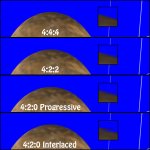
4:2:0 means that non-green colors are recorded at a lower resolution, making the edges rougher. The result can be artifacts that show up in fine hair and semi-transparent areas, which are hard to key under the best of circumstances.

Chroma_2D00_Examples.jpg

Going 4:2:2 gets you more color resolution, so edge detail keys better.

I've heard many people say they great keys using only the AF100 so long as the green screen scene is well lit.

Here's a good recipe for digital keying:

(1) Evenly lit screen, 1 stop under key talent;

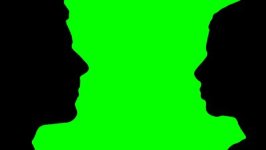
(2) Position FG talent far enough away from screen so that if you turn off talent light, you get an absolutely black silhouette from the green screen.
stock-footage-kissing-silhouette-green.jpg
If you do this, you don't need any fringe lights or other lights to compensate for green spill.

If you can't get the talent that far away from the screen, you can either reduce the light on the screen, or use rim lights to overcome the spill. (I'd recommend avoiding that, because you end up with rim-lit figures after the key. Often, you can deal with a little spill with digital spill reduction tools.)

(3) Turn down/disable all sharpening/detail/hyping on the camera. These actually work like Unsharp Mask in Photoshop, and add a halo of bright or dark pixels to edges to create the illusion of sharper focus. When you key with those on, you get a nasty colored fringes that needs to be shaved off. Better to shoot without the "enhancement."

(4) Generally shoot with the smallest aperture and the lowest ISO you can get away with. Deep DOF makes tracking and screen correction easier. Low ISO reduces noise, and makes for a smoother key.

(5) If the shot is locked off, make sure to shoot a clean plate before and after minus the talent/foreground subject. Some keying software including Ultimatte and others can use the clean plate to correct imperfections in the screen prior to keying.

But do you get much better results using the Atomos Samurai or Ki Pro Mini?
If you're recording straight to Pro Res, will it be much easier to pull a clean key?

Uncompressed vs. ProRes in keying doesn't really matter. Either one will key fine if you've followed the rest of the recipe. Once you're in 4:2:2 from a clean source, the next major improvement would be a 10-bit source. The AF100 is 8-bit, so recording it to a 10-bit file doesn't create any new data. Manipulating the data in 10-bit space will give better results, but you don't need a 10-bit source file to do that.

Pro-level compositing programs (AE, Shake, Nuke, Motion, etc) work in 32-bit float, which gets you the best results possible.

So, the Samurai is a fine choice, as are the other SDI recording options. The big jump in quality comes from getting off the compressed SD card files and using the 4:2:2 SDI feed.

Hope That Helps.
 
Last edited:
Is the noise around edges caused by the compressed nature of the AVCHD codec? I'm using Adobe Keylight 2.0 to chromakey.

See my previous post. Bad edges can come from compression, high ISO and sharpening.


For a crash course in keying by one of the authorities on the subject, look here. Alex is formerly of ILM and a veteran of the Star Wars movies.

He also did a great demo on how to use Keylight to its maximum potential in Shake, but you can translate it into Keylight AE easily.

Hope that helps!
 
4:2:0 means there's NO GREEN CHANNEL recorded! For green screen! The green data is interpolated (made up/guessed at) by software when the clip is played back. This can cause inaccuracies with fine detail, when the software guesses wrong. The result can be artifacts that show up in fine hair and semi-transparent areas, which are hard to key under the best of circumstances.

Some very interesting points you make there, especially the silhouette with lights off, which sounds very old school optical - which is a good thing!

But I have to question the 420 logic, as we are not recording RGB with video cameras, rather YUV.
The Luma samples are full quality in the 4, whearas it's chroma samples that are half sampled in the 2,
and missing all together in the 0 and hence interpolated, hence 420.

422 half samples all chroma. (chroma interpolation occurs to make up the picture).

This all works and is aided by the fact that the eye is more sensitive to Luma than Chroma.
 
Last edited:
Hello everyone, I can't thank you all enough for all this great advice. This dvxuser forum is fantastic, because you get so much valuable feedback. I'm sure everything mentioned in this thread will be of great use to others who have similar questions regarding the Samurai.

This will be the first time I'm shooting uncompressed, so I will be posting my results shortly on Vimeo and linking to this thread. Popcornflix, thanks very much for going into the technical details of 422.

I've already done some chromakey testing with my AF100, but the results were not that clean so far because I was still using the AVCHD codec:

http://vimeo.com/29286886

I tried to light myself as evenly as possible with two Litepanel 1x1s and using a Reflecmedia chromaflex. As soon as I get my Samurai I'll posting new samples. Can't wait to try this out.
 
4:2:0 means there's NO GREEN CHANNEL recorded! For green screen! The green data is interpolated (made up/guessed at) by software when the clip is played back.
This is totally and completely inaccurate. Of course green is recorded!

4:2:0 means that one color sample is assigned to each 2x2 block of pixels. In effect it means that in 1920x1080 video, the color resolution is 960x540.

4:2:2 means that one color sample is assigned to each 2x1 block of pixels. In effect it means that in 1920x1080 video, the color resolution is 960x1080.

4:2:2 literally means twice as much color information is being recorded as 4:2:0.
 
Well put Barry.

When talking about 4:4:4, 4:2:2 and 4:2:0 we're talking about sampling. I stole my lay person explanation of sampling theory from Dave Stump, ASC- it's painfully simple, and also effective in communicating the theory behind what's going-on.

This is the explination:

If you live in a cave and you only ever go outside one time a day, and that time of day is always midnight, then you have a very narrow sample of the world (illumination, color..etc)

If you go out twice a day, once at noon and once at midnight, you know twice as much as before but still have a very narrow sample of the world.

The more times you leave the cave, the more samples of the world you can get, the better you understand what the world looks like.
------------------------------

Back to the topic of the Atomos Samurai, I purchased several of them for re-sale (disclaimer: Hot Rod Cameras is an Atomos dealer, even though we haven't advertised it) the quality of recording and features for price of the Samurai are spectacular. But fair warning, you should not look at using the Samurai's touch screen monitor for anything other than framing reference. It's great that the monitor is there to confirm recording, but really that monitor screen is not accurate to color/resolution or exposure and has essentially no user adjustability control. You'll should not think that purchasing/renting a Samurai will enable you to skip buying a proper monitor especially if you are shooting greenscreen.
 
Regarding your sample key test.

The lighting has no modelling in it and so subject appears very flat and "cut out".
Its all front light ( 2 spectral lights show in the eyes) and no edge or back light for modelling. Skin is grey

You also need to work on your key effect to sort the hard edging issue. (feather etc)

Check out some of the key light or ultralight tutorials.


YOu do not have to light subjects FLAT for a key scene.
dave-key.png


Wendys-Spicy-75.png


JnJREach_7112.png

 
Agreed Shooter, my lighting needs more work. It was definitely flat and lacking definition. Regarding the greyish skin tone, I had read somewhere that a downside of using Reflecmedia was that it can make skin tone not look that great. But that maybe my fault in terms of how flat my lighting was.
 
The major problem with using something like the Reflecmedia is: you're shining green light onto your actors. That's not conducive to healthy skin tones. I'm not a fan of the Reflecmedia type of systems, I think they have their place but for ultimate quality I prefer conventional greenscreening. Even so, if working with the Reflecmedia system, I'd probably try to grossly overpower the green (or blue) LEDs on the subject by lighting to a higher degree than I might otherwise...
 
Barry as usual expressed the technical explanation of video clearly and concisely, much better than my clumsy attempt. I just was alarmed at the missing green!

At this point my video knowledge comes to bits (pun not intended) regarding the ins and outs of video colourspace beyond uncompressed, as I guess I've always worked 444 if you want to put film work with frames into video colourspace.
I shoot it and post it and I love this camera.
It's like shooting transparency film instead of negative, with very little latitude to work with.

Give me 10bit log Cineon frames scanned from film, with lovely flobbily grain and a long rolloff in the highlights and I'll take you to the moon in a Nuke.
 
dhart1949, can you tell me what the AF100's "low noise" camera profile is? Did you just set the AF100 to lowest ISO setting (200 ISO), or are there other settings you tweak in the AF100 to get that low noise profile???
 
Until dhart1949 can respond, I'll just point out a couple of things that assist with getting lower noise: use NORM2 matrix, and turn your detail and v-detail levels down to about -4, and if you need still lower noise, you can crank the coring up.
 
Some very interesting points you make there, especially the silhouette with lights off, which sounds very old school optical - which is a good thing!

But I have to question the 420 logic, as we are not recording RGB with video cameras, rather YUV.
The Luma samples are full quality in the 4, whearas it's chroma samples that are half sampled in the 2,
and missing all together in the 0 and hence interpolated, hence 420.

422 half samples all chroma. (chroma interpolation occurs to make up the picture).

This all works and is aided by the fact that the eye is more sensitive to Luma than Chroma.

This cannot be more wrong...

Anyways, I'm new and that probably wasn't a good start! I am recording green screen for corporate on an EX3 (samurai) and soon a FS100 (ninja), and wouldn't mind some advice. The key (pardon the pun) is in the lighting it seems, with 4:2:2 obviously helping because you have more co-sited pixels per pixel than 4:2:0 which will help with keying... However, all my keys are going to be for nought if I cannot get a proper evenly lit green screen. Unfortunately I only have these Ikan LED lights (http://www.prokit.co.uk/index.php?view=product&product=Ikan-ID-500-LED-Light-Kit) to light the screen... the screen is around 10 feet diagonal (believe it or not it was larger until I cut it down).

What would people recommend I do to light the screen more evenly? Can anyone recommend a good light meter for under £100 and would it help any in getting an even key? Lighting was never my strong suite and tended to lean towards post when leaving Uni, but now it seems all I do is TRY and light a green screen!

Thanks all in advance for any help!
BTW sorry if I have hijacked this thread... thought it would be good to keep it going! haha
 
Last edited:
This cannot be more wrong...

Anyways, I'm new and that probably wasn't a good start! I am recording green screen for corporate on an EX3 (samurai) and soon a FS100 (ninja), and wouldn't mind some advice. The key (pardon the pun) is in the lighting it seems, with 4:2:2 obviously helping because you have more co-sited pixels per pixel than 4:2:0 which will help with keying... However, all my keys are going to be for nought if I cannot get a proper evenly lit green screen. Unfortunately I only have these Ikan LED lights (http://www.prokit.co.uk/index.php?view=product&product=Ikan-ID-500-LED-Light-Kit) to light the screen... the screen is around 10 feet diagonal (believe it or not it was larger until I cut it down).

What would people recommend I do to light the screen more evenly? Can anyone recommend a good light meter for under £100 and would it help any in getting an even key? Lighting was never my strong suite and tended to lean towards post when leaving Uni, but now it seems all I do is TRY and light a green screen!

Thanks all in advance for any help!
BTW sorry if I have hijacked this thread... thought it would be good to keep it going! haha


Instead of spending the money on a light meter, why not hire a good gaffer :)
 
Back
Top