World's first official Convergent Design Gemini 4:4:4 recorder short test

Its all of that. The benefit of sLog is multi fold. First, it requires low compression capture to be used efficiently. First and Fore most, that takes care of alot of the issues we encounter with highlights, clipping, macro blocking, etc.... Second, LOG seems to very accurately render highlight information, color, sharpness, dynamic range, subtle tones. Yes you can now choose where you clip white/black in post, but its so much more about creatively placing elements of your exposure in ranges of the IRE scale that were inaccessible before. 85-99 is oddly "safe" in sLog. its bright yes, but looks natural.

Recording uncompressed, gives you even greater accuracy.

The fact is that any footage shot in raw or SLOG has to be color corrected, because the image is basically like a flat picture profile. It maximizes how the signal is recorded by spacing out the dynamic range from 0-100 (or even higher) IRE. So shooting SLOG just to color correct is not the reason you shoot SLOG. You color correct because you shot SLOG.

What would be great to see is someone recover detail in highlights by bringing them back in post, I've yet to see that anywhere but I did see you bring out some details in shadows in your footage from under the bridge.
 
Well, its not about recovery. Wysiwyg. If its clipping @ 110 in log, its gone.

Its not lke red cine w/ RAW. Its like when you view raw mode, and see everything, if you're clipped in raw, its clipped for good.

SLog is like recording raw to 10bit444 with baked in color temp.
 
I downloaded the compressed version of your S-Log footage and did a grade.

I noticed that the clouds in 0:45 to 0:47 were exhibiting blockiness after my grade. Is this less apparent in the raw S-Log file off from the Gemini 444?

And thanks for uploading it by the way!
 
Its all of that. The benefit of sLog is multi fold. First, it requires low compression capture to be used efficiently. First and Fore most, that takes care of alot of the issues we encounter with highlights, clipping, macro blocking, etc.... Second, LOG seems to very accurately render highlight information, color, sharpness, dynamic range, subtle tones. Yes you can now choose where you clip white/black in post, but its so much more about creatively placing elements of your exposure in ranges of the IRE scale that were inaccessible before. 85-99 is oddly "safe" in sLog. its bright yes, but looks natural.

Recording uncompressed, gives you even greater accuracy.
Holy worlds!
 
Hi Filippo,
Anything is possible, not everything is efficient. You will have to carry a whole bunch of drives and someone transferring them to HDD. Unless you are made of money and then you buy 50 SSDs.
For most jobs 10bit 422 is enough.
I will eventually upgrade to Slog and Gemini, but like I was telling starcentran "when a customer wants it bad enough, they will pay for it"
Hi Douglas,
I prefer to have the better quality from my F3... when it's possible.
I don't need a whole bunch of drives, 4/5 of them+ a laptop are enough for me.
 
If the Gemini can record to Cineform and retain S-Log info, that might be the best balance between quality and storage needs.
 
Dear Douglas,

By "How long can you record with 4 or 5 drives uncompress 444? ", do you mean the SSD's that we use in the Gemini 4:4:4?

I assume so.

This depends on the frame rate / flavor of the video that the Gemini 4:4:4 is recording.

For 1080p24, 4:4:4, one 256 GB SSD is good for around 21 minutes (1080p25, 4:4:4 is around 20 minutes).

For one 512 GB SSD, or two 256 GB SSD's, the times are 42 minutes and 40 minutes.

For two 512 GB SSD's, the times are 84 minutes and 80 minutes.

And the Gemini 4:4:4 supports Hot Swapping.

Or one can record to two SSD's simultaneously for safety.

Or one can record native Log footage to one drive while recording footage with a LUT applied to the second drive.

And, of course the Gemini 4:4:4 supports more frame rates than just 1080p24 and 1080p25.


Alternatively, you may mean that if one has 4 or 5 Hard Disk Drives, how much footage can you store.

Today, high capacity, fast Hard Disk Drives are readily available for very low prices.

Just as an example, a quality 7200 RPM 1 Terabyte Hard Disk Drive costs $60 (US).
This would store approximately 80 minutes, maybe less depending on various factors.

And, of course, 1.5 TB, 2 TB, 3 TB drives are also available.

And Raid Enclosures are reasonable today.

Dear Zeke,

Yes, our very high performance SSD's are relatively expensive, but that depends on your point of view.

Our 256 GB SSD, capable of sustaining a write speeed of over 250 Megabytes per second, from 0% to 100% full, costs $749 US.
Our 512 GB SSD is $1,349 US.

256 GB of fast CompactFlash cards, which are limited to around 90 Megabytes per second would cost around $1,919 and 512 GB would cost around $3,838.

Thus, our much higher performance 256 SSD at $749 costs less than 40% of the lower performance CompactFlash cards.


Or, you can price RED's SSD's.

Please do not compare our SSD's to commonly available SSD's one may use in a computer. Ours are in a different league.


One can upload our SSD's to a suitable disk subsystem (could be RAID drives) fairly quickly. Much quicker than real time.

Also almost all SSD's are not fast enough to record full uncompressed 4:4:4 video.

I hope this helps.
 
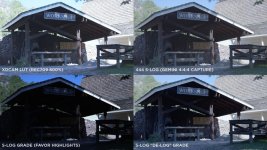
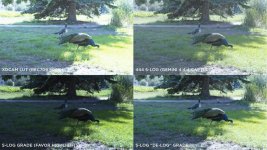
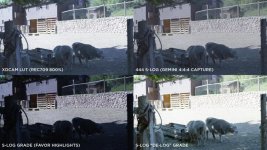
Here are a few examples of S-Log images taken from the F3/Gemini444 combo, captured from the dual link output. I used the built in F3 log (rec709 at 800%) to save to the XDCAM 35Mb/sec onboard, while using the Gemini built in monitor to view the flat S-Log image...

STABLE_QUAD_VIEW.jpg
PEA_QUAD_VIEW.jpg
SHEEP_QUAD_VIEW.jpg

In Photoshop, I took the S-Log DPX files from the Gemini and did a few quick grades on them, with one grade or each image trying to show off how much high light detail can be preserved by S-Log.

These were all bright full sun, with subjects in dark shade. In the case of the sheep, they were in full shade with no reflected fill from any close buildings, etc. All grabs were shot at 3200K, even in the bright sun. Only the sheep image has actual color correction for the CT difference.

Regards,

Jim Arthurs
 
This is the test I've been waiting for, SLOG is not just about increased dynamic range and better tonal reproducttion, it is possible then, from the outcome of this test to recover some detail in areas that might otherwise appear as blown.

Jim, if the first image, can you say what IRE the roof and sky were at in terms of exposure?

Excellent stuff!
 
In the shed/workshope image, the sky above the roof hit 100 IRE (where my zebra was set), when viewed on the F3 via the REC709 LUT. Glancing at the Gemini screen (still viewing flat S-Log) it was pretty obvious there was more detail in the highlights of the "over exposed" area. That became the model for the rest of the shoot, relying on the LUT for exposure, with a glance now and then at the S-Log image for confidence.

I was cautious about using any of the viewing LUTs, having gotten fairly used to the flat S-Log image, but I now see value in using them. What they do is allow you to set your exposure a bit on the conservative side, knowing that you'll have a significant "cushion" above and beyond what your on-camera exposure tools tell you. This was a very contrasty day, with bright sun and dark shadows. To my eye, I wouldn't have wanted to trust getting back detail in the shadow areas without extra fill lighting help. But the full dynamic range of this camera is very empowering...

I should have brought the spot meter, for reporting back on the total f-stop range, which I'll do next time. At one point, I was exposing for a distant hill range, in bright sun, when a couple of people walked in front of the camera, both in full dark shade from the overhead tree branches. I remember mentally thinking they would just be black outlines, but when scanning through the footage I was surprised to discover picture detail in their forms...

I see the uploaded images of my test are small and poor quality after the forum conversion. Here's bigger jpgs...

http://ftp.datausa.com/imageshoppe/outgoing/S-LOG/STABLE_QUAD_VIEW.jpg
http://ftp.datausa.com/imageshoppe/outgoing/S-LOG/PEA_QUAD_VIEW.jpg
http://ftp.datausa.com/imageshoppe/outgoing/S-LOG/SHEEP_QUAD_VIEW.jpg

Regards,
 
Good stuff jim.

The potential for grading is absurd with these files. You can place the data where ever you want. Log makes me happy.
 
Filippo, can I ask you how went about determining your exposure in-camera or off-camera when working with SLOG?

Did you establish where to shoot middle gray, or just worry about the where the whites were?
 
Filippo, can I ask you how went about determining your exposure in-camera or off-camera when working with SLOG?

Did you establish where to shoot middle gray, or just worry about the where the whites were?
Hi Dennis,

I left my great TV Logic VFM-056WP at home, so I used the camera histogram.
 
Quick note to everyone....

DONOT RECORD THE 800% lut to xdcam as a final image. It retains a lot of the dynamic range, but its noisier, and has weird highlight roll off....

Tried to be slick and use that, but after testing, its no go.
 
Back
Top