WORKFLOW - FS700 + Odyssey 7Q + Resolve Lite

maxlarsson

New member
Hi!


I really would need some help to clear things out.


Can someone tell me the correct workflow going from the RAW files out of the Odyssey 7Q.


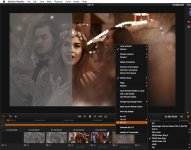
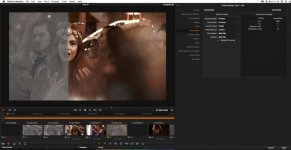
This is filmed with the latest firmware and I have downloaded the FS700_Raw_Slog.cube and uses it as the 3D LUT on the following below. As you can see, I have two different settings and I don't know which one is the correct way to go. Here you can download the .dng file: https://www.dropbox.com/s/6clfos53hwkwii2/DOTTER_S008_0005373.dng
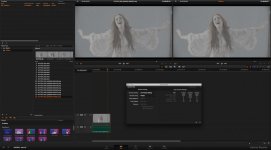
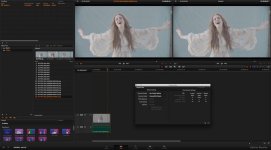
Skärmavbild 2014-04-24 kl. 23.32.35.jpgSkärmavbild 2014-04-24 kl. 23.33.02.jpg


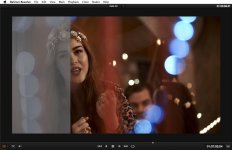
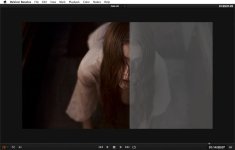
Yesterday I filmed some more and here you can see my settings for that... is this correct?
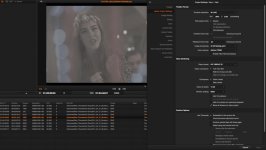
Skärmavbild 2014-04-30 kl. 10.46.55.jpgSkärmavbild 2014-04-30 kl. 11.11.44.jpgSkärmavbild 2014-04-30 kl. 11.16.49.jpgSkärmavbild 2014-04-30 kl. 11.31.06.jpgSkärmavbild 2014-04-30 kl. 11.34.14.jpg

Thanks
/Max
 
A nuanced property in Resolve, rarely brought up...
obviously, when importing RAW, it matters not what colorspace one selects. However, it IS important when one exports; and, to what colorspace one needs. If you grade to broadcast levels (16-235) and you need broadcast levels out, then you have to export "DATA LEVELS". If you grade to full scale (0-255) and you want broadcast levels, then you must export "VIDEO LEVELS". The AUTO SELECT gets me in to trouble when importing to my NLE, if I'm not careful. It's possible to export full scale and have the superblacks and superwhites clipped by my NLE on import.
 
There is no correct workflow with Resolve, i've been battling with this for a while and was trying to write it up whilst still battling.

First point of note is that the CinemaDNG workflow doesn't offer highlight recovery. The image clips where it does. The camera is very green sensitive so invariably the green clips first but RB don't. What the highlight recovery does is to reconstruct the clipped channel based on data in the others. Sometimes this isn't noticeable in real life, sometimes it is. A step wedge can recover as much as a stop of highlights this way. Your out of focus bokeh would probably benefit here. (Lovely shots BTW)

This applies to ACES as well, the cinemaDNG IDT won't recover. The ACES route does something odd with exposure levels but funnily enough it is the *only* way to get linear out of Resolve, most people don't need that though.

You can interpret as Rec709/Linear Gamma with highlights and that will get you all the data, you'll have to be mindful of what you do after that - there's no easy way to get that to Slog2 for example AFAIK. If i export EXR files from that i would expect them to be linear but i can see they're not quite. There is a VFX Linear to Slog2 LUT which, in theory should work, but does strange things to the exposure levels. It may be possible to compensate for this, but the very fact it's doing this makes me suspicious of it. In theory Slog2 offers a fixed relative level of exposure, from mid grey there are X stops over and X stops under (the exact number escapes me). If you expose for mid grey and take it through the above LUT steps then the mapping isn't correct on the resulting SLog2 file, and you loose photographic linearlty.

You can also interpret as BMDFilm (which you appear to have done in the project settings, although you seem to have tried both CinemaDNG and BMDFilm) and this will both get you a nice log curve and highlight recovery. However beyond Resolve nothing understands BMDFilm and BMD don't appear to open to giving out what the curve actually is.

Now if you are grading in resolve then we're nitpicking here because it's a case of what looks nice, but if you want a known type of file out of resolve that's where it becomes difficult. The supplied CD Slog2 LUTs don't deal with Red very well, at least in my testing, they become magenta. Compare Slog2 out of camera with RAW -> Slog2 and it's pretty obvious. Personally i'd also argue that the red out of the camera with Slog2 isn't quite right either (it's too orange).

There are some options. SpeedGrade is a possibility with some new plug ins, but time will tell on that front. Cliphouse can get you a Rec709 style image very quickly.

Finally, right now i'm looking at cinelogdcp. Originally for ACR (which generated a cinelog image out of ACR retaining the range) there are Resolve LUTs now too. You can go from BMDFilm to Cinelog. Then there's a companion lut that will go from cinelog to LogC (Alexa). So you can output LogC files from Resolve and so far they seem pretty good, although i've a lot more testing to do.

As i mentioned i am in the process of writing up my findings and also results of delving into the DNG files but that may take me a little while, so thought i'd try to help here...

Very interesting in hearing others workflows. I guess most people say in resolve and if you're doing that then accuracy isn't quite so important. But for those trying to use these lovely RAW files in other applications this transcoding is quite important...

cheers
Paul
 
I cannot clearly identify your settings as you downsized the screen shots. Is it possible that you supply the screen shots 1:1? You don't have to upload them to dvxuser, you can embed a file from your dropbox (public folder) via
 
@ Maxarlarson

I think you're settings are way too flat and would require too much grading to pull back to normal.

Here's what I've been doing. I followed Paul's advice and switched to ACES and I like what I'm getting. I find that anything BMD color space tames the reds

Default Settings
1) ACES
2) Camera RAW: Cinema DNG - Decode Using: Project - White Balance: As Shot - Color Space: BMD Film - Gamma: BMD Film - Highlight Recover: Check
3) Exposure +2.5
4) No LUT

-------Then

5) In the Color portion of resolve, I add a 0.9 Contrast (or 0.8 if you want it flatter). In the pic it's 0.9, but I've been going 0.8 as it's a bit flatter.

I find this gets it pretty close to 4K2HD. It's actually a little more LOG looking than 4K2HD. I find that not using BMD colorspace, the color red becomes very magenta so I stick to BMD colorspace.

Photo2.jpg
 
I found this introduction tutorial about Resolve ACES
How did you set your LUT Output Device Transform?

 
ACES, following Paul's advice (Paul, next time I see you'll I'll bring you a medal!) has worked out best for me recently. Here's a short I shot @ 4K and graded in Resolve: http://vimeo.com/97120120 (password: meat) using ACES, Rec709 ODT (apologies for the quality of the acting and sound - I was just in charge of image!)

As I recall (I'd need to fire up the computer to check) it was Rec709 IDT with Rec 709 gamma and colour space (or possibly cDNG IDT) this gave me a great place to start from. After that I colour corrected using white balance and tint settings in camera Raw and exposure compensated (I generally 'over expose' a couple of stops) in camera Raw. Then I messed up the white balance (I wanted it blue-er), desaturated (0.25) and crushed the shadows with the curve. A few shots had some secondary colour correction (messing about where the lights were) and one has some neat noise reduction applied (stupid bloody director used the last take when we had failing light, all the others were fine). Obviously highlight recovery was not an issue with this one!

However, I recently read the following article from Art Adams: http://www.dvinfo.net/article/post/making-the-sony-f55-look-filmic-with-resolve-9.html - which makes me think the camera could also benefit from a little saturation choking in the luma-sat curve. Definitely something worth playing with once we get user loaded LUTs available!
 
ACES, following Paul's advice (Paul, next time I see you'll I'll bring you a medal!) has worked out best for me recently. Here's a short I shot @ 4K and graded in Resolve: http://vimeo.com/97120120 (password: meat) using ACES, Rec709 ODT (apologies for the quality of the acting and sound - I was just in charge of image!)

Hey Colin,

Off topic a bit, but nice images. On the opening interior, high contrast shots, did you over-light it a bit then crush the blacks in post? How are you exposing this? To right, middle or left? I notice your blacks are very clean.

I find that the blacks / shadows can get pretty noisy if under-exposed too much so I've been exposing as much as I can, which in indoor shots you might really struggle with the light, then just giving it the crushed, dark look in post.
 
I'm glad it worked out for you, i was just about to grab some lunch and watched that, maybe i'll go veggie today. Looks great, the shadows look very smooth on vimeo.

I have spent literally months working on getting the best out of RAW and i keep meaning to write up the various workflows and approaches that have worked or not (mostly not). Real work prevents me from doing it but i am slowly getting through everything.

There are a few basic observations though.

One is that any workflow using 3rd Party (i.e. all) cDNG will need some exposure compensation to match correctly, around 2-4 stops. This is not an 'as shot' exposure issue, it's a issue with the nature of these 12 bit files. So in Resolve the best way is in the camera panel, not in grading. In camera is doing some gaining internally before writing out Slog2 files (the camera 'Slog2' isn't very accurate either)

Secondly and this is a biggie. The cameras own gamut, especially with Reds, appears larger than sRGB/Rec709, quite a bit larger. This is resulting in those awful whacked out reds that we are seeing, especially in Resolve. This is why switching to ACES works, the colourspace is large enough to accommodate these reds - however the standard Resolve one isn't. I've been using Speedgrade recently with some new plug ins that are doing a much better job.

This is also why BMDFilm works too, although that route is compensating for BM cameras and isn't ideal

I don't know what options there are in Resolve for this - i find the whole app far too automagical for my liking and don't get what it's doing half the time.

Gene, on exposure the shadow regions are incredibly limited - exposing up and bringing it down is by far and away the best way of dealing with this. Take a stop from the headroom.

I do have tonnes of tests and samples that i really will write up - just takes time

cheers
Paul
 
@gene_can_sing
Did you apply anything at lookup table ACES input and output?
if not apply anything on Lookup table then from what i seen, there is no difference between color science: YRGB and ACES

I dunno is my mistake or it just look like that, i end up getting contrast+saturated color image with following setting:

i follow this video: http://www.youtube.com/watch?feature=player_embedded&v=B7DqtW7LB7g
1) i change my master project setting: color science to ACES
2) Lookup table ACES input: cinemaDNG
3) ACES output: REC709
No LUT apply

is there any way to get back more natural look and colour setting without doing a lot grading? Found that BMD color space and gamma setting still need a lot grading to get better colour or look =/
Beside that, wanna ask anyone using higher iso than 2000 at indoor?what is your thought? Was it still usable and easy remove noise?
 
Hi Alan,

I did not apply a LUT. For me personally, I prefer a LOG image to grade. I actually avoid pre-baked images so I never try to get an in-camera or pre-graded look. I just edit the log footage or apply a quick preset to get the colors back. I usually just transcode RAW from Resolve to 422 10-bit, edit in Premiere and color correct in After Effects.

Currently, the BMD work space does not tweak the color red. Cinema DNG default without BMD makes the reds really magenta.

IMO, it's really, really easy to just make a quick Levels + Saturation preset and apply it in an NLE. I do it that way as opposed to baking it in camera or on a RAW to 422 render.

I've been using 4000 ISO indoors with no problems. It's still clean IMO.
 
Last edited:
thanks gene_can_sing, appreciate that,i need try more to get used to it.

how about any difference between choosing color science: YRGB and ACES,which one work better? if using BMD i didn't see any obvious difference in davinci before grade.
 
Finally i get the colour i want from 7Q for today film shooting. I had made a huge and silly mistake for last few days. I was not believing the histogram but just looking on the screen image brightness and i shoot all in too way under expose and especially in raw file it give you more darker image, yes it can bring back many stops but yeah i was never getting the look and colour i wanted like @gene_can_Sing did. Today i rely on histogram and just use 4000/5000 iso at indoor and 2000iso outdoor, finally i getting the image i love! Thanks so much Gene for keep explaining to me, i had been fool by myself and the screen brightness look ok to my eye ><
 
Alan, from my experience it's better to shoot at high ISO than to underexpose and push exposure in resolve or your NLE. I used up to 12.000 ISO in dark industrial ambience and it was surprisingly good.

I use a 95% Zebra line in the histogram of the LCD to avoid clipping and it works quite well

exposure.jpg


in RAW you can still go over it but in 4K2HD it's my limit.
I shot two clips with identical exposure, 4K RAW and 4K2HD sLOG

4K RAW treatment in Resolve:

1) ACES
2) Camera RAW: Cinema DNG - Decode Using: Project - White Balance: As Shot - Color Space: BMD Film - Gamma: BMD Film - Highlight Recover: Check
3) Exposure +2.0
4) No LUT
5) No further correction, also no contrast change

This it how it arrives in FCP X

4KRAW2BMD-Film.jpg


compared to 4K2HD

4K2HD-Slog2.jpg


btw.. dynamic range is awesome
 
@clemond

Indeed! i was so worry to use high iso before, but after tried today, high iso noise in fs700 raw file is not bad noise, is kind of film grain i would say, and it's pretty easy to remove noise on shadow too. I will try again with higher iso again at indoor to see how far can it go. Now i still only limit myself using 100fps at indoor, 200fps mean higher shutter speed and more darker, need boost the iso to help it, my led light not enough for lighting up wide shot for slow motion at indoor. iso12000 footage still manage to use?
 
normally I don't use HFR in industrial indoor environments as the are mostly lit with flickering fluorescents. ISO 12.000 is an exception but better than pushing underexposed footage.
 
Back
Top