Widescreen - Adobe Premiere Pro CS6

Gary,
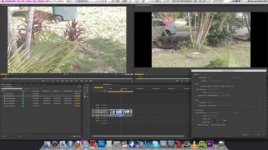
Just for followed all of your instruction then took my original sequence, copied it, and pasted into my custom sequence. Check out the preview monitor? Why is it cropped liked that?

Screen Shot 2013-02-09 at 1.26.24 PM.jpg
 
Also, are there any export settings that I should know about. I export at H.264 and choose Vimeo HD 720 @23.98 ....anything else I should be doing here?
 
Well, I just tried it and it worked fine for me on Premiere CS6. So I would assume you've made some other change somewhere, such as the pixel aspect ratio or something.
 
Gary,
Thanks for taking time out of your day to help me with this, really appreciate it and it means a lot. Let me give you a detailed review of what I'm doing, with screenshots.

1. Created a custom sequence preset like you said, here are the sequence settings: http://i.imgur.com/Zf6bOxX.png
2. Here are my general settings, as you suggested: http://i.imgur.com/GLZNd40.png
3. Then, I import my footage. I drag a file onto it, and click on keep settings: http://i.imgur.com/gGaghDC.png
4. Then this is what I get: http://i.imgur.com/Y0e5xOW.jpg
5. Then the only way I get it to fit the frame is if I scale it to 135: http://i.imgur.com/vGRSDJE.jpg


Any idea on what is going on?
 
Premiere won't automagically re-size your 1280x720 clips when you import them into a 1920x800 timeline. That's the problem.
 
Well, the issue isn't even the 720 clips. The one in the timeline and in all the screenshots is a 1920x1080.
 
Well that's just strange. Unchecked the default scale to frame size and restarted. Now when I dropped the 1080 file it worked. When I dropped the 720 file it still gave me a square and forced me to re-scale. Any ideas?
 
Ok, great. Again I want to thank you for all of your help, seriously means a ton! We need more people like you in the world!
 
Back
Top