FS7: Why should you shoot flat?

ajp9039

Member
Hey everyone,

I know the main reason to shoot flat is to preserve as much dynamic range as possible, to preserve highlights and information in the blacks. We have been shooting SLOG2 and SLOG3 with the FS7, both internally to ProRes with the XDCA unit (custom mode) and 4K2HD ProRes HQ 10-bit 4:2:2 to the Odyssey 7Q+ (Cine EI). One of the engineers in our department claims that by doing this, we are throwing away color information that cannot be recovered. He believes that by baking in a 10-bit compression in a YUB color space is more lossy in the chroma channels than shooting the "standard" picture profile with the STD gamma setting.

He has organized a meeting early next week to discuss our methods of shooting. I would love to gather as much information as possible to bring to the meeting. I would appreciate any technical details, links to videos explaining the advantage of LOG shooting, or anything else that may help.

Note that for this specific project, we are shooting in several uncontrolled, high contract locations. The client also wants a contrasty, saturated look to the finished piece.

Thank you!
 
Last edited:
By doing what the engineer wants you're throwing away dynamic range that you cannot recover.

There's not always a necessity to shoot SLog3 if the scene can sit in the REC709 dynamic range and you'll get better use of your 10 bits. In low contrast scenes Slog3 can be a waste of bits and can be broken easily in post.

I've been baking in LUTs for quick turn around work and a decent LUT that has a nice highlight roll off that has a nice fat waveform can be the best of both worlds.
 
Your engineer is talking bollocks.

By shooting in a Cine EI log colourspace you are recording far more than the tv or web rec709/srgb spaces can see.

He is suggesting filling up a half-pint glass

By shooting EI Slog on the FS7 you are talking about 3/4 filling a whole pint glass, which you can then decide which constituent parts get poured back in to fill the half pint for delivery.

The F55 with raw might fill that whole pint glass even more than 3/4.

A quick piece on F55 profiles from John Hoare's website to perhaps give you some ammunition in terms of how much information is there in each.

Standard gamma:7-stop dynamic range.

When you want "the blacks 0%, and the highlights 100%", straight out of the camera. Pros: it gives you legal (>= 100%) tv signal with no grading. Cons: there is much less room for manoeuver to change the look / correct exposure errors. Higlights are less natural.
STD5 R709 Rec709 is the most commonly used gamma; it's the default HDTV standard gamma. It's the only standard gamma I ever use.
STD1: DVW camcorder equivalent. Has lowest slope near black (for low noise and black-crushing).
STD2 x4. Somewhere between Std1 and Std3
STD3 x3.5
STD4 240M
STD6 x5.0


HyperGamma:

10-stop dynamic range. Sony's useful half-way house between Standard Gamma and S-log; it captures much more light and dark shades than rec709, it renders highlights more naturally (less colour-shift), and it is gradeable using tools bundled with all popular NLEs. Two are optimised for 100% white clip in a TV workflow (HG 1 and 2), and four for the 109% white clip generally used in traditional film style workflow (HG 3 to 8). I don't shoot any straight-to-air stuff so I always use 109%.


HG1 3250G36 Good for low-light: brighter mid-tones. Use if workflow clips everything at 100%.
HG2 4600G30 Where extra dynamic range is more important (capturing bright objects). Use if post clips everything at 100%.
HG3 3259G40 Close to HG1, but clipping at 109% not 100%.
HG4 4609G33 Close to HG2, but clipping at 109% not 100%.
HG7 8009G40 800% range. Good for low-light: brighter mid-tones.
HG8 8009G33 800% range. Where extra dynamic range is more important.


How to read these hypergamma codes: eg "8009G33" breaks down as:
800 means 800% range of exposure is captured
9 means it clips at 109%, giving you 9% more data to interpret a given scene. 0 clips at 100%
G33 means you should expose an 18% reflectance gray-card at 33% on the vectorscope.


S-Log:

14-stop dynamic range. Exploits the full range of the F55 chip, but should be graded by an experienced colourist. Watch for highlight clipping (it has no shoulder roll-off); read up before shooting. Sony says S-log2 and 3 have 1300% dynamic range.
S-Log2 places 18% gray at 32%.
S-Log3 places 18% gray at 40%.


The current sweet-spot for Log shooting is S-gamut.cine/S-log3. S-gamut.cine is considerably easier to grade than other Sony colour-gamuts, and it emulates Arri Alexa's beautiful natural colour-renditions (notably in desaturating highlights). Sony wrote this white paper giving an overview for DITs and colourists. Art Adams has written a nice overview of his tests. To avoid noisy shadows in S-log3, the consensus is to over-expose by around 1.5 stops; especially for dark scenes.


Pulling some quotes from Alister Chapman's summary: SLog3 mimics film a little more closely than SLog2 (Cineon was designed to mimic film, SLog2 is designed to maximise data recorded from a video sensor). This means that SLog3 has a density response similar to film. Which in turn means that your exposure will be brighter than SLog2.


SLog3 is allocating more data to the mid to low range than SLog2, so shadows and darker mid tones will have slightly more levels per stop than SLog2. Also mid tones will look brighter as the exposure is slightly brighter.


In post production as the curve is so close to Cineon you will be able to use almost any Cineon compatible LUTs or Looks. It's also very, very close to Arri's Log-C curve so LUTs designed for Log-C will work very well with SLog3 and Sgamut3.cine making it much easier for many colourists to transition from cameras like the Alexa or a film based workflow to material from the F5/F55.
 
Last edited:
Shooting flat, or in slog, yes it does give you more dynamic range than a standard gamma curve you'd find in REC709 or even a cine/hyper gamma etc.. and what it does is attempt to equalize the distribution of data per stop which can be handy later on in post as seen here in the graph I've created to show the levels distributed between slog2 and slog3:

ScreenShot2014-11-11at95059AM_zps5b93d478.png


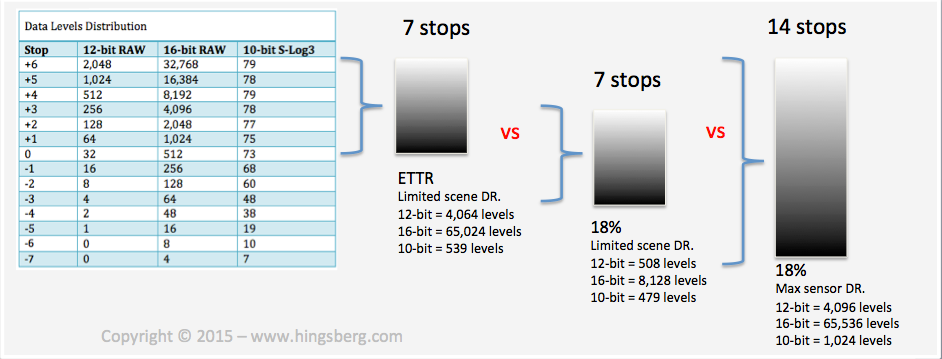
Now is shooting with a 7 stop gamma curve better than a 14 stop gamma curve? That's a trick question. How much dynamic range is your scene?

Look at what can happen when your scene itself has varying dynamic range and why where you place it might matter.

Screen%20Shot%202015-11-12%20at%2010.50.43%20PM_zpsw2k99tb0.png


Focusing on the RAW format a bit more, where you place your scene by exposure matters even more when shooting RAW as seen here: (ETTR is your friend)
Screen%20Shot%202015-11-12%20at%2011.05.52%20AM_zpsqxfb94lh.png


Now consider after you've shot your footage what happens in post when you push an image or pull it. ie. how are you effecting the effective S/N ratio of the camera improving or creating noise in the image. Again what if the scene used the full dynamic range the camera was capable of versus a smaller portion of it - what happens when you push/pull in post now?

My advise if you're shooting several uncontrolled high contrast location is to shoot RAW on a RED camera or F5/F55. Not slog which is a bit finicky with exposure, and definitely not a gamma curve with limited DR either.
 
Last edited:
Just to add, it is possible your 'engineer' has come from a DSLR background and has found that 'cinestyle' flat looks haven't so well for him on an 8-bit DSLR which is still shooting rec709 regardless.

But that's not what is going on here with the FS7. Whole different ballgame.
 
You engineer is spot on.

By spreading 1024 levels over 14 stops your data per stop is lower than if you spread 1024 levels over say 8 stops baked profile.

Trouble is that if you set your camera to an 8 stop profile and encounter a 9 stop scene then your image goes to crap.

Now if you are delivering 709 then you are only delivering 255 levels

255/1024.. you have 750 levels to waste..

You can choose to waste them by recording more DR .. very safe.. or just waste them by recording more data levels than you need per stop.

Now mix in reality that most 'baked' sony profiles look horrid and Slog comes even more to the fore.

If your engineer can paint you the looks you need in camera, and you remember to use them in the right lighting scenarios, and you nail your WB every time, and your exposure, and the sun never goes out/in mid interview.. then the baked image will be better... in reality you will mess up one of these things unless you are shooting in perfectly engineered studio.

That is the difference between theoretical engineering and engineering using empirical knowledge. Emperical knowledge says Slog will get you a better picture.

S
 
Problem is Sam, as you put it, an engineer by their very nature has problems between numbers on paper and reality. If this was my situation I would tell the engineer to DP the project and walk as fast and as far away from it as possible.
 
Last edited:
Thinking about your meeting you need to engage with the engineer.. he is theoretically correct.

So now we need to allow himself to equip himself with more data so that he sees that his theories may not stand up in practice.

You may need to perform a test together.. a proper organised test.. that will float his boat.

I would consider these situations..

1) the operator is in error*

You need to shoot some stuff where the camera is deliberately mis set.. under or over exposed or the WB off by a few thousand kelvin

These shots need to be corrected in post.

2) wide DR

you need to shoot some tests of WDR scenes

3) Also you need to actually test Slog by over and under exposing it.. it may be that he dislikes your footage because you are a serial under exposer.

4) Low light, it may be worth testing Slog Custom or Slog NReduction

S

* even the competent operator can be in error if they are using the FS7 in standard configuration.
You cannot judge WB as the camera has no RGB tools
Exposure is hard to judge with a WFM that is the size of a peanut
 
How I see it, colour rendition is a byproduct that comes from resolution and also how much data you have for each colour channel. So technically more resolution would give better colour i.e. 444 versus 420 or 422 as has been long debated in several posts in this forum, and also the data and number of levels would also contribute to "better colour". ie. 256 levels can make good colourful images, but 1024 is better, as would 4096 (10-bit), and especially 65,000 (16-bit RAW).

Again it goes back to the how to maximize the use of the full data available. Maybe he's right that if you shoot a 4-5 stop scene in 7 stop gamma then you have maximized everything to it's fullest. Most data allocated per stop. But is this realistic in an uncontrolled environment? Might we not settle for 14 stop range with a little less data per stop instead?

The answer is not clear cut, and he's thinking far too much like a calculator. Not real world.
 
The analogy I gave you in the 2nd post about being able to fill the smaller glass how you see fit is completely true for colour.
 
Maybe he simply doesnt know how to/ couldnt be bothered to .. grade Slog footage.. of course REC709 will suit him alot better.. knock it on the head and eat a donut in the sun..
 
On the colour front in a 709 mode the thing will record more colour resolution becaus a small change in colour will result in a larger change in data level - but as we remember we have 1000 levels at capture and only need to deliver 250 levels - so we still have 750 spare levels so maximisimg capture may not be the prime element in a great delivery.

On the downside using a 709 capture will both put the colours in the nasty places sony choose to place them (unless you are expert at painting the camrra) and also will risk you clipping a colour channel (if you are in error or recording a wide Dr scene) at which point the colour will go seriously bad
 
Last edited:
Sam,
i followed all posts about DR discussios. I an not professional, i am abitionated amateur and try to shoot high quality videos. All my videos will be watched on TV-screens, flat LED oder PC panals. I use self burned BluRays, NAS streamings or HDD (H264-about 25-50 Mbits). As for my understanding under such circumstances Slog 2/3 does not make sence becouse also in Resolve graded footage and final compositions will be delivered in REC 709. Better to use Hyper-(FS7) or Cinegammas (FS5)?
Are my conclusions right ? What are the mistakes in my thoughts ?
Thanks for help, klfi
 
If you own an 8 bit camera I would shoot Cine Gammas. If you own a 10bit camera (Fs7, FS5 HD mode) I would shoot Slog and learn to make lovely colours in Resolve.

S
 
If you own an 8 bit camera I would shoot Cine Gammas. If you own a 10bit camera (Fs7, FS5 HD mode) I would shoot Slog and learn to make lovely colours in Resolve.

S

I would add that if you have an external recorder like a Shogun, you can shoot S-Log on the FS5 in 4k in many situations without issue. I just shot a bunch of 4k talking head interviews in S-Log 3 and the skin tones are handled better in S-Log than they are in the Cine Gammas IMO. 8-bit 4:2:2 in Pro Res HQ is significantly better than 8-bit 4:2:0 with XAVC-L compression.
 
Back
Top