
Navigation
Install the app
How to install the app on iOS
Follow along with the video below to see how to install our site as a web app on your home screen.
Note: This feature may not be available in some browsers.
More options
You are using an out of date browser. It may not display this or other websites correctly.
You should upgrade or use an alternative browser.
You should upgrade or use an alternative browser.
White Shadows (not the TV series)
- Thread starter TrailBoss
- Start date
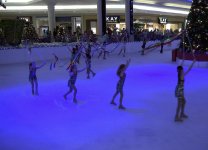
I will when I get home. A little more info: Shot on the AF100A onto a Samurai Blade. The white shadows are on the raw footage, so it's not my NLE's (Vegas Pro 13) doing. Also, I was indoors using Panasonic's H-PS14042 (12-42mm, f/3.5). I know, I know (now) I should've used a faster lens. Didn't have one at the time. Lighting changed constantly (due to the lighting guy) from normal, bright white to dark blues to dark greens hitting the rink floor.

scott favorite
Active member
Was DRS set to off? Sometimes a high setting of 2 or 3 on the dynamic range stretch feature can automatically gain up the shadows and create a ghosting effect.

David W. Jones
Veteran
I wasn't there, and I have no idea what your vectorscope and waveform looked like when you were exposing your image. But I would wager the LED lights used are an issue.
Also, when dealing with colored lights, the shadows sometimes get a colorcast from the lights used, and wont appear anything like the shadow from a white light source.
http://www.onstagelighting.co.uk/lighting-design/shadows/
http://www.onstagelighting.co.uk/lighting-design/shadows/
VenezuelanD
Well-known member
I haven't seen this particular issue but event lighting people love to go into this blue/ultraviolet completely over-saturated color on their LEDs that looks great to the eye but wrecks havoc on almost any sensor. The blue channel clips hard and that creates all kinds of issues...maybe the camera is using DRS or some kind of knee that along with the blue LEDs is causing this issue.
Did the shadows look normal when the light was a different color/more full spectrum?
Did the shadows look normal when the light was a different color/more full spectrum?