White Balance

After a good search i have found no clear results. How are you guys handling white balance on this camera? manual or one of the presets? its just i haven't been able to be completely pleased with skin tones from any of the presets or manual settings.
 
You can dial the white balance in degrees Kelvin. That's the most commonly-used method around here. Since the Kelvin scale basically covers all of the white balancing possibilities of the camera, then perhaps the camera itself is the problem for you, if you don't like any of what it has to offer, in terms of white balance.
 
I dial in degrees Kelvin. However this is only shifting colours along the blue red axis.

If I'm dealing with fluorescent lights, I will set a custom WB (see the manual) to correct for shifts along the green magenta axis.
 
If I'm dealing with fluorescent lights, I will set a custom WB (see the manual) to correct for shifts along the green magenta axis.
Thanks for the clarification. I stand corrected.

To the OP: White balance has traditionally been set with a white card. The purpose of white balance is to make sure that whites are truly white under any given lighting condition. So put a white card, or other purely white object, in front of the lens and hit the custom WB. See if you like the results then.
 
Maybe i just need to do a little more experimenting then. i can now get a good enough result when filming outdoors and manually wb using a white source, however indoors under practical lighting the colour axis always seems to lend itself to either being too red or too blue.
 
I dial in degrees Kelvin. However this is only shifting colours along the blue red axis.

If I'm dealing with fluorescent lights, I will set a custom WB (see the manual) to correct for shifts along the green magenta axis.

Hah... I am an idiot for not knowing this (and reading the manual). I've always just manually set my white balance with the Kelvin dial... can't wait to go home and "really" white balance :)
 
I dial in degrees Kelvin. However this is only shifting colours along the blue red axis.

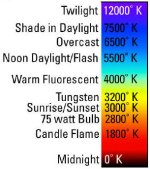
Actually that's not true. Kelvin goes from red to yellow to green to blue to indigo....just like a rainbow. Fluorescent lights typically are around 4000K-4300K which would be considered green.

The presets on your camera are just Canon's version of what tungsten, daylight, fluorescent, etc. degrees Kelvin should be. For example, I think Canon's daylight preset is 5300K while most daylight bulbs are set for 5600K.
 

Attachments

  • Kelvin.jpg
    Kelvin.jpg
    100.1 KB · Views: 0
Maybe i just need to do a little more experimenting then. i can now get a good enough result when filming outdoors and manually wb using a white source, however indoors under practical lighting the colour axis always seems to lend itself to either being too red or too blue.


Indoors you may be under different types of lights (fluorescent, tungsten and/or daylight) and that can affect your color.
 
Do you guys 'offset' white balance for aesthetic reasons?
I'm asking as I know that especially with these DSLRs, proper white balance is important to preserve maximum dynamic range, however sometimes I want a scene to look different. Considering the limited post pro possibilities due to the codec, do you prefer setting WB close to the desired result or do you white balance correctly and do it in post? I've read that false white balance can cost up to about 1 1/3 stops of dynamic range?!
 
Actually that's not true. Kelvin goes from red to yellow to green to blue to indigo....just like a rainbow. Fluorescent lights typically are around 4000K-4300K which would be considered green.

The presets on your camera are just Canon's version of what tungsten, daylight, fluorescent, etc. degrees Kelvin should be. For example, I think Canon's daylight preset is 5300K while most daylight bulbs are set for 5600K.

Well, OK so moving from red to blue means you have to go through a bit of green. But what I was referring to was not so much the degrees Kelvin of fluorescent. This can vary widely from tungsten balanced to daylight balanced and it would be inappropriate to set WB to 4000-4300K simply because the posted diagram suggests it. Also there is often a green spike in the colour spectrum of fluorescent light.

So if you want accurate WB under fluorescents you first have to consider the red blue axis as the fluorescents could be anything from 3200 to 6500K. You also have to consider if there is an additional green tinge from the lights.

This can be corrected for on the 5D either by doing a custom balance, or shifting the WB function in the menu along the magenta / green axis. And I guess that the Color Tone setting in the picture style does the same thing. Very useful in all lighting situations to have that control if you need it.
 
Well, OK so moving from red to blue means you have to go through a bit of green. But what I was referring to was not so much the degrees Kelvin of fluorescent. This can vary widely from tungsten balanced to daylight balanced and it would be inappropriate to set WB to 4000-4300K simply because the posted diagram suggests it. Also there is often a green spike in the colour spectrum of fluorescent light.
Note that the spectral output of fluorescent lights is totally different from that of incandescent lights. It's not a nice curve, but rather a series of spikes along different wavelengths. As such, fluorescent lights can't actually be measured with the Kelvin scale. The fluorescents that are deemed suitable for video use are known as "full spectrum" lights, which try to maximize spectral output for all wavelengths, in order to better approximate the curve of incandescent sources. These lights use the Kelvin scale, but even then, the Kelvin rating is only an approximation, not an accurate measure of color balance.
 
Back
Top