GH4 wherein we discuss Noise Reduction

mcbob

Veteran
So I see many many threads where folks will throw the GH4 into CineD mode and mash down the NR to -5, then say there's too much noise. What exactly is the logic behind this? Are post production noise reducing software assumed to me altogether superior?

I've been fiddling with actually increasing noise reduction in some settings for low light use, and it seems to work OK for situations where baked-in, quick turnaround footage is necessary. Trying to analyze exactly where the tradeoffs occur. Curious to discover others' findings.
 
So I see many many threads where folks will throw the GH4 into CineD mode and mash down the NR to -5, then say there's too much noise. What exactly is the logic behind this? Are post production noise reducing software assumed to me altogether superior?

I've been fiddling with actually increasing noise reduction in some settings for low light use, and it seems to work OK for situations where baked-in, quick turnaround footage is necessary. Trying to analyze exactly where the tradeoffs occur. Curious to discover others' findings.

My presumption has been that a post process for noise reduction would be preferred to an 'in camera' one. There are two reasons that come to my mind, 1) the in camera process is limited and so, given that there are tradeoffs as to reduce noise, but also 'smooth/smear' edges, yield a 'less sharp' look. 2) problem 1) is burnt into the media, and so can't be changed.

With post processing, one can balance between the two requirements, as well as add 'nice' noise aka Grain to cover problems... I mean, add artistic choice...

In camera NR, along with other 'styles', is better for people who are going to be going direct from camera to viewing, with minimal post processing.
 
In camera noise reduction does bad things to skin. Makes it look like plastic. I se mine at -2.

Hook up a monitor and dial it up and down while framing a tight shot of someones face.

For a night scene without people it wont hurt to leave it at default or maybe +2.
 
For years I've always taken in camera NR down to the absolute lowest. When I started testing the GH4, though, I shot charts with various settings and came away seeing that I could get better results with modest NR in camera than applying (lengthy) post-processing.

Don't get me wrong, Neat Video is great and is a godsend when you need it, but there is an advantage to doing this sort of processing before compression is applied to the recorded image.

My personal settings are -2 for ISO 200 & 400, and 0 for ISO's above that.
 
That old NR demo of the 7D footage at iso6400 is rather silly by todays standards.
 
Charts look fine but you lose significant detail with NR at 0.

If anyone wants to do extensive tests of -5, -4, -3, -2, -1, 0 that would be great. Any value over 0 is useless to me :)

Part of the issue is that the NR reduces fine detail but not large splotchy noise.

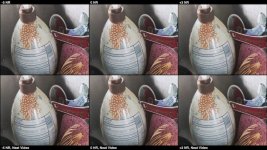
It's best seen in a video, such as this one I did, which compares -5, 0 and +3. Upper row is out-of-camera. Lower row is with Neat Video. If you're planning on running Neat Video (with temporal mode on)... the in-camera NR is pretty useless. If you want to do quick-turnaround, the in-camera NR is only semi-useless...

http://www.boacinema.com/projects/2014/GH4/GH4_NR_summary.mp4

This resized still doesn't really show it so please just download the video.

GH4_NR_summary.jpg

Bruce Allen
www.boacinema.com
 
Back
Top