

Navigation
Install the app
How to install the app on iOS
Follow along with the video below to see how to install our site as a web app on your home screen.
Note: This feature may not be available in some browsers.
More options
You are using an out of date browser. It may not display this or other websites correctly.
You should upgrade or use an alternative browser.
You should upgrade or use an alternative browser.
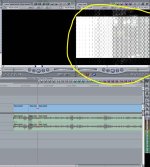
When it looks like this??
- Thread starter ShamrockFilms
- Start date
ShamrockFilms
Well-known member
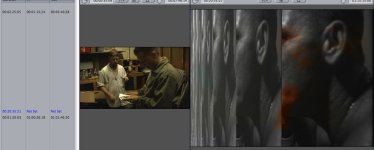
Also 29.97 plays back fine, its only 23.98 footage that plays back as checkerboard.

ShamrockFilms
Well-known member
Its a problem within FCP, not my DVX. The checerboard is showing on all my already captured footage which was fine when i captured and fully edited it.
ShamrockFilms
Well-known member
When i play the clips from the capture scratch they are fine, its only when the footage is in the timeline it becomes checkerboarded.

Luis Caffesse
Admin
Have you tired importing the footage into a new project and seeing if the problem is consistent?
If it plays fine in a new project it could be the sign of a corrupted project file...
but that's just a shot in the dark.
If it plays fine in a new project it could be the sign of a corrupted project file...
but that's just a shot in the dark.

ryan brown
lOwEr CaSe Member
FCP attack, FCP rescue, trash prefs, etc.
Then run disk utility on all your drives. See what happens.
Then run disk utility on all your drives. See what happens.
Luis Caffesse
Admin
FCP attack, FCP rescue, trash prefs, etc.
Then run disk utility on all your drives. See what happens.
RC - I have FCP Rescue (which is awesome), but I'm not familiar with FCP Attack.
Do you have a link?
I did a quick search on Google but didn't come up with anything.

DeVi| D0do
Active member
Do you have more than one monitor connected? I've run into strange problems like this when using two monitors... Disconnecting one of them solved the issues.
ShamrockFilms
Well-known member
Do you have more than one monitor connected? I've run into strange problems like this when using two monitors... Disconnecting one of them solved the issues.
I tried that and thought it would work. I didn't now it looks like this...
Attachments
ShamrockFilms
Well-known member
I do have AJA KONA, maybe its the setting in the control panel. Right now im using the desktop as a monitor and not my television.
ShamrockFilms
Well-known member
when i mess around with View>Range Check or View>Channels, I can see the video normally until I try and play it, then it plays and I can only hear the video, when i stop it i can see the video again. the issue seems to be in the playback settings, I just don't know where it is.
ShamrockFilms
Well-known member
When i change the sequence settings to 4:3 instead of 3:2 it works, but i have to render the entire sequence. Before I didn't have to render anything when i captured at 3:2 NTSC DV
ShamrockFilms
Well-known member
The compressor of each file is DV/DVCPRO - NTSC, that's what I always captured in. When I change the Compressor to anything else in the sequence settings, I can see the playback again, but its telling me to render the timeline. That will make it hard to edit having to render everything i drag into the timeline. Any ideas?
ShamrockFilms
Well-known member
looks like the project file went currupt. I created a new project file and copied bins over to that and it seems to work now. Thanks
Luis Caffesse
Admin
looks like the project file went currupt. I created a new project file and copied bins over to that and it seems to work now. Thanks
Glad you got the bottom of it
:thumbsup:
I would definitely go ahead and trash the prefs with FCP Rescue.
Doesn't hurt to cover your bases.
ShamrockFilms
Well-known member
One thing though, it may of had to do with Text overlays. I tried adding a text overlay to the new project file and the playback went bad in the area of the overlay like the previous project.
ShamrockFilms
Well-known member
I removed attributes "Distort" in the clips in the timeline and it fixed the problem.
Last edited:
