
Navigation
Install the app
How to install the app on iOS
Follow along with the video below to see how to install our site as a web app on your home screen.
Note: This feature may not be available in some browsers.
More options
You are using an out of date browser. It may not display this or other websites correctly.
You should upgrade or use an alternative browser.
You should upgrade or use an alternative browser.
When is Adobe support for FS700 and Odyssey 7q coming?
- Thread starter ilnow
- Start date
Mitch Gross
Veteran
The issue is actively being addressed between Convergent Design and Adobe.
Mitch Gross
Veteran
Not quite sure what you mean. It is our job to write our own Avid files in DNxHD format. Avid has provided us with all the salient information. We're just not finished yet.hey Mitch,
I'm curious to know if C-D is working a similar issue with Avid?

cuervo
Veteran
Let me elaborate, then.
I edit on Avid's Media Composer v7.03. Avid, currently, works in 1920x1080 (p). It has the capability to read UHD thru it's "frameflex" feature. This is all within Avid's arena, not really related to input from C-D. However, MC cannot, as of this version, read .dng. Yes, i know DNxHD is in the works, but, I'm referring to Avid's ability to read, natively, DNG. Avid can read Sony's RAW format thru a plugin available from Sony. To my knowledge, there's no plugin for BMD's cinemaDNG (isn't that what C-D uses for their current RAW format, or whatever the open source DNG C-D uses?)
I edit on Avid's Media Composer v7.03. Avid, currently, works in 1920x1080 (p). It has the capability to read UHD thru it's "frameflex" feature. This is all within Avid's arena, not really related to input from C-D. However, MC cannot, as of this version, read .dng. Yes, i know DNxHD is in the works, but, I'm referring to Avid's ability to read, natively, DNG. Avid can read Sony's RAW format thru a plugin available from Sony. To my knowledge, there's no plugin for BMD's cinemaDNG (isn't that what C-D uses for their current RAW format, or whatever the open source DNG C-D uses?)
paulcurtis
Veteran
Isn't cDNG an Adobe project? It would be for Adobe to develop suitable plug-ins, or more likely for Avid to do it based on the open source info.
Avid appear to still be a bit of an island when it comes to interoperability...
cheers
Paul
Avid appear to still be a bit of an island when it comes to interoperability...
cheers
Paul
cuervo
Veteran
Thanx for the info, paul, I guess DNG is an Adobe initiative. And, since it's open source, yes, Avid would need to take the ball. I'll post something in the Avid blogs. It's been years since I tried Premiere. It's always been very very balky and unreliable. Over the years, I've found Avid to be the only really professionally oriented NLE. Apple all but killed FCP and Adobe's Cloud really looks too unweildly for me.
Not really wanting to fire up an NLE war, here....that's passe. I just like Media Composer.
Not really wanting to fire up an NLE war, here....that's passe. I just like Media Composer.
Stillinsane
New member
The issue is actively being addressed between Convergent Design and Adobe.
Ok, so it's been a long time "actively addresses" now. I know it's not CD's fault, I'm sure. But what's the deal now, what kind of obstacles are you or is adobe facing? From my perspective they just have to get the color science fixed since the sensor output is nowhere near adobes "standard". Is it because they only support cameras and no recorder? It can't be that hard for them.
It would be a dream come true to natively edit these DNGs in a Lightroom - AE tandem.
thx in advance for any further information Mitch.
paulcurtis
Veteran
Thanx for the info, paul, I guess DNG is an Adobe initiative. And, since it's open source, yes, Avid would need to take the ball. I'll post something in the Avid blogs. It's been years since I tried Premiere. It's always been very very balky and unreliable. Over the years, I've found Avid to be the only really professionally oriented NLE. Apple all but killed FCP and Adobe's Cloud really looks too unweildly for me.
Not really wanting to fire up an NLE war, here....that's passe. I just like Media Composer.
Fair enough. We started cutting on Avid because of our editor at the time but moved off into PPro where i'm much, much happier. MC has a very traditional slot in the pipeline and shows its offline roots. The nice thing about PPro is that it's acting as an online hub and it's not far off being able to finish as well. I developed a web based management system that ingests an XML file from PPro and turns that into a shot list (or syncs with one) which, in our case, is used with a Nuke based pipeline and web services to manage, sync and auto generate grades and script files. So i can see the show online, set the cameras used for the files and the tech grade based on scene and the rest automagically happens. There's no way to approach that with Avid. Generally i'm very happy with the pipeline we've created and it allows us to parallel editing, grading and VFX work without needing picture lock.
Ok, so it's been a long time "actively addresses" now. I know it's not CD's fault, I'm sure. But what's the deal now, what kind of obstacles are you or is adobe facing? From my perspective they just have to get the color science fixed since the sensor output is nowhere near adobes "standard". Is it because they only support cameras and no recorder? It can't be that hard for them.
It would be a dream come true to natively edit these DNGs in a Lightroom - AE tandem.
thx in advance for any further information Mitch.
FWIW i generated some calibrated profiles for the O7Q DNG files based on dual illuminant (2800K, 6400K) which can be used with ACR. I didn't really make a song and dance about them because the O7Q would be updated and the issue would become a non-issue. In the meantime if you want to try these profiles then PM me with your email and i can send them to you. I know you tried them Gene, i don't know if you've actually used them though? I'm sure the CD solution will be better, but these may help in the short term!
cheers
Paul

jpardon
Active member
I have a related issue regarding Odyssey 7Q footage in Premiere, but this concerns the 1080 HD DPX files that the 7Q can record:
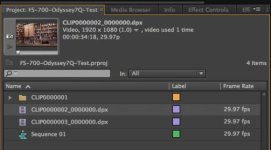
I shot some very simple test footage recently with a colleague (Michael Erlewine). As you can see in the image below I have imported a 1080 HD DPX file recorded by the Odyssey 7Q as a DPX Image Sequence into Premiere.
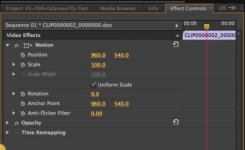
Double-clicking on the clip in the Project pane reveals the expected Position parameters in the Effects Controls pane (960 x, 540 y)
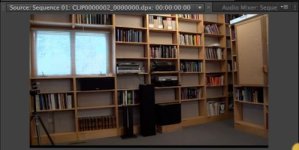
However, it looks as though the DPX Image Sequence is missing 21 lines of pixels at the bottom edge of the frame. Look closely at the screen grab below to see the black area at the bottom of the frame:
Can anyone replicate this issue? And does anyone have any ideas about what may be causing this? This is the first footage that I have ever shot on the Odyssey, so I'm willing to admin "operator error" on this. But could this be a problem with the Odyssey 7Q and/or Premiere?
I shot some very simple test footage recently with a colleague (Michael Erlewine). As you can see in the image below I have imported a 1080 HD DPX file recorded by the Odyssey 7Q as a DPX Image Sequence into Premiere.
Double-clicking on the clip in the Project pane reveals the expected Position parameters in the Effects Controls pane (960 x, 540 y)
However, it looks as though the DPX Image Sequence is missing 21 lines of pixels at the bottom edge of the frame. Look closely at the screen grab below to see the black area at the bottom of the frame:
Can anyone replicate this issue? And does anyone have any ideas about what may be causing this? This is the first footage that I have ever shot on the Odyssey, so I'm willing to admin "operator error" on this. But could this be a problem with the Odyssey 7Q and/or Premiere?
cuervo
Veteran
Are you aware that the O7Q records 2k or UHD, which is 1.89 PAR....2048x1080? When you bring this into a 1920x1080 format, you get either the full aspect ratio within the 1920 frame, and black bars on the top and bottom of the frame; or, a full 1920 x 1080 frame that crops a small portion of the 2048 width. I use Avid Media Composer which lets me select format sizing when I import a 2K image. I'm sure premiere pro does that somewhere.
However, it looks as though the DPX Image Sequence is missing 21 lines of pixels at the bottom edge of the frame. Look closely at the screen grab below to see the black area at the bottom of the frame:
View attachment 81325
Can anyone replicate this issue? And does anyone have any ideas about what may be causing this? This is the first footage that I have ever shot on the Odyssey, so I'm willing to admin "operator error" on this. But could this be a problem with the Odyssey 7Q and/or Premiere?
I can't say for 100% this is the issues since I'm not a 7Q expert, but I noticed that the DNG resolution is 2048x1072, which is 8 pixels shy of 1080. I noticed on a test I did, it has thin black bars at the top and bottom. Even though 8 pixels isn't much, it would be nice to get full vertical resolution in a firmware update. For some reason, I thought 2K still had 1080 pixels vertically... I could be wrong.
Last edited:

Clermond
Veteran
I have a related issue regarding Odyssey 7Q footage in Premiere, but this concerns the 1080 HD DPX files that the 7Q can record:
I shot some very simple test footage recently with a colleague (Michael Erlewine). As you can see in the image below I have imported a 1080 HD DPX file recorded by the Odyssey 7Q as a DPX Image Sequence into Premiere..
.
.
Can anyone replicate this issue? And does anyone have any ideas about what may be causing this? This is the first footage that I have ever shot on the Odyssey, so I'm willing to admin "operator error" on this. But could this be a problem with the Odyssey 7Q and/or Premiere?
I was curious and wanted to see how DPX behaves in PP and AE CS6. I cannot confirm this issue. It works fine in both apps. I have the same settings in video effects as shown on your screen shot. Unfortunately I am no Adobe expert so I have no idea what could have went wrong. Have you checked your files in Resolve also?

Last edited:
jpardon
Active member
As I understood he was talking about HD DPX which is 1920 x 1080

Yes, that is correct. I have double-checked everything and the black bar at the bottom still exists. You can download a single DPX frame at: http://www.vantagepointvisual.com/client/CLIP0000002_0000000.dpx
How can I make Mitch or Dan at CD aware of this issue?
Mitch Gross
Veteran
I am aware of what you are reporting and have forwarded the message to our engineers to investigate.Yes, that is correct. I have double-checked everything and the black bar at the bottom still exists. You can download a single DPX frame at: http://www.vantagepointvisual.com/client/CLIP0000002_0000000.dpx
How can I make Mitch or Dan at CD aware of this issue?
Colinelves
Well-known member
I've a project starting next month that is insanely post effects heavy and we're going to be shooting 2K Raw (assuming that none of the 4K or 4K derived formats aren't going to be ready by then) and building everything in After Effects so I just wanted to check the current O7Q compatibility with AE. Has anyone tried working with the O7Q CinemaDNG files in After Effects? Are they compatible at all? Is there anything we should look out for (apart from the weird colour temperature thing which I hope will be resolved before the shoot).
Thanks,
Thanks,
Mitch Gross
Veteran
Adobe compatibility is coming in the February firmware update.