
Navigation
Install the app
How to install the app on iOS
Follow along with the video below to see how to install our site as a web app on your home screen.
Note: This feature may not be available in some browsers.
More options
You are using an out of date browser. It may not display this or other websites correctly.
You should upgrade or use an alternative browser.
You should upgrade or use an alternative browser.
FS7: What's your look and color process? Both in-cam and post?
- Thread starter traviswears
- Start date
morgan_moore
Major Contributor
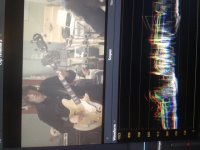
The WFM is not thick. The data on the WFM is thick.
S
S
Last edited:
morgan_moore
Major Contributor
Here is an ungraded image that I would consider slightly under exposed.
Looking at the WFM I guess the average value is about 384, (it is thick at 384)
Id like it to average about 512 or just under.
Why I have I not exposed at my ideal? Because Im probably shooting at 2 with a booster (aka 1.4) so getting as much light as was practical.
You will notice that post will DARKEN the image in 90% of cases.
S
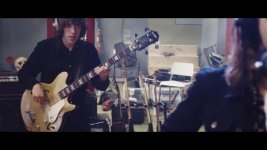
And after applying a LUT and noise and a raised blue desat 'vintage' look..
Looking at the WFM I guess the average value is about 384, (it is thick at 384)
Id like it to average about 512 or just under.
Why I have I not exposed at my ideal? Because Im probably shooting at 2 with a booster (aka 1.4) so getting as much light as was practical.
You will notice that post will DARKEN the image in 90% of cases.
S
And after applying a LUT and noise and a raised blue desat 'vintage' look..
Last edited:
Why would you want to over expose that image a stop more? Is it because you could then lower the offset in post before applying a LUT to reduce noise in the blacks?
Your blacks are raised a bit which is the 'look' your going for right? Which could introduce noise into the blacks but its hard to see in a still image.
Your blacks are raised a bit which is the 'look' your going for right? Which could introduce noise into the blacks but its hard to see in a still image.

morgan_moore
Major Contributor
Why would you want to over expose that image a stop more? Is it because you could then lower the offset in post before applying a LUT to reduce noise in the blacks?
I guess im just saying that I feel the 'thick' bit should be around the middle and yep pulling down in post keeps stuff nice and clean.
This ive 'normalised it' ie pulled it down (LUT + -ve offset) but then "done art" in adding a bit of a raise to the blue shadows and probably a bit of desat to the whole image. And added graind too.
S
mrchirster
Well-known member
I feel like exposing in LOG is such a hit and miss. I'v been shooting in Custom Mode, SLOG3 Gamut, Color Matrix off and NR to Medium for half a year now. Generally I'm quite happy with the results, but often times it's exposed a bit too dark. I think when you shoot quick run and gun doc style like me you sometimes expose too dark because it looks right to the eye in LOG. I have Zebras set to 92 and generally expose to the right but sometimes I forget. Once the new firmware is out I might switch back to CineEI and have a LUT displayed. I don't like shooting without NR atm so I'm stuck with Custom.

Liam Hall
Veteran
I feel like exposing in LOG is such a hit and miss. I'v been shooting in Custom Mode, SLOG3 Gamut, Color Matrix off and NR to Medium for half a year now. Generally I'm quite happy with the results, but often times it's exposed a bit too dark. I think when you shoot quick run and gun doc style like me you sometimes expose too dark because it looks right to the eye in LOG. I have Zebras set to 92 and generally expose to the right but sometimes I forget. Once the new firmware is out I might switch back to CineEI and have a LUT displayed. I don't like shooting without NR atm so I'm stuck with Custom.
You're doing it wrong.

Doug Jensen
Carbonite Member
+1


Nirv
Carbonite Member
- Are you shooting mostly custom or Cine EI?
- If custom, what scene files?
- What LUTs in post and where can I find them?
- Any sharpening, etc...part of your regular color correction?
In the 5 months I've had the camera it has been a constantly evolving process from shooting with a VF LUT REC709 800 and recording SLog3 to baking in a LUT I built in LUTCalc. I don't use external monitors so I much prefer being able to see the LUT in the VF while having the waveform and/or zebras available while shooting.
The LUT i bake is based off the BBC 800 gamma curve with a low and smooth knee which gently compresses anything over 90% gently into over exposure. The curve places 90% at 75 on the waveform so the meat and potatoes of the shot are in the 0-75 zone with plenty of room for the brights. If you need to overexpose the whites you can judge how much they're being compressed on the waveform. I've found this creates a nice fat file that can be sent out with minimal adjustment but also grades incredibly well too.
I might reappraise the situation if Sony allows me to see my custom LUT and record Slog3 with the Waveform live but I expect we'll be waiting a long time for that.

FrameFarmMedia
Veteran
Nirv - How did you arrive at the BBC800 gamma base? I've heard of others finding 'Canon Look' luts online for baking in but I have not come across anything yet.
I have LutCalc but its all greek to me. I need to find some tutorials (Any recommendations?). Since having the FS7 for 14 months now I've almost exclusively shot Slog3/Sgamut3.cine in CineEI as it was for my own production company and I could control the post pipeline or companies like Vice Media who want the SLog3 and have the workflow in place to handle it.. I have a job coming up this week for another company and am meeting to discuss format and their post workflow. It might just be easier to shoot with a baked in extended lut and be done with it to make life simpler for all (and guarantee they don't butcher it). I did some tests and wasn't completely satisfied with just baking in the LC709-typeA or the 709(800) lut. Any recommendations would be appreciated.
I have LutCalc but its all greek to me. I need to find some tutorials (Any recommendations?). Since having the FS7 for 14 months now I've almost exclusively shot Slog3/Sgamut3.cine in CineEI as it was for my own production company and I could control the post pipeline or companies like Vice Media who want the SLog3 and have the workflow in place to handle it.. I have a job coming up this week for another company and am meeting to discuss format and their post workflow. It might just be easier to shoot with a baked in extended lut and be done with it to make life simpler for all (and guarantee they don't butcher it). I did some tests and wasn't completely satisfied with just baking in the LC709-typeA or the 709(800) lut. Any recommendations would be appreciated.

starcentral
Veteran
What I suggest you can do is shoot a standard scene, bring it in Catalyst Browse, load either 709(800), LC709, or LC709A then tweak it how you like and export new 3D LUT which you can then load into camera and/or bake if you want, or just provide the LUT when you deliver slog.
Sometimes for clients I agree to provide a LUT afterwards.
Hey happy new year by the way!
Sometimes for clients I agree to provide a LUT afterwards.
Hey happy new year by the way!
FrameFarmMedia
Veteran
Sometimes for clients I agree to provide a LUT afterwards.
Happy New Year Dennis! Its funny you mentioned that because I had completely forgotten (too much christmas booze) that I had done exactly that for CBC arts before and it worked well. Since this shoot is a talking head in front of a seamless slate backdrop I can pop off easy colour in catalyst and send off to the producer/editor in no time and I can retain more control over the look I wanted in post. I think I might just do that. Thanks for jogging my memory.
Do luts transfer between Catalyst and Premiere well? I'm an Avid guy myself so I haven't had much experience in taking a lut from Catalyst to Premiere.
Nirv
Carbonite Member
Nirv - How did you arrive at the BBC800 gamma base? I've heard of others finding 'Canon Look' luts online for baking in but I have not come across anything yet.
I have LutCalc but its all greek to me. I need to find some tutorials (Any recommendations?). Since having the FS7 for 14 months now I've almost exclusively shot Slog3/Sgamut3.cine in CineEI as it was for my own production company and I could control the post pipeline or companies like Vice Media who want the SLog3 and have the workflow in place to handle it.. I have a job coming up this week for another company and am meeting to discuss format and their post workflow. It might just be easier to shoot with a baked in extended lut and be done with it to make life simpler for all (and guarantee they don't butcher it). I did some tests and wasn't completely satisfied with just baking in the LC709-typeA or the 709(800) lut. Any recommendations would be appreciated.
I had been grading using a LUT I'd customised in LUTCalc and decided it was about time I tested it as a baked LUT. Since this LUT has become my preferred LUT by burning it I can get a waveform which I can't get if I am using the REC709 800 VFLUT and recording SLog3.
I use the BBC WHP283 800 Output gamma curve with the LC709A gamut. I check the Knee options and make some adjustments until I've got a nice roll off. Take note of the 90% and 44 % values below the chart to set the Zebra levels in the FS7 and generate the MLUT. Load it into the FS7 etc etc...
The idea was to create a flatter look than REC709 but with enough contrast to send straight out or for quick turn arounds and to try and differentiate ourselves a bit from the REC709 crew. If you need more contrast the Canon Wide DR gamma curve is a bit more punchy and you can bend your own knee to taste. TBH it's just a bit of trial and error.
HTH
This is a good question. I've moved completely away from PP now -- but have been told on this forum and read elsewhere that they do not (LUT export form Catalyst into PP Lumetri) will not look the same.Do luts transfer between Catalyst and Premiere well? I'm an Avid guy myself so I haven't had much experience in taking a lut from Catalyst to Premiere.
It certainly works fine with CGC in FCPX as well as to use in camera.
And agree with Nirv that trial and error in LutCalc can be fun playing and trying... but then also infinitely so...just remember to come up for air (and paying gigs!)
Camera.
Slog 3
Expose so the thick bit of the WFM is in the middle, watch for highlight being clipped.
Post
Davinci, add Slog-LC709a LUT
Add a bit more punch using an SCurve.
Done
I have to agree with this. Just follow these steps and it's so easy to get an amazing image out of the FS7. Personally, I just avoid S-Log2 and Custom as I just don't like the colors. There's so many options in the FS7, but this is the ONLY setting I use.
Some clients just want LC709a baked in, and they've all been very happy with the look and colors.
I came from Canon and I'm really happy with the FS7 colors when shooting CineEi and paired with LC7009a, Alexa Luts or this Kodak LUT from Impulz. FS7 is easily as cinematic as Canon when the right settings are used.
Great camera.
I will add, so many users try an endless amount of combinations of profiles, Slog 2, Slog3, Custom, etc... Sony kind of pushes S-Log3 / SGamutCine / CineEI and also LC709a as their last color science, and with good reason, it looks better than the old color science.
Last edited:
Camera.
Slog 3
Expose so the thick bit of the WFM is in the middle, watch for highlight being clipped.
Post
Davinci, add Slog-LC709a LUT
Add a bit more punch using an SCurve.
Done
So, what you're saying is that the majority of the data on the WFM should be right in the middle, and that would give me a correct exposure every time? And I guess that the highlights shall, if possible, never exceed the top of the WFM (I try to keep them just under the last line before the end of the WFM, is that correct?)
So, say that I am outside, extremely bright all over outside. If I film let's say a person, he/she should be around the middle line on the WFM while the other parts (background) of the image can go above as I can't affect the surrounding lights.
And same thing goes if I shoot a moody dark scene, the talent should be around the middle and the background can go a bit under the middle, and in post I can then bring the levels down if I want to make it darker (in order not to get to much noise).
Sorry if this is a bit of topic, I just loved the simple explanation and would like to know a bit more =).