What type of external drive to use for editing? USB/Thunderbolt/FireWire

bradywurtz

Active member
So I've been editing video for a while on a Western Digital My Book Studio external hard drive on my MacBook Pro via FireWire 800. The hard drive requires additional power because of its high RPM on the drive.

But it I never really took the time to ask and find out what everyone else edits their HD video or create their Motion/After Effects projects off of. What does everyone else use?

im assuming thunderbolt works fast and great, but those drives are expensive right now.
is USB 3.0 good enough for you to do large video work on?
should I still be looking at traditional moving parts hard drives that require battery power for higher RPM? Or is bus powered solid state hard drives just as good?

im in the market to buy a new hard drive and I just wanted to know what everyone else uses and what is required and what is frowned upon within the professional video community when it comes to editing your video projects
 
Im holding my breath for Caldigit and their Thunderbolt work... Would be great to have a terabyte or two of SSD raided over thunder :-P
 
Now i've heard that Thunderbolt is like the fastest thing out there, and that USB 3.0 is next in line to it (not close in speed, but the next best thing), so would you recommend editing off of a USB 3.0 external hard drive if someone didn't have a thunderbolt enabled computer, or just didn't have enough money :D

the reason i'm asking this, is because i was told a long time ago, and i have no idea if there is any truth to this, that USB only travels in one direction through the cable, which makes editing HD video off of a drive via USB difficult and slow sometimes. That was why I was told to use Firewire 800 instead. Not only for the speed, but because Firewire was able to transfer data both directions (drive to PC, PC to drive), whereas USB could only go in one direction at a time.

Do you know if that statement holds true? If so, USB 3.0 would not be a better choice than Firewire when it comes to editing HD video on long projects daily, but could be better than Firewire when it comes to getting a backup hard drive or just a drive to transfer data on the go.
 
Get a USB raided drive for now... cheap selection and large sizes. If your using a smaller USB powered drive, most standard Hard Drives will only give you 80-120MB/s transfer speeds (So still relatively close to FW800 speeds). So your never gonna make full use of the USB 3 bandwidth and just barely using the max of your FW800.
On a side note, you could get a 128Gig SSD drive and throw that into a USB 3 case. You'd be getting super speeds for around $100 (SSD drive) + $20 (Portable USB 3 case) = $120
You could get a 256Gig now for like $165
Amazon.com : Mushkin Chronos 240 GB SATA 6.0 Gb-s 2.5-Inch Solid State Drive (MKNSSDCR240GB) : Laptop Computer Internal Solid State Drives : Computers & Accessories
 
Clearly data flows both ways over USB. It if didn't, then USB keyboards wouldn't work.

I meant to say, what i was told was that USB couldn't send data flow both was simultaneously. Obviously it could send a signal both ways, but what i meant to say was that someone told me that it couldn't send a signal simultaneously in both directions at the same exact time. Is this still true or was i lied to/misinformed ?
 
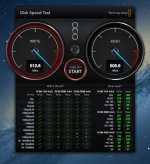
I went low cost by using 3 3TB Thunderbolt drives together in a RAID 0 configuration.
 

Attachments

  • iMac Speed Test.jpg
    iMac Speed Test.jpg
    73.2 KB · Views: 0
The USB protocol has a few limitations in constant throughput. It has spikes and drops in the rate that when averaged out look really good on paper, but might not be good enough for keeping a stream going uninterrupted. It's not a one way street or anything, but it can be an issue if you need to read a heavy file for a long time without any hiccups. Firewire is very good at sustained read/write speeds which is why it was considered the standard, or minimum for an external drive.
There are a few other factors here that can make more of a difference than what your connection type is. Drive speed, controller chip, RAID or single drive, amount of free space, any and all of which can be a bottleneck. USB3 is much better than USB2 ever was, but combining all of the above factors and comparing them in real life to your needs will be the deciding question. It's a big difference in reading a single stream of ProResLT vs four streams of 4k!
 
Can you elaborate on the three drive/raid thing? I was looking into the 2TB little big disk from lacie. Its two 1 tb thunderbolt drives already networked in a raid 0 config and i believe, in the same case. But its also around $400. Wondering if your solution was cheaper?
 
Just remember that RAID 0 with two drives is twice as likely to fail as one drive, and three drives is three times as likely, so BACK IT UP!!!
 
Back
Top