FS5: What is the workflow for CDNG recorded from Atomos Shoguns?

Demistate

Veteran
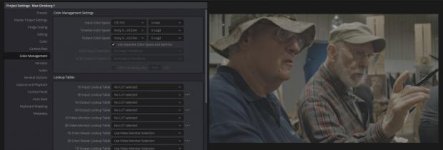
I've seen a lot of information about the workflow about recording FS Raw to CD's Oddssey 7q, but I'm looking for information on how to take the CDNGs recorded from the Atomos Shogun Inferno/Flame, and get them to Slog2/3 with sGamut color in Davnici Resolve. the CDNG files do come in "very dark" which my guess is that they are being interpreted as some sort of Linear data.

Am I supposed to just use CD's LUTs, and run with Slog2?

Edit: This is Convergent Design's workflow documentation for their recorder: https://convergent-design.com/kb.html?view=kb&kbartid=34
 
Last edited:
Bump on this again. It looks like the Slog2/3 selector is gone from the recorder now and It's unclear what kind of Log it's recording from the FS-RAW now for prores/DNx recordings
 
Got this answer from Atomos yesterday regarding the slog2/3 issue:
"I have an update for the fix, as i talked today morning with our engineer. They are working on it and hopefully it will be out in few days. They are close on it"
 
In fact cDNG is a linear format. There's a number of ways to deal with it, each has its advantages.
1-my preferred method is ACES CCt. If you're working in Resolve, set the IDT to Blackmagic Design Film and the ODT to REC709. This is, by far, the simplest.
2-an alternative is to work with Davinci RGB. In this method, you can set the RAW parameters all BMG Film, both gamma and gamut. This is, in effect, a linear workflow.
3-for a true linear workflow, set the RAW gamma to linear and the gamut to REC709. Then, use a final node to set a Linear to your desired format, usually REC709. This method works pretty well to recover highlights that you think were blown out on capture, but, really the data exists above IRE255, you just need to bring it back into legal range.
 
Thanks for the input on how to get into a linear workflow. Currently I find that Aces is not a good color space to work in. I generally do Cineon, or Slog3 (since they are similar) and use luts to shape my work on the output. Is there a Non ACES way to go from Linear to SLOG3 or Cineon?
 
You can use DaVinci YRGB Color Managed color science and use explicit colorspace transforms.

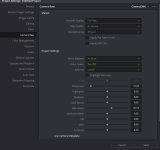
Second this workflow. In Resolve 12.5 or 14 you can do a direct conversion from CDNG linear color space to S-log, S-log2, or S-log3. See attached image for color managed settings using DaVinci YRGB.

33990891054_b829f34635_o.png
 

Attachments

  • CDNG linear to S-log3 Cine conversion.jpg
    CDNG linear to S-log3 Cine conversion.jpg
    16.3 KB · Views: 0
Last edited:
In fact cDNG is a linear format. There's a number of ways to deal with it, each has its advantages.
1-my preferred method is ACES CCt. If you're working in Resolve, set the IDT to Blackmagic Design Film and the ODT to REC709. This is, by far, the simplest.
2-an alternative is to work with Davinci RGB. In this method, you can set the RAW parameters all BMG Film, both gamma and gamut. This is, in effect, a linear workflow.
3-for a true linear workflow, set the RAW gamma to linear and the gamut to REC709. Then, use a final node to set a Linear to your desired format, usually REC709. This method works pretty well to recover highlights that you think were blown out on capture, but, really the data exists above IRE255, you just need to bring it back into legal range.

Hi @cuervo; could you please elaborate why - in your proposed workflows 1 and 2 - you use BMG film and not Cinema DNG on input? Perhaps the answer is obvious, but frankly I'm new to RAW (have been recording S-log 90% of the time) and hence no experience whatsoever. Is it that only BMC can treat the source as linear, while CDNG (as IDT in Aces, or Camera RAW setting) can't - is it's so, why? Please elaborate.

I'm not going to switch to CDNG recording on my Shogun Inferno, but use DNxHR encoding which bakes S-log2/3 in, and can also be used for framerates exceeding 30p; another reason being purely practical (file sizes). But I'd like to learn something new; TIA!

Piotr
 
Second this workflow. In Resolve 12.5 or 14 you can do a direct conversion from CDNG linear color space to S-log, S-log2, or S-log3. See attached image for color managed settings using DaVinci YRGB.

33990891054_b829f34635_o.png

Is it incorrect go straight to 709 (or in my case of HDR10 grading - to 2020/BT2084) as T/L and output color/gamma?

Piotr
 
Is it incorrect go straight to 709 (or in my case of HDR10 grading - to 2020/BT2084) as T/L and output color/gamma?
Typically you would set the output color space to the color space of the grading monitor.
The timeline color space influences the controls, for instance you could prefer to have the controls react in a log or linear fashion.
 
Yeah I use RCM in Resolve all the time, and - having a HDR-capable monitor - always use Rec.2020/BT2084 as my T/L settings... Just thought the CDNG workflow - for whatever reason - requires S-log... Thanks,

Piotr
 
Is it incorrect go straight to 709 (or in my case of HDR10 grading - to 2020/BT2084) as T/L and output color/gamma?

Piotr

I use the above color management process for color space conversion to any output needed. I normally set both timeline and output color space to either REC709 2.4 gamma or SRGB. I don't use grading LUTS much. I do use the CDNG raw menu adjustments for overall exposure, white balance, highlight, and shadow recovery prior to any other grading nodes. This process does make mathematically accurate color space conversions to any output. If you are grading 4k for high quality 10 bit delivery 2020/2084 makes perfect sense. I'm working mostly in SRGB for 8 bit web delivery.
 
Thanks, @Razz16mm - now I'm clear on that part (I just thought CDNG workflow somehow imposes log T/L and output). If I only get enlightened why BMDfilm (rather than CinemaDNG) is recommended as IDT for ACES or DR RAW, I'd be all clear :)

Piotr
 
When do you have a need for sRGB?

Anything posted to the web and viewed on computers or mobile devices. It is the standard color space for that. SRGB is essentially the same color space as BT.709 for RGB monitors. The difference is full 0-255 data range and a standard gamma of 2.2 vs 2.4. My view is that you should monitor and grade in the color space you are delivering for since these are display referenced standards. Currently my setup is pretty basic with a good quality 8-bit calibrated SRGB monitor.
 
Thanks, @Razz16mm - now I'm clear on that part (I just thought CDNG workflow somehow imposes log T/L and output). If I only get enlightened why BMDfilm (rather than CinemaDNG) is recommended as IDT for ACES or DR RAW, I'd be all clear :)

Piotr

A lot of us shooting Digital Bolexes used BMD film as input color space because it ignores the camera color matrix metadata.
 
Anything posted to the web and viewed on computers or mobile devices. It is the standard color space for that. SRGB is essentially the same color space as BT.709 for RGB monitors. The difference is full 0-255 data range and a standard gamma of 2.2 vs 2.4. My view is that you should monitor and grade in the color space you are delivering for since these are display referenced standards. Currently my setup is pretty basic with a good quality 8-bit calibrated SRGB monitor.
I would use Rec.709 video range if you target deliveries for destinations like YouTube and Vimeo.

If you make your videos full range you will run the risk of clipping your black and whites for destinations like YouTube and Vimeo.
 
Last edited:
I would use Rec.709 video range if you target deliveries for destinations like YouTube and Vimeo.

If you make your videos full range you will run the risk of clipping your black and whites for destinations like YouTube and Vimeo.

If you grade on an SRGB calibrated display in SRGB color space for web delivery to Youtube and Vimeo, your white values wind up visually in the same place as they would under restricted range BT709. SRGB and BT709 look identical on monitors that are correctly calibrated for each. You only see a difference if you play BT709 broadcast legal video on and SRGB monitor. I've not encountered any issues delivering video graded in full range SRGB space to Vimeo or Youtube when it is exported to a BT709 compliant YUV compressed codec for delivery anyway. This is a video I did some time ago to calibrate color space delivery for Vimeo so that Resolve' window on my monitor looked identical to Vimeo playback on the same monitor.

 
Thanks for the input on how to get into a linear workflow. Currently I find that Aces is not a good color space to work in. I generally do Cineon, or Slog3 (since they are similar) and use luts to shape my work on the output. Is there a Non ACES way to go from Linear to SLOG3 or Cineon?

If you work in Davinci YRGB, go to your default cDNG RAW settings and set Input Color Space to REC709 and Input Gamma to LINEAR. Now do your grading on the timeline. For a FINAL node. set the LUT to VFXIO>LINEAR to xxxx, Where xxxx is the output color space of your choice. Using this method, you can output to whatever color space you choose, REC709, REC2020, Arri, or bake your own from Ben's LUTCALC.Capture.JPG
 
Last edited:
Back
Top