What is the most recent firmware?

Peem Washikiat

Active member
Hello folks,
I just purchased the dvx200 and am without a computer for a bit. Could someone please tell me if version 1.81 is the most current version? Or do I need an update?

Thanks!
 
"If you feed a man a fish, you feed him for the day. If you teach him to fish, you feed him for a lifetime." Everything related to the focus, including focus assist, speed, etc. is located in the menu. If you cannot get a hold of a manual or Barry Green's free downloadable book, then you need to stop and take some time to play with the camera. I always suggest taking a few hours, a few days, or a week to get to know your camera. The better you know the camera the better shooter you will be, well maybe. I do not have my camera in front of me or I would guide you through the menu. But I think it would be to your advantage to search the menu and find what you are looking for. You said you are without a computer. If you are without a computer, how are you posting on this forum?

I have owned this camera for almost a year, and I still do not know everything about it. It is a complex camera and requires some study to be intimate with its operation. I know how to use my camera and know how to find anything I need to know. Like I said read the manual and Barry Green's book. Barry's book is the best resource out there. As Jason would say, RTFM
 
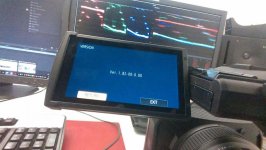
On my DVX200...there was the Firmware 1.82 :huh:

Even the Panasonic Support didnt know that this versions exist.
I asked for it at the support. The Answer was: This is the normal Firmware only with a "Service Option"
I have no idea what that mean.
Version_DVX200.jpg
 
My DVX200 has just come back from a repair where they changed a faulty jog dial with an "improved jog dial unit" and it now also has firmware 1.82 on it. No idea what the difference to 1.81 is though.
 
It probably enables some diagnostic thing. Maybe it helps them keep track of cameras if they have to be serviced more than once? Whatever it is, it's not a publicly-available official firmware. There is no v1.82 with extra bug fixes, adjustments, or added functionality. We're not missing out on anything except some engineering mumbo-jumbo.
 
It probably enables some diagnostic thing. Maybe it helps them keep track of cameras if they have to be serviced more than once? Whatever it is, it's not a publicly-available official firmware. There is no v1.82 with extra bug fixes, adjustments, or added functionality. We're not missing out on anything except some engineering mumbo-jumbo.

Yep, it is essentially nothing to write home about. The latest firmware is 1.81 - the 1.82 is not an update released to the public and appears to be something related to service. I did not want to say they were being used as Guinea pigs, but that just might be the case. You are right, we are missing nothing. LOL a beta release for the unfortunate.
 
There was no Service or repairing. I bought the camera (March 2017) and the Firmaware was on it.
I have massive problems with the colors in the V-Log L Mode. Dont know if that comes from the Camera or from my Software (Premiere Pro cc 2017, Davinci Resolve 12.5.5)
Maybe someone can Help? My latest guess is that the Software is missinterpreted the Gamut. But thats only a theory.
Thread: http://www.dvxuser.com/V6/showthread.php?353003-how-to-grade-vlog-l-to-rec709
 
There was no Service or repairing. I bought the camera (March 2017) and the Firmaware was on it.
I have massive problems with the colors in the V-Log L Mode. Dont know if that comes from the Camera or from my Software (Premiere Pro cc 2017, Davinci Resolve 12.5.5)
Maybe someone can Help? My latest guess is that the Software is missinterpreted the Gamut. But thats only a theory.
Thread: http://www.dvxuser.com/V6/showthread.php?353003-how-to-grade-vlog-l-to-rec709


The DVX is good, Premier Pro is good, and Davinci is good. It is not the camera or the software. Sounds like a missing skill set. Are you a colorist? Or experienced with V-log? A lot of the problems I see people struggle with in V-log has to do with trying to fix a production problem in post. Shoot the scene right and it will be easy to color your footage, especially in log. Lighting, exposure, etc. is very critical in log.
 
I think i know how to handle Log and raw footage. I´m not an ultra professional colorist but this color problems i have with the dvx are new for me. if you look to Log Footage of the DVX200 on vimeo etc. there are not these kind of color problems like I have.
These people set the official LUT on the Footage and the colors are shown correct.
I know i have to make a lot of steps to be ready for creating a look...like the right exposure during shooting, WB, denoising before tone mapping etc.
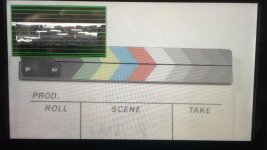
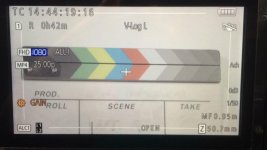
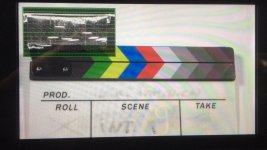
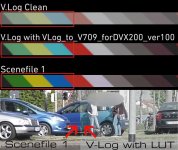
I filmed a clapboard with color stripes on it. One shot with Factory Scenefile1 and one with the V LOG L Mode. Then i tried to match the color of the both shots.
Maybe you can try this? :thumbsup: The shots are recorded internaly...

V-Log:
https://www.dropbox.com/s/h9ne08vpb7qnau2/V-Log.MP4?dl=1

Factory Scenefile1:
https://www.dropbox.com/s/zi9gcwdq7xymo0b/Scenefile 1 no V-Log.MP4?dl=1

Sorry for the Offtopic...will post the rest to the right Thread: http://www.dvxuser.com/V6/showthread.php?353003-how-to-grade-vlog-l-to-rec709/page3
 
I think i know how to handle Log and raw footage. I´m not an ultra professional colorist but this color problems i have with the dvx are new for me. if you look to Log Footage of the DVX200 on vimeo etc. there are not these kind of color problems like I have.
These people set the official LUT on the Footage and the colors are shown correct.
I know i have to make a lot of steps to be ready for creating a look...like the right exposure during shooting, WB, denoising before tone mapping etc.
I filmed a clapboard with color stripes on it. One shot with Factory Scenefile1 and one with the V LOG L Mode. Then i tried to match the color of the both shots.
Maybe you can try this? :thumbsup: The shots are recorded internaly...

V-Log:
https://www.dropbox.com/s/h9ne08vpb7qnau2/V-Log.MP4?dl=1

Factory Scenefile1:
https://www.dropbox.com/s/zi9gcwdq7xymo0b/Scenefile 1 no V-Log.MP4?dl=1

Sorry for the Offtopic...will post the rest to the right Thread: http://www.dvxuser.com/V6/showthread.php?353003-how-to-grade-vlog-l-to-rec709/page3

You answered this question yourself. You said other people on Vimeo are NOT experiencing the problems you have, and you are new to the DVX. Your problem is either a malfunctioning camera (very unlikely), or you are doing something wrong.

I will not open up those links you posted, because it is asking to download the files. I will not do that because of the ransomware issues we face. Can't you up load pics to this forum?

There is no official LUT. There is a Panasonic recommended LUT. And even after applying a LUT like REC 709, depending on your footage it will take more tweaking. A LUT seldom gives you instantly perfect footage. Your outcome is also related to how you lighted and shot the scene. Give more info, what are the IRE levels, lights, lighting conditions, etc. Also upload view able photos.
 
You answered this question yourself. You said other people on Vimeo are NOT experiencing the problems you have, and you are new to the DVX. Your problem is either a malfunctioning camera (very unlikely), or you are doing something wrong.

I will not open up those links you posted, because it is asking to download the files. I will not do that because of the ransomware issues we face. Can't you up load pics to this forum?

There is no official LUT. There is a Panasonic recommended LUT. And even after applying a LUT like REC 709, depending on your footage it will take more tweaking. A LUT seldom gives you instantly perfect footage. Your outcome is also related to how you lighted and shot the scene. Give more info, what are the IRE levels, lights, lighting conditions, etc. Also upload view able photos.

View in Dropbox: (its the "=1" function for downloading.)
I thought some people wants to look for the "Out of the camera" Video. It´s only a MP4 ;-)

Vlog:
https://www.dropbox.com/s/h9ne08vpb7qnau2/V-Log.MP4?dl=0

Scenefile1:
https://www.dropbox.com/s/zi9gcwdq7xymo0b/Scenefile 1 no V-Log.MP4?dl=0

I hope it´s the Reason #1 ;-) ...if its #2 I´ll Quit my Job :grin:

Yes there is no "official LUT" its the Panasonics recommended "official LUT" for the Varicam. And Yes...applying a Lut will not give me a perfect looking picture. But it have to show me the color correctly.
A Lut is a good starting point after preparing the footage for grading a look. I will shoot some more takes for you and give you the information you asked for. (back in a few minutes...)
 
A couple of things:

1. You're doing it wrong.

Each Scene File Setting has a bunch of components that have been tweaked. Gamma curves, color correction, phase, knee, just a bunch of settings that have been setup a certain way and can be completely changed by the enduser. Entering V-log mode disables all of that, rendering a Scene File Setting completely moot. Selecting a Scene File Setting and then activating V-log L does not simply create a "flat" version of that Scene File Setting. Of course the images don't match between V-log L and any of the Scene File Settings. They're not supposed to match. They're completely separate things.

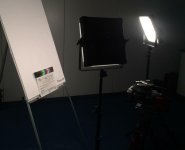
2. You're using cheap, crappy LED's instead of direct noon sunlight.

F&V K4000s are notorious for having varying color temperatures and green spikes. You need at least a 1/4 minus green to shoot with them, even the daylight versions. This is why LitePanels are so expensive, and cheap crappy LEDs are cheap and crappy. You should try this same test outside in sunlight, the one with the perfect CRI rating.

3. There is no official LUT.

I don't even know what that means. You shoot in log and go from there. If you mean the Varicam 35 V-log to REC 709 lut, then, sure...but it's far from anything "official" for DVX200. Anyway, if you want REC 709, then shoot in REC 709. The extra ~2 stops you get shooting in V-log-L before conforming to REC 709 isn't going to help anything if the footage is shot poorly to begin with. Oh, and the other thing is...

3A. The Varicam 35 LUT won't work exactly right with DVX200's interpretation of V-log L because the colorimetry of the Varicam 35 is completely different from that of the DVX200. Varicams render colors differently than the AG-class of videocameras. They just do. That's part of why they're so expensive. DVX200 is no slouch but shoot a scene with both an AG-class and a Varicam 35-class (including LT) with V-log and the image will look different after applying the V-log to Rec 709 lut. So, don't think the DVX200 is a mini Varicam ever. DVX200's log is splotchy in comparison. That's why you need that external 10-bit 4:2:2 for heavy grading work.
 
Last edited:
Just to reinforce Jason's comment on the F&V K4000....its CRI (Color Rendering Index) is published as 85. That really is terrible. I wouldn't suggest using an LED light with a CRI <92. There are quite a few affordable LED lights out with CRIs of 95.
 
A couple of things:

1. You're doing it wrong.

Each Scene File Setting has a bunch of components that have been tweaked. Gamma curves, color correction, phase, knee, just a bunch of settings that have been setup a certain way and can be completely changed by the enduser. Entering V-log mode disables all of that, rendering a Scene File Setting completely moot. Selecting a Scene File Setting and then activating V-log L does not simply create a "flat" version of that Scene File Setting. Of course the images don't match between V-log L and any of the Scene File Settings. They're not supposed to match. They're completely separate things.

2. You're using cheap, crappy LED's instead of direct noon sunlight.

F&V K4000s are notorious for having varying color temperatures and green spikes. You need at least a 1/4 minus green to shoot with them, even the daylight versions. This is why LitePanels are so expensive, and cheap crappy LEDs are cheap and crappy. You should try this same test outside in sunlight, the one with the perfect CRI rating.

3. There is no official LUT.

I don't even know what that means. You shoot in log and go from there. If you mean the Varicam 35 V-log to REC 709 lut, then, sure...but it's far from anything "official" for DVX200. Anyway, if you want REC 709, then shoot in REC 709. The extra ~2 stops you get shooting in V-log-L before conforming to REC 709 isn't going to help anything if the footage is shot poorly to begin with. Oh, and the other thing is...

3A. The Varicam 35 LUT won't work exactly right with DVX200's interpretation of V-log L because the colorimetry of the Varicam 35 is completely different from that of the DVX200. Varicams render colors differently than the AG-class of videocameras. They just do. That's part of why they're so expensive. DVX200 is no slouch but shoot a scene with both an AG-class and a Varicam 35-class (including LT) with V-log and the image will look different after applying the V-log to Rec 709 lut. So, don't think the DVX200 is a mini Varicam ever. DVX200's log is splotchy in comparison. That's why you need that external 10-bit 4:2:2 for heavy grading work.

1: activating V-log L does not simply create a "flat" version of that Scene File.... I Know

2: Yes, but then both shots has to look crappy green tinted.

3: Official, recommended,....what ever. I will call it in future "theVariCam35fromtheofficialPanasonicWebsitewhichisrecommendedbysomepeople LUT"

4: ...DVX200's interpretation of V-log L because the colorimetry of the Varicam 35 is completely different from that of the DVX200. Varicams render colors differently than the AG-class of videocameras

This is the only sentence that brings me new Information :love4:
My only question with this issue is why turns blue to cyan after applying the "theVariCam35fromtheofficialPanasonicWebsitewhichisrecommendedbysomepeople LUT" only with my footage.
¯\_(ツ)_/¯

Thanks for your time Jason
 
Last edited:
How did this turn from the latest firmware to a color correction course? It sounds like you need to shoot correctly and obtain good footage. As I stated prior, either your camera is malfunctioning or you are doing something wrong. What are the details of your lighting, etc. That is not how you shoot a color chart. We cannot be there when you shoot or edit. But something is not going right. Do you get the same effect under all lighting conditions? Every time you shoot? Test you camera
 
How did this turn from the latest firmware to a color correction course? It sounds like you need to shoot correctly and obtain good footage. As I stated prior, either your camera is malfunctioning or you are doing something wrong. What are the details of your lighting, etc. That is not how you shoot a color chart. We cannot be there when you shoot or edit. But something is not going right. Do you get the same effect under all lighting conditions? Every time you shoot? Test you camera

Yes...all the time the same... :-(
Set the levels by hand brings the same color.
i ordered a 2nd DVX200 at teltec...maybe (I hope) its a malfunction.
I´ll be back if the camera is here and ready to test. Thank you guys for helping me.
DVX Vlog Test_1.jpg
 
Back
Top