What is the lag on ux180 through sdi

I read Barry Greens post about the lag on screen and through HDMI to be about 3.5 frames. How about through the sdi? I'm ready to purchase this camera but I would hope that it would fit into our live mixing environment (and going live to LED walls), however if the camera itself adds 3.5 frames of delay to our chain that could be a deal breaking problem. Has anyone tested the lag on the sdi output?
 
It's about the same, about 3 frames, up to 4 frames.

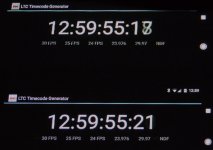
I set up my phone running a timecode app, and put it in front of my monitor, and took some shots of the phone live and the monitor's output after it'd been processed through the camera and sent out the SDI. I got some good clear shots with 3 frames different, and some blended shots with about 4 frames different. Other shots were harder to tell because my monitor doesn't display 1080p, only 1080i, so it wasn't as easy to get a lot of great shots, but I'd say that you're probably in the same ballpark of 3-4 frames at 30p.
SDI-lag-1.jpg

SDI-lag-2.jpg
 
Big question: Did you have OIS on or were the tests conducted with it off?

Gah, everything else was leading me towards this camera. We currently own 6 hmc150s and still use those for our live switching jobs. While they work great, I was really looking forward to longer zoom and not having to use a converter to get to sdi. Have you ever measured the hmc150 our of curiousity? If not, I could do a test, maybe I'm already dealing with a few frames...but I don't think so. As I mentioned if the cameras are adding 3 frames and the switcher adds a frame and the LED wall adds a frame...we are getting into a bit of a bad area when we start talking about 5+ frames. Of course, when we do outdoor concerts it doesn't matter much because it all depends on how far people are from the video wall...some people are 300 feet away (which creates about a 10 frame delay ahead of the audio...so the 5 frames of delay in video would just move the sweet spot for our outdoor festivals).

Do you think that this is a trend that will continue with cameras?
 
Not only was OIS on, it was in the "hybrid" mode. I don't know if that adds to the lag or not.

I haven't tested an HMC150, and don't have one to test. I can't say how the lag would compare to how the HMC150 does; as you said, it's entirely possible that you're already dealing with it, but I don't know. As for whether this will be a trend or not, all I can say is that the DVX200, UX180, UX90, GH4 and apparently the GH5 all have the same general processing engines and all seem to have comparable lag on the LCD or SDI outputs, so ... I don't expect it to change anytime soon. Of course, it might, they might surprise us, but just observing the trend over their last few releases, it seems like this is just a byproduct of the processing engines they're using.
 
I do think OIS would make a difference as it's doing some form of processing. I will test my HMC150's to see what is already there...but I have never noticed or heard of anyone mentioning anything before. Processing is always what introduces lag. If a projector is using digital lens shift...lag, not in it's native form...lag, a standards converter upscaling...lag....etc, etc.
 
If it's truly an optical image stabilization system there shouldn't be any lag introduced by that system.

3-4 frames is pretty big. That would make it really hard to adjust for/track anything fast moving with a monitor. Hopefully the VF doesn't suffer the same lag.

On a side related note, I did a five camera shoot last week(all F5/55's) and even though we were all TC jammed, they still slated with a TC slate. After dumping my cards, I checked the footage with the Sony software and there was exactly a one frame difference in the slate and the recorded TC. The video image of the slate showed it to be one frame behind the actual recorded camera TC.
 
Want to ask whats the lag in general for Sony camera? If ux180 is really bad, I'm wondering what about the rest of the competitor?
 
I'm in the process of buying 3 camera with SDI for multi-cam production. Would love to stick with Panasonic camera but the frame lag is really of concern. I was told to look at the Sony PXW-X70 instead as the frame lag from SDI is quite low. H
 
I'm curious if the lag goes down when in the following situation: Camera is set to 1080 60p and output is 1080 60p.

I am assuming the lag is due to internal processing from 4k down to the lcd monitor and/or hdmi output and/or 3g output that may not be in 4k.

Barry have you tested it this way? Also, how about 4k in camera and 4k out the hdmi? still lag?
 
Sorry if this is a dumb question, I' confused... I use a GH4 with yagh unit so I can connect my mike via XLR input to the yagh for my interview set up. I then process the clips from the sdhc card in Vegas Pro...I have not notices any audio to video lag....maybe I'm not looking hard enough. Or does it only produce a audio lag if I where to output the video from the yagh's sdi or hmdi output to a recorder?
 
I'm in the process of buying 3 camera with SDI for multi-cam production. Would love to stick with Panasonic camera but the frame lag is really of concern. I was told to look at the Sony PXW-X70 instead as the frame lag from SDI is quite low. H

The output lag on the Sony PXW-X70 is a bit less than on the Panasonic UX180. It's about 60 to 100ms (2 to 3 frames at 30fps) on the Sony X70, whereas for the UX180, the lag is about 100 to 140ms (3 to 4 frames at 30fps). So the X70 is about a frame or so better. This is for the output from the video output ports HDMI/SDI.

The lag on the built-in LCD on the Sony X70 is actually a bit less than the external output lag. This is different from the UX180 where the built-in LCD tends to have slightly more lag than the external output.
 
I'm curious if the lag goes down when in the following situation: Camera is set to 1080 60p and output is 1080 60p.

I am assuming the lag is due to internal processing from 4k down to the lcd monitor and/or hdmi output and/or 3g output that may not be in 4k.

Barry have you tested it this way? Also, how about 4k in camera and 4k out the hdmi? still lag?

The output lag in 4K/UHD seems to be about the same as has been reported for HD modes. So about 100ms or so latency in the HDMI output, and the latency seems to be about the same in both 2160p30 or 2160p60. This also matches the tests that were reported in this thread:
http://www.dvxuser.com/V6/showthread.php?352147-HC-X1E-LCD-frame-lag-vs-HDMI-lag

Keep in mind that the camera always does a full sensor readout (even when recording in 1080p), so it will have to downscale from the 4K native sensor resolution to 1080p when the camera is set to record or output in HD. Also the resolution of the LCD screen is actually less than 1920x1080, so regardless of what mode the camera is set to (4K, UHD, HD), the camera will have to do downscaling from what is being captured to display it on the LCD screen.

This may explain, in part, why the LCD screen has a bit higher latency than the external (HDMI/SDI) output. Although if I had to guess, any additional LCD latency may be due to the need to generate the on-screen displays and overlays (focus peaking, focus peaking, waveform, etc.) on the LCD. Notably, things like focus peaking are not available on the external output ports.
 
Yes the Yagh produces a similar Delay. If you feed the Audio via interface you would not notice but if you use the Cam in a Liveswitchsetup or Multicamsetup with external Recording (10bit) it is very irritating/disappointing.
 
Is there a device to delay audio so that it is in sync with the lagged video? Is this ever done?
 
Yes, there are lots of audio delay devices available. What device makes the most sense may depend on your application:
http://audio-video-supply.markertek.com/broadcasting/Audio Delay

Keep in mind that if you feed audio into the camera's XLR audio inputs, this audio will be kept in sync with the video (both in recorded video and over its SDI/HDMI video outputs). Essentially any audio fed into the camera goes through the same camera processing delay as the video.

If you are sending the camera's video output into a video recorder like an Atomos Shogun/Ninja Inferno or Video Devices PIX-E5/E7 and separately feeding analog audio into the recorder, then these recorders have built in audio delay settings that allow you to delay the audio so that both audio and video are in-sync in the recorded video.

If you are separately recording audio to a dedicated audio recorder, then you will have to sync this later with the video anyway. So it's mostly for live or broadcast applications where you might need an in-line audio delay device like one of the ones in the link above.
 
Back
Top