What is the deal with my footage?

1) Are you referring to the focusing? If its in auto focus, that is the problem. When in auto, the camera will hunt for focus in and out, especially shooting at longer distances, with a high f-stop (small iris opening), and zooming in. You really can only kind of get away with autofocus if you are very close to your subject and there is lots of light. After a year with my camera I am only now finally realizing you always need to shoot manual focus.

2) I have heard that panning in 24fps will often result in the strobing affect.
 
Last edited:
It looks like normal footage to me. Maybe you should try to play with the scene file settings, the HMC scene file settings can really make a huge difference to the footage. Many like the cine V och cine D scene files, they have a rally nice look to them...

What's nice or not is really up to the person looking at it, just like art. Try to get a look from the scene file where you are happy with the colors, some post with the colors can also make a huge difference!
 
That wasn't "ultra slow" panning at those focal lengths. There's a formula to it for 24p that they teach you in cinematography 101, and part of that formula relates to your focal length.

The easy answer is -- switch to 60p and see if you're having the same problems.

The truth is that whatever your complaint is could span anything from your display/computer through to your camera or tripod.

And, of course, 1/48th is a relatively slow shutter speed that's designed to emulate the motion blur you've seen in movies for the past one hundred years.

Start googling or buy Barry Green's book that I think addresses these issues. I'm sorry I don't have an easier answer.
 
Thanks everyone for the helpful replies. I don't have these issues with 60p. This was shot in manual, not auto. The flicker really bothers me, but hopefully switching scene files will help. I'll mess around with scene files and shutter speed some more as well. Barry Green's book came with the camera, plus a dvd with his scene files which I did exactly what is described to load them onto a sdhc card, but I cannot find them on my camera where they should be. Any body have experience with this?
 
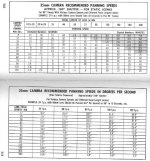
You are simply panning and zooming to fast for 24P. You would have the same problem with an arri or panavison etc., film camera at 24 frames a second. Checkout the following blog about panning tips and that chart is from the ASC manual I believe.

http://kamranali.blogspot.com/

panning.jpg
 
That's what I was hoping...I prefer to shoot in 30p or 60p and haven't done much 24p work. Thanks for the link!
 
I don't think this has to do with your camera, so much as your software and the rendering. If you shot at 720p 24fps, then your rendering should be like this:

Sony AVC (aka .mp4)
Frame size: 1280x720
Frame rate: 23.976 (IVTC Film) - this is what the HMC150 ACTUALLY records 24fps at
Field Order: none - progressive scan
Pixel aspect ratio: 1.0
 
Looks like an export problem and file conversion to me. At 720p the footage breaks up like crazy, definitely an export problem.
 
I don't think this has to do with your camera, so much as your software and the rendering. If you shot at 720p 24fps, then your rendering should be like this:

Sony AVC (aka .mp4)
Frame size: 1280x720
Frame rate: 23.976 (IVTC Film) - this is what the HMC150 ACTUALLY records 24fps at
Field Order: none - progressive scan
Pixel aspect ratio: 1.0

What software is this for?
 
What software is this for?

I use Vegas but the settings are applicable for the rendering of the file in any NLE. The main issue I'm seeing in your footage is the framerate. If you recorded at 24fps and are exporting to 30fps, you could see this kind of issue. You want to make sure that you export at the same framerate that you recorded. Look at the raw file... Match the frame rate and resolution in your rendering settings, and you should be straight. Sony AVC (mp4) is the absolute best format for web. Whether you are uploading to vimeo or youtube, mp4 is where its at.
 
I use Vegas but the settings are applicable for the rendering of the file in any NLE. The main issue I'm seeing in your footage is the framerate. If you recorded at 24fps and are exporting to 30fps, you could see this kind of issue. You want to make sure that you export at the same framerate that you recorded. Look at the raw file... Match the frame rate and resolution in your rendering settings, and you should be straight. Sony AVC (mp4) is the absolute best format for web. Whether you are uploading to vimeo or youtube, mp4 is where its at.

I'm not the OP. MP4 is a container I believe, the codec is what is more important I would think. I use h.264 wrapped in an MOV, as I am a Final Cut user. I agree though, you want to export the same frame rate.
 
I watched marine 2 the other night (Yes I was bored) and there was a shot where the camera cranes around the actor (360 deg) and was done way way way to fast, it looked even worse than the footage you posted, but yet very similar...
 
Back
Top