what do i do?

bigmajik

Well-known member
this is the wedding i filmed like 2 weeks ago. my dvx was set at 30p with a 1/60 shutter speed. i put on 29.97 timeline in ppremiere pro for editing.
i was told i would not need pull down nor deinterlacing if used in this manner.

i have these lines through out the exported video and how do i get rid of it?
it looks like deinterlacing but i am not sure.

i want to show a pic but don`t now how to add it to the post. sorry!
 
Did you just export straight from premiere or did you use a different program?
I don't use premiere, but if there is a deinterlacing filter, use that. Also make sure your timeline is set up for progressive and not interlaced. In final cut pro you have to change the field dominance to none to do this.
 
You mean?; you captured via firewire -- from dvx or tape deck.


i captured via firewire from from my dvx into premiere pro to a 29.97 timeline.

Did you just export straight from premiere or did you use a different program?

i exported using premiere pro media encoder

Are you exporting for web, dvd for NTSC TV

i`m exporting for dvd.


I don't use premiere, but if there is a deinterlacing filter, use that. Also make sure your timeline is set up for progressive and not interlaced.

i don`t know how to change from interlace to progressive in premiere pro
 
You shot ALL footage in Progressive, captured in 29.97p timeline; Then everything you're working in Premiere is already Progressive. It sounds like you don't have to change anything in Premiere.

What you need to figure out is an appropriate export preset. In Media Encoder; under the Output, Export Preset at top; try MPEG2-DVD.

BTW: What export setting did you use for that screen capture you posted above?
 
BTW: What export setting did you use for that screen capture you posted above?

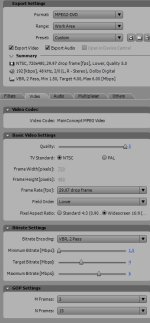
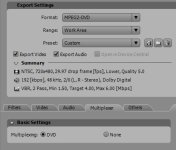
here is a screen shot of the settings i used when i exported. i did use high quality preset.
 

Attachments

  • SNAG_Program-0000.jpg
    SNAG_Program-0000.jpg
    90.2 KB · Views: 0
  • SNAG_Program-0001.jpg
    SNAG_Program-0001.jpg
    56.5 KB · Views: 0
Don't use a deinterlace filter. Don't. Never use a deinterlace filter with progressive footage.

In the sequence settings, under the General tab, you can change the Field Order from Lower to Progressive (none). Do that.

But, if you've already edited the whole thing in an interlaced sequence, you may have edit points which split frames. When you export to NTSC for DVD, you're exporting to an inherently interlaced format, and these lines will show.

You can try changing the Field Order in your export settings, too.
 
i don't have pro, but in premiere under field order you set it to "no fields."

from what i see on what you posted under "basic video settings" you do have field order set for "lower" which is creating interlaced video and using the "lower field first" format.

on that selection there should be "no fields" or "none" if not i'll research...
 
if i right click on a clip and choose field order it gives the option to choose progressive.

couldn`t i just do it this way and rerender all the clips in each sequence?

or could i just copy everthing in the project and copy it to a progressive project?

or will that do more bad than good?
 
Novelt is talking about your EXPORT settings. You have "Lower Field First" selected which is interlacing your output. Choose "No Fields" = Progressive
 
i just noticed that i had edited all my footage in a interlaced project.
i go to project/ project settings /and the field order is set to lower and its grayed out so i can`t change it.

how do i correct this without starting over again?
 
i think i fixed the problem. i captured my footage via firewire from my dvx straight into premiere pro. but i setup my project through the intensity pro card preset wihich interlaced the footage cause in the field order there is only upper & lower field order. so i was told that if i had captured with the intensity pro card i would not have had that problem. being that all footage was changed to lwer field i had to export in lower field. i have not actually tried this yet but when i do i will post the results. i think i said that right.
 
Back
Top