GH3 what codec for Edius?

stefanocps

Well-known member
Hi , after experiencing differnt nle, avid, pp, edius i have come to conclusion that mov file from gh3 have strong compressdion that nmakes hard editing.
i always get quick red line, with fex clips and 2, 3 minuites footage, and no effect
i am using edius now, my pc is not monster but non so terrible, i3 quad core, 8 gb ram win 7 64 bit
i have come tro conclusion that is better if i transcode mov(i generally use 25fps 50mbp) to a smoother codec.
I read mac user go prores, what is advisable in windows/edius?
thanks
 
Last edited:
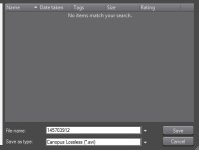
No problem here playing GH3 native .mov files on Edius 5.51. I get a yellow line not a red one. If you are experiencing problems you could render the timeline or "convert" clips in you bin to Edius to "lossless.avi" or a variety of other HQ file types. Also, you can post the problem over at http://forum.grassvalley.com/forum/index.php and most likely get a speedy response.
ScreenHunter_132 Jan. 05 12.34.jpg

Here is my system specs: Edius 5.5, HDSPARK, Asus P6T Deluxe mobo, i7-920 processor, Antec 900-2 case, Corsair 650 watt p.s., Corsair 3GB XMS3 PC3-12800 DDR3, Sapphire HD7770, WD 160GB Caviar, 1TD WD Caviar Black, Lite-on IHAS324, Sound Blaster X-FI Titanium, Vista 32 bit.
 
Last edited:
i3 quad core,

i3 is dual core not quad core. i5 is quad core, i7 quad core with hyperthreading where each core can act like two.

Some dual core processors may have hyperthreading, I had one some years back but when AVCHD came along it would choke badly.
 
i3 is dual core not quad core. i5 is quad core, i7 quad core with hyperthreading where each core can act like two.

Some dual core processors may have hyperthreading, I had one some years back but when AVCHD came along it would choke badly.
right..i got confused form edus itself, the version 7 whne start it say quad core detected
i don't undertand, you sayinng better to disable hyperthreading if there is any enabled?
 
No problem here playing GH3 native .mov files on Edius 5.51. I get a yellow line not a red one. If you are experiencing problems you could render the timeline or "convert" clips in you bin to Edius to "lossless.avi" or a variety of other HQ file types. Also, you can post the problem over at http://forum.grassvalley.com/forum/index.php and most likely get a speedy response.
View attachment 80647

Here is my system specs: Edius 5.5, HDSPARK, Asus P6T Deluxe mobo, i7-920 processor, Antec 900-2 case, Corsair 650 watt p.s., Corsair 3GB XMS3 PC3-12800 DDR3, Sapphire HD7770, WD 160GB Caviar, 1TD WD Caviar Black, Lite-on IHAS324, Sound Blaster X-FI Titanium, Vista 32 bit.
red or Yellow, getting confused with the diffeent color the various nle se. the thing is that at a certain point i must render very often if i want to have a reasonable play back. that is why wantto try a transcode of al clips before start edit
 
ok, transcode your files and all will play correctly. Use canopus lossless for the best quality.

ok made a test
actually i had mainly Yellow(or orange) line, not red. still not really nice though
i Had converted the same project in lossles and it all become blue line
it is a big improvemnt! isnt' it?
and yes if i apply a strong effet (magic bullet denoiser for example) i get red line
and for this i suppose i can only change cpu?


p.s.
does anyone experience problem in writing in this forum?often happen that key i press on m keyboard are not detected in the post i am writing, i have to press again and stronger..kleyboard react different from normal
 
Last edited:
right..i got confused form edus itself, the version 7 whne start it say quad core detected
i don't undertand, you sayinng better to disable hyperthreading if there is any enabled?

No, it's not better to disable hyperthreading, hyperthreading tries to get each processor core to function as if it were two cores. Some software will detect hyperthreaded cores as if they were double. Windows Task Manager running on my Core i7 (quad core with hyperthreading) will display and show a graph showing eight "threads" (apparent cores) when the Performance tab is clicked on.

It's still only a quad core and not capable of matching an actual 8 core machine in processing power.
 
and yes if i apply a strong effet (magic bullet denoiser for example) i get red line
and for this i suppose i can only change cpu?

Unlikely. Generally older motherboards will not support Core i5 and Core i7 processors. And more recent memory may also be required. Since the developement of multi core processors I've ordered complete PC's by Dell and by HP featuring a ready built solution with all components designed to work together. I realize this is better priced for us living in the US but you might check into it.

Once I started using AVCHD and Mov based HD cameras, my dual core with hyperthreading processor based computer proved woefully inadequate.
 
my motherboard support vpre up to i7, so i will upgrade soon..money are never enough, and i am planning to buy an hdmi monitor first. editing right now is sitl possible, may be with some slow moment beacusa of render but still possible. external monitor start to be a must, though, as manual focus in the little display it is too hard for me
 
Back
Top