What causes Vertical banding on Reds & Orages

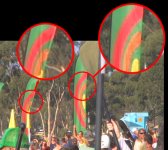
Hey, I couldn't see any posts on this, and was wondering if anyone had any ideas as to why my footage on my DVX100B always has this vertical distortion / banding issue only on reds and oranges? Is it the vertical coring in the setup?too high saturation setting? faulty camera? What?

Any input and solutions are greatly appreciated.

Thanks!
 

Attachments

  • vertical banding issue.jpg
    vertical banding issue.jpg
    347.6 KB · Views: 0
I use the Deartifactor in Magic Bullet, and it works great for me, even helps remove subtle things for when i blow up to HD. Just have to remember to set the render/sequence preset to apple proress 422 or something that doesn't have the same problems.
 
Other possibilities...

Other possibilities...

This is really interesting,.. and seems strange that even on the camera before it's digitized I can see on the flip out LCD screen the issue as well. So are there any in camera settings that can be tweaked to reduce this issue. My client feels very distracted by the issue and is accusing me of a faulty camera and ineffectiveness as a videographer. I must admit I feel a bit ignorant and embearased by it as well.

This appears to be a serious issue and a deal maker or breaker! I haven't seen this issue on other DVcams and would like to resolve it or get a better handle on it. The discussion in the link above was interesting, but left me wanting more practical understandings and workarounds.
 
The problem is there aren't any. The codec at the heart of the DVX (or any DV camera) will do this all the time with extreme colors. It will happen with deep blue and purples too. The best way to stop it from happening is to not film those colors in the first place. Like I said, just a simple filter in post will fix it. Perhaps lowering your saturation in camera will do something, but I don't think it's substantial enough.

You will see it on the LCD because that is after the A/D conversion process as well.
 
Any DV codec, even HDV, will throw out a lot of the resolution overall, in particular with the red channel. I think I remember hearing that in regular DV25, the red channel is reduced to 180 vertical lines.
Just as an aside, HDV is even worse, take a look at this portion or a shot I got on an A1. It was transcoded to the apple intermediate codec upon importing so maybe that has something to do with it, but it looks pretty horrible.
EDIT - Well, it got pretty compressed there but you can still see that it's extremely soft on the top and bottom, which is where it SHOULD be sharp considering that a third of the vertical lines are basically made up if it's going to 1080p, not horizontal lines though.
 

Attachments

  • HDV R. rtfcts.jpg
    HDV R. rtfcts.jpg
    7.7 KB · Views: 0
Back
Top