GH2 What causes this color banding in the sky?

I did check vimeo a bit more and did find out that other DSLR´s have similar issues:

5DII
http://www.vimeo.com/7313665 (0:21)
http://www.vimeo.com/20358157 (slightly during panning)
http://www.vimeo.com/15407026

7D
http://vimeo.com/20812406 (first seconds of the clip)
http://vimeo.com/7056092 (first seconds of the clip)

As a beginner and hobby filmer this isnt that big of a problem for me, but maybe people are more calm if they see that other cameras have issues aswell. ;)
GH2 still produces such nice pictures...amazing cam.
 
well i have to shoot my whole feature with this..
"We'll solve it at post" as they say.. countin' on film grain footage ;)
 
I did check vimeo a bit more and did find out that other DSLR´s have similar issues:

5DII
http://www.vimeo.com/7313665 (0:21)
http://www.vimeo.com/20358157 (slightly during panning)
http://www.vimeo.com/15407026

7D
http://vimeo.com/20812406 (first seconds of the clip)
http://vimeo.com/7056092 (first seconds of the clip)

As a beginner and hobby filmer this isnt that big of a problem for me, but maybe people are more calm if they see that other cameras have issues aswell. ;)
GH2 still produces such nice pictures...amazing cam.

vimeo is not the real footage.. unless you downloaded it..
 
vimeo is not the real footage.. unless you downloaded it..

Even if you download it, can we be sure the banding isn't from some weird compression in the settings? We need to see the footage straight out of the camera.

Some people are saying Panasonic is aware of the problem, but I'm feeling less then hopeful that they will fix it anytime soon.
 
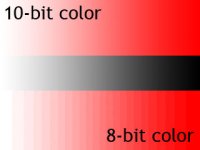
Isn't it just as simple as an 8 bit colour and compression issue. It cant handle the gradation.
 
yea i'm almost sure it's not a firmware fix.
the 8-bit codec + GH2 sharp image probably exaggerate it.
 
yea i'm almost sure it's not a firmware fix.
the 8-bit codec + GH2 sharp image probably exaggerate it.

This makes a lot of sense. Maybe even if Canon makes a sharper image in their next 5D, as long as it stays 8-bit, it will have problems with gradients. But I still want to ask Canon users about this.

So, maybe there isn't going to be a fix from Panasonic and we're just going to have to wait until Panasonic increases the 8-bit image in their next development.

The AF-100 is also 8-bit. Does it have the same problem with gradients?
 
Last edited:
Ok, just charged the battery & tried a few different settings. It appears that "smooth mode" slightly reduces the banding (ie it probably has a lot to do with oversharp 8-bit). Overall thuogh, there is banding in ANY type of bokeh on my GH2, the bitrate doesn't break up at fine gradients... it breaks up completely no matter what you're shooting, unless everything is in focus...

Oh well, more testing to be done. Have a few days to decide if I'm returning the camera or not. YES; it's about the content, but... this is, slightly, depressing. :)

Hopefully Vitality cracks this nut open, cus these issues will, of not dissapear, reduce greatly if we force up the bitrates. Right now, the camera just drops it to webcompression-land....


rof.jpg
 
Last edited:
can anyone please upload some before/after footage that has been post fixed with some noise, as some people here suggested?
 
Banding is an issue you will find even when creating graduated elements in say After Effects. Often a smooth gradient goes bandy when viewed on a broadcast monitor. There simply aren't enough colours to represent an even gradation. On the web it happens because compression by its very nature reduces information in the image, thus a smooth sky goes bandy. One way to do it is to introduce noise and I have found it actually looks much better when moving rather than pixel peeping a still image. Everyone wants noise free images but in fact they (slightly grainy) work better on consumer displays. I have used a great little program Mac only I am afraid called 5Dto RGB. It used to have an add grain function in an earlier beta and this works really well. It's basically a much better way to decode the mts files. It does a great job and the add noise feature really can overcome the banding issues. Trouble is it adds to the workflow considerably.
 
Trust me, it's there in the raw files. At least on my unit. On the other hand Gunther's vid looks amazing, so I'm wondering what's really going on here.

My main concern is grading this stuff, just drag n dropped some files into premiere and... it's not pleasant. Doubt 10-bit would make much difference, it's there already, and it's bad.

I'll probably keep the camera though... too much of a hassle finding a low-FPN Gh1. Oh, speaking of lowlight... noise level at iso 1600 is like the 200 on my 550d. :) http://vimeo.com/22295243
 
yea i'm almost sure it's not a firmware fix.
the 8-bit codec + GH2 sharp image probably exaggerate it.

You can see this on your 'hd' LCD displays. Banding will be present for LCD displays that don't have deeper than 8 bits per color resolution...

I've run into this doing graphics generated by After Effects, and using photo scans. With a slow 'fade', at some point the image will begin to block up on displays that don't have the bit depth...

From the examples it seems that a value that is 'one or two stops' darker than 'middle grey' seem to have the problem more pronounced... For Zone System aficionados, that would be zones III and IV, and the area has to
have a 'gradient' falloff to lower values.

Surface texture, clouds in sky etc. break up the gradient so that the 'problem' is less obvious or not observed at all...

Situations that seem to 'maximize' the effect... clear blue sky, especially with a polarizing filter... If I get motivated perhaps I'll shoot some sky shots... not my typical... but it looks overcast today...
 
Trust me, it's there in the raw files. At least on my unit. On the other hand Gunther's vid looks amazing, so I'm wondering what's really going on here.

Are you talking about the screen grabs he put up in this thread? The files are reduced and I can see some posterization. Maybe it's jpeg compression, but if Gunther says the original is clean then so be it.
 
I think some people are mixing up the types of banding being talked about here. The deep color banding is a different phenomenon than the banding from poor compression from vimeo ,etc...posted in some of the examples (and there is a 3rd type of "banding", which is the low light vertical/horizontal fixed pattern streaks variety)

Dithering, pre processing, good encoder, will significantly help the poor preparation / poor encoding 8bit type , but not so much with the other 2 types .
 
Banding is an issue you will find even when creating graduated elements in say After Effects. Often a smooth gradient goes bandy when viewed on a broadcast monitor. There simply aren't enough colours to represent an even gradation.

AE in 16bit or 32bit does not produce banding nor Dithering
 
can anyone please upload some before/after footage that has been post fixed with some noise, as some people here suggested?


what type of banding ?

1) e.g. "normal" 8-bit banding from poor compression/lack of pre-processing, can be treated quite easily with filters

For example wanderer63's post:
http://www.dvxuser.com/V6/showthrea...g-in-the-sky&p=2283572&viewfull=1#post2283572
http://www.vimeo.com/17390087

To illustrate download these zip file from wanderer63's video.
http://www.mediafire.com/?u0pislia1vi3uu3

Some people are not as perceptive to the "banding" or "blocking", so look at the the luma enhanced view screens and then re-examine the corresponding RGB composite shots. Those macroblocks are from high encoder quantizers, which produces the effect that you see which is percieved as "banding". It's not 8-bit banding. The encoder used didn't have sufficient bitrate, wasn't efficient enough at that bitrate, or didn't distribute the bitrate effectively enough. Dithering adds noise specifically to those regions , which forces the encoder to use lower MB quantizers and this yields a smoother gradient for 8-bit video. But even with a light dither applied, you can see the png filesize is increased ~20-30% - dithering requires that you have extra bandwidth and bitrate . The cause of the problem in this example is poor vimeo encoding and preparation; it's NOT the same thing as the color banding being discussed. (Not trying to pick on wanderer63 here, just trying to illustrate the differences)

Proper dithering is not the same thing as adding grain to the entire frame. Applying a proper dither applies only to gradients areas that need it (through mask detection), so only the gradients get affected and the entire frame doesn't get noisy. The filters in gradfun family and related ones were mentioned earlier - thats essentially what they do.


2) color banding , as in the 1st post, much more difficult to treat

The GH2 deep color banding issues here are different. The width and size of the bands suggest it's not entirely due to poor encoding or high macroblock quantizers. And there is a bigger issue - there is non uniform color gradient. It's not a simple blue to blue gradient, there are bands of blue/yellow (or other colors in some of the other good examples). This reduces dithering effectiveness because you would have to apply gradient in different "colors". Compare this to wanderer63's example above, where the gradient is principally, blue to blue.

Yes you can improve it slightly, but it requires a lot of dithering and grain plus color noise, maybe more than some are willing to use on their "clean" images (it will end up looking like "300" the movie shot in lowlight with additional chroma noise added ) . Also, in order to keep the dither and grain, you need a good encoder and high bitrates (because that noise and dither is very expensive bitrate wise to encode). So if your end goal is web distribution or DVD, you can probably forget about it. Vimeo and youtube etc.... don't use enough bitrate to hold the dither, and the bitrates required to keep the dither working aren't streaming or bandwidth friendly. It will end up looking "splotchy" or worse. Grain and dither is an all or nothing treatment. Either you supply adequate bitrate, and good enough encoder, or don't even bother.

Robert Werden's sky trails video, this is compressed with dnxhd 8-bit , split screen, then repeated with sides swapped.
http://www.mediafire.com/?t366nxqb2w273nf

As you can see it's slightly improved but there is still color banding. The amount of dither and grain required to reduce it farther is substantial. It will become very noisy. Compare this to the amount of dither required for the "normal" banding above.

So why is there "color banding" in some GH2 videos, but others, like wanderer63's , do not have the superfluous "color bands" ? under what conditions , settings , lenses etc... ? wanderer63's is more "typical" banding, a single color gradient, and more easily treatable. It's bright daylight in that one. Low light seems to play a factor in bringing out the worst as in Uwe's example. Robert Werden's video wasn't lit as well as wanderer63's either:
http://www.vimeo.com/22225257
 
Back
Top