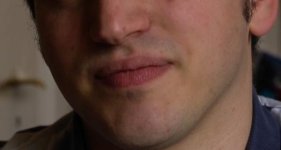
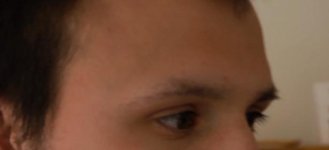
What can I do to get rich looking colors and natural looking skin tones?

thomas diehl

Active member
How do you do your white balance and how do you set the chroma-level?
I have to decrease the chroma level quite a lot (-7) and do a very cold looking wb - otherwise everything looks yellowish and i get posterization-artifacts
I do wb with the var-function/knob, not possible with a white card at all - colors don't look natural. Also using grey cards does not work really.
What can I do to get rich looking colors and natural looking skin tones?

Why was so easy with the ex3 - why is it so difficult with the af 100?
Is it a bug? Is there a workaround? Should I send it to the service?
 
I guess it would be easier for you to post examples of what you mean. I, as well as others are getting results that we are very happy with.
 
Thanks Jan, I will try that. Did not know what "init scene file" is there for ...
But - apart from that- isn't it a known issue that the wb is too yellowish? couldn't an fw update fix that?
 
Init takes you back to the factory settings in that scene file. And no there isn't a know value of yellow for whit balance. What is the version number on your camera software? It should be 1.15.
 
The white balance is definitely not too yellow. Do a manual white balance on a white card and it will be spot-on perfect.

I suspect you're just grossly overexposing. Set your zebras on 90% and don't let any zebras show up on the LCD at all, and then tell us if you're seeing better color.
 
Thank you very much for your input. Highly appreciated.
- No, I am not overexposing ... usually ... but I will take even more care on that point.
- I am using the camera lcd but the zacuto efv is already ordered. Rhe effect also shows up on my eizo monitor.
- I will upgrade to 1.15 - I did not know it has an effect on wb

As soon as I have checked everything I will give a feedback!
 
1.15 has no effect on white balance. It affects the slight greenish color cast on the LCD.

If you're exposing the image so hot that some of the color channels are blowing out, then that will affect the color at those overexposed levels. Again, try letting nothing at all exceed 90, just to see if that makes the difference.

Do not set exposure by how things look on the LCD! Set exposure by the zebras or the waveform, never by the LCD>
 
As Barry said the new firmware has no impact on WB, but may influence your opinion if you are looking at the LCD for a judgement call. You should upgrade your camera, and while you are at it, register your camera in the PASS network, this gives you the 3 year warranty.

Best regards,

Jan
 
My take is that you should work with this camera in DEFAULT... before you even attempt to mess with scene settings.

The camera is perfectly capable of producing a great image, "straight out of the box ".... assuming the user knows what they are doing.

This camera is slightly more complicated than other consumer /prosumer cameras. It is a production level camera. The user needs to get it right in the first instance.

This does not mean a need for anything more than DEFAULT settings. (They are just used to "gild the lilly")
 
As Barry said the new firmware has no impact on WB, but may influence your opinion if you are looking at the LCD for a judgement call. You should upgrade your camera, and while you are at it, register your camera in the PASS network, this gives you the 3 year warranty.Best regards,Jan
Jan on a side note I've been unable to register my camera online since January, is it too late to do so?
 
After some research I found out that I am not the only one who thinks that the skin tones are critical with the af 100
http://www.dvxuser.com/V6/showthread.php?237009-Skin-tones-on-the-af100/page2&highlight=skintone

However, buying the F3 is not a solution for me, so I have to find a workaround. Default Settings dont look good to me.
I like Barrys settings but even if I underexpose I keep getting yellowish skin tones ...
Anyone with settings that avoid that effect?

btw: I have registered my AF straight after buying ... but I am not so keen on fw-updates - never change a running system...
 
My take is that you should work with this camera in DEFAULT... before you even attempt to mess with scene settings.The camera is perfectly capable of producing a great image, "straight out of the box "....")
My experience did not reflect this. After shooting with correct exposure through reasonable glass the first time I used the camera in good lighting conditions, the noise in certain parts of the image almost caused me to take the camera back to where I purchased it.In saying that, I am now extremely happy with my pictures after working scene files a little.
 
here they are.
hope it helps.
 

Attachments

  • Bildschirmfoto 2011-07-18 um 15.31.21.jpg
    Bildschirmfoto 2011-07-18 um 15.31.21.jpg
    11.3 KB · Views: 0
  • Bildschirmfoto 2011-07-18 um 15.34.40.jpg
    Bildschirmfoto 2011-07-18 um 15.34.40.jpg
    8.8 KB · Views: 0
  • Bildschirmfoto 2011-07-19 um 12.43.51.jpg
    Bildschirmfoto 2011-07-19 um 12.43.51.jpg
    10.1 KB · Views: 0
Last edited:
My experience did not reflect this. After shooting with correct exposure through reasonable glass the first time I used the camera in good lighting conditions, the noise in certain parts of the image almost caused me to take the camera back to where I purchased it.In saying that, I am now extremely happy with my pictures after working scene files a little.

So what is the magic bullet scene file setting that made the camera acceptable for you? (Do you have a before and after frame grab from your tests)
 
Back
Top