Waveform monitor

Shooter

Veteran
My FS700 RH is due to arrive and one thing I know for sure is that I am certainly going to miss having an on board waveform monitor.

Histograms are going to take some using to get used to for me because I have always worked with waveforms and treat them as most valuable tool for exposure. I can read them and understand them perfectly in shoot and post . Never been let down by them and I find I relate to the WF far ore than a histogram. Its specific and IRE is precise for video. especially broadcast.

Yes..many shoots I can still rely on the wfms in my broadcast monitors just like I do now...but run and gun shoots...different story.

Will be doing some tests so that I understand histograms as well as possible before I embark on its first shoot which is 75% "run and gun"!

I know I have zebras as well. My practice has been to never (rarely) use them if I have a WFM.

Anyone else in the "I dont like histograms" club?

ANy good using histogram tips?
 
Treat a histogram like a WF display turned on its side. Right edge is white clip, left edge is black clip, middle gray, EV 0 exposure is half way between the two if the histogram uses a log scale like a WF. Vertical scale shows the distribution density of pixel values in the image. Extremely wide DR might show distribution over the whole black to white range with clipping at both ends showing as vertical bars at the ends. A low contrast scene will show most values bunched together around your center exposure index. The value distribution will look pretty much like a bell curve centered around the predominant range of your scene values. Darker exposures progressively to left of center, brighter exposures progressively to right of center.
I generally try to expose for a fat histogram around the middle and adjust +/- one or two stops around that. Underexpose a bit for high contrast scene highlight protection so very little or nothing clips, but normally no more than two stops under. Overexpose low contrast scenes a bit to get better detail and SN in the shadows, but typically not more than 1 stop.
 
Thank you.

One of the first tests I will do is expose a full gray scale Test Chart to my WFM (IRE) and see how the Histogram displays it.

Comparing 0 - 255 to IRE Video and Broadcast Standard. Thats the baseline for everything for me from shoot thru post thru broadcast .

A simple example of the difference of Histogram vs WFM functionality would be that I can legalise video on waveforms...and not a chance with histograms.

Another...Identifying what is luma "illegal" such as a clipping flare when shooting is easy to locate in a wfm. Not so in a histogram.
 
S hooter;1986465672 said:
Thank you.

One of the first tests I will do is expose a full gray scale Test Chart to my WFM (IRE) and see how the Histogram displays it.

Comparing 0 - 255 to IRE Video and Broadcast Standard. Thats the baseline for everything for me from shoot thru post thru broadcast .

A simple example of the difference of Histogram vs WFM functionality would be that I can legalise video on waveforms...and not a chance with histograms.

Another...Identifying what is luma "illegal" such as a clipping flare when shooting is easy to locate in a wfm. Not so in a histogram.

WFM is the only way to go. Now that you have your FS700 save up and get a Convergent Design 7Q. Great WFM plus with the FS700 raw option it will put your camera in another league.
 
I'm not going to plug away for our product -- I'll let others offer their opinions. But I will agree with you that I am no great fan of histograms, especially ones that only read luma. An RGB histogram tells me marginally more information, but in the end I am far happier with a waveform or a false color mode. I grew up on waveforms and am quite comfortable reading them at a glance with a lot of detailed info. When I first saw a false color mode I wasn't sure how I felt about it compared to my trusty waveform, but I've since grown to love it. When reading exposure you don't really need to see every little bit of exposure information, at least not most of the time. Generally you just need to know a few key reference points or zones, like where middle gray is landing, where flesh tone is, what it hitting clip point and what is dropping into the toe. False color is great for doing just that.
 
Thanx Mitch and other responders.

I am very interested in Convergent design 7Q for this very reason.

@ you though Mitch. Could you PM me with a contact . I have a query and a suggestion.
 
I feel like histograms are more of a still photography tool that somehow got shunted into the video world. Possibly by the histogram lobbyists????
 
I have to say, the monitoring tools on the 7Q are incredible. Waveform in particular. So many options... Zebra, False, histogram. No real reason to expose incorrectly!
 
I feel like histograms are more of a still photography tool that somehow got shunted into the video world. Possibly by the histogram lobbyists????

I concur with the 1st part. Part of the DSLR "revolution" that had no understanding of film making. Print photography had no need for IRE.
 
I'm totally with you about waveform. The histogram is better than nothing, but when I got the Ikan d7w for the FS700, it was a transformation -- after all, it's literally an extra dimension of information.

And yes, if I was doing it again, I would be saving for a 7Q. I'd love to say that if a 7Q is out of reach, the Ikan makes a more budget-friendly way to get waveform.... but honestly, for all the extra stuff you get, I would go the whole hog.
 
I can't even imagine a histogram now. I mean I rarely use a waveform now. False color is the way to go 85% of the time I'm finding. Especially since it is all configurable on the 7Q. I only wish I had different profiles I could quick load for the false color based on what camera/signal/gamma I'm feeding into the 7Q. But false color is faster/easier to use than anything anymore. There is almost no guessing/interpreting. That said I do like having a waveform for various specific reasons! =)
 
One thing with histos is that they are all crap on (sony) video cameras and the BMC which I tried today.

On the FS100/700/EX1/F5 the thing is mono colour and tiny.

The 07q seems to have reasonably large histos but the best type are the RGB overlay or at least vertically aligned - with that histo system you can point the cam at a grey card and change the WB until you align the 'spikes' until they are uniform

A competently designed video histogram would also note you legal levels (sony do that I think - if you have a magnifying glass)

ie if the blue spike sits left you have a yellow tint to your image and need to change the WB.

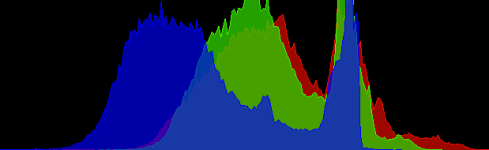
this is an image from the histo on a Red camera

histogram1.png

The main trouble with most video camera histos is that they are so poorly implemented rather than histos per se being a bad system..

Personally I also like the overlaid WFM system seen in resolve where one can find a perfect grey (unlike the side by side system seen on the 07q)

By the way the image above translates thus..
-Not many blacks,
-A nice roll off with not many values above 90, mild clipping in the red channel
-a significant lack of blue ie yellow cast (or maybe a yellow subject!)
I guess it is a normal (ave grey scene) shot with camera set at 5500k the scene illmuminated by tungsten light, competently exposed

S
 
Last edited:
Thanx for all your thoughts guys.

I understand what is available in the way of devices with false color etc....

I have the gear that does that already.

Just bringing it back a little to my O.P where I mentioned "run and gun" ( ie minimal gear and crew..one man band shooting).

Point is that one does not want the bulk of all the accessories just to get fast and accurate "exposure" as a side benefit of the multi purpose devices. Cool as that is... of course!

I guess that my post is really about why videocam manufacturers chose histograms.
 
Thanx for all your thoughts guys.

I understand what is available in the way of devices with false color etc....

I have the gear that does that already.

Just bringing it back a little to my O.P where I mentioned "run and gun" ( ie minimal gear and crew..one man band shooting).

Point is that one does not want the bulk of all the accessories just to get fast and accurate "exposure" as a side benefit of the multi purpose devices. Cool as that is... of course!

I guess that my post is really about why videocam manufacturers chose histograms.

I think it is easier to implement histogram than an easy to view WF, especially in a small monitor.

I have shot with everything, like you I am sure, from light meters for film and even just guessing at times. To B&W viewfinder in ENG cams with only zebra and a correctly adjusted VF for setting correct exposure. They all work fine. No doubt a great set of scopes is the best way. But I must say that a quick glance at even a minuscule histogram and Zebras set to 95-105 IRE, depending on camera and PP, works really well for run and gun. In a way histogram is more graphic especially a small one, that may also have influenced the manufacturers.

I still use a light meter at times when studio lighting, It really tells you what light is doing what and it is the fastest way I know to set up a chroma screen with even light, yes even faster than a WF IMHO.

Just my nickel...
 
One thing with histos is that they are all crap on (sony) video cameras and the BMC which I tried today.

On the FS100/700/EX1/F5 the thing is mono colour and tiny.

The 07q seems to have reasonably large histos but the best type are the RGB overlay or at least vertically aligned - with that histo system you can point the cam at a grey card and change the WB until you align the 'spikes' until they are uniform

A competently designed video histogram would also note you legal levels (sony do that I think - if you have a magnifying glass)

ie if the blue spike sits left you have a yellow tint to your image and need to change the WB.

this is an image from the histo on a Red camera

View attachment 90206

The main trouble with most video camera histos is that they are so poorly implemented rather than histos per se being a bad system..

Personally I also like the overlaid WFM system seen in resolve where one can find a perfect grey (unlike the side by side system seen on the 07q)

By the way the image above translates thus..
-Not many blacks,
-A nice roll off with not many values above 90, mild clipping in the red channel
-a significant lack of blue ie yellow cast (or maybe a yellow subject!)
I guess it is a normal (ave grey scene) shot with camera set at 5500k the scene illmuminated by tungsten light, competently exposed

S
I must point out that the Odyssey7 and Odyssey7Q offer both side-by-side RGB displays of both Histogram and Waveform (known as Parade) as well as overlay mode, where the three colors are mapped one atop the other (again in both Histogram and Waveform). We also have clear markers for exposure level, though not as many in Histogram. But importantly there is a 100% reference there, which is the only one you really must have.
 
Back
Top