Hi am wondering if anyone else has issues when plugging in headphones?. It seems that sometimes When i first plug them in the volume adjust screen comes up really large instead of the other display screen and often I cant get rid of it unless i press the menu button BUT if already recording then pressing buttons doesnt remove it and so i cant see any of the other displays unless i stop recording or remove headphones which is very annoying. Also the level seems way to low compared to other cameras ive used with the same headphones.

Navigation
Install the app
How to install the app on iOS
Follow along with the video below to see how to install our site as a web app on your home screen.
Note: This feature may not be available in some browsers.
More options
You are using an out of date browser. It may not display this or other websites correctly.
You should upgrade or use an alternative browser.
You should upgrade or use an alternative browser.
volume menu on screen issue
- Thread starter ade c
- Start date
Robert Bale Eventshd
Member
Yep, that's pretty much what I do also.

Elvis Deane
Active member
The volume is definitely low, even on the speakers. I was trying to playback footage for a client and they could not hear a thing without the headphones, which were only mildly better. It's a pain.
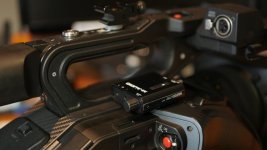
I found the solution: m-audio bass traveler
(If the developers had been unable to solve)
http://www.m-audio.com/products/view/bass-traveler#.V1Equsdeldw
small, light, cheap, loud enough
Me is mounted fixedly,
so it does not bounce up the annoying volume menu
finally we have a mechanical volume control
(If the developers had been unable to solve)
http://www.m-audio.com/products/view/bass-traveler#.V1Equsdeldw
small, light, cheap, loud enough
Me is mounted fixedly,
so it does not bounce up the annoying volume menu
finally we have a mechanical volume control
Larry Chapman
Well-known member
Hi am wondering if anyone else has issues when plugging in headphones?. It seems that sometimes When i first plug them in the volume adjust screen comes up really large instead of the other display screen and often I cant get rid of it unless i press the menu button BUT if already recording then pressing buttons doesnt remove it and so i cant see any of the other displays unless i stop recording or remove headphones which is very annoying. Also the level seems way to low compared to other cameras ive used with the same headphones.
Yep, the volume menu isn't implemented well. However, when I turn the volume all the way up it powers my headphones (two different brands) just fine.
I posted something on this awhile back as well. If you are looking for a solution for playback for your clients without having to have them put on headphones, there are many different "hockey puck" rechargeable speakers that will work. You can look back at this thread ( DVX200 Audio Issues )I started and see what I did for my rig. Works really well.

