Viewer and Canvas show two different sizes

_JD_

Well-known member
I'm losing my mind with this issue. Any help would be appreciated.

My viewer shows clips in the correct size 1280x720. The canvas is showing a much smaller image (apparently 720x480) than it ever has and FCP7 is outputting in 720x480 to Quicktime. Naturally the image looks terrible and I cannot figure out which setting has changed. My two year old son has been known to climb up and fiddle with my MacBook- so I'll blame him:)

Properties for each clip in my timeline show that each clip is indeed 1280x720. Any ideas to fix this would be greatly appreciated.
 
Last edited:
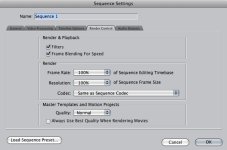
If your canvas looks to be down-rezzing to SD, check your sequence settings to see if they're set properly.
 
Thanks guys- all my settings look fine, but I'm sure something small is causing this.
 
Screenshot2009-10-28at110837AM.jpg


Screenshot2009-10-28at111205AM.jpg
 
Here is a screen shot. As you can see, both viewer and canvas are shown at 25%. The text that now overlaps the footage on the canvas was at one time within the bounds of the frame. So the text stayed in the proper size, but the frame size has changed. As I said before- all the frame sizes in the timeline are proper 1280x720.

FullScreenshot2009-10-28at111634AM.jpg
 
Show the motion settings tab for a clip in the edit. It looks like it's been scaled. Are your source clips 1280x720 or?

Noah
 
Here's the motion setting for one of the text clips that seem to render properly despite the frame size of the source video:

MotionScreenshot2009-10-28at114307A.jpg
 
Fook it. I'm starting over with correct settings. When I started a new project, the sequence settings were indeed set to 720x480. I guess it's not reversible. Oh well- guess I'll make it again- with the right settings from the beginning.
 
YOu have YET to show us the CLIP settings. The motion tab is at 100%...and the clip is SMALL on that 1280x720 timeline. That tells me that your clips are SMALLER than the timeline settings. Plus you have render bars above your clips. This is a BIG CLUE that your clip settings and sequence settings do not match.

Select a clip in the Browser and either scroll to the right until you see the clip settings like dimension, or right-click on it and choose ITEM PROPERTIES>FORMAT.
 
YOu have YET to show us the CLIP settings. The motion tab is at 100%...and the clip is SMALL on that 1280x720 timeline. That tells me that your clips are SMALLER than the timeline settings. Plus you have render bars above your clips. This is a BIG CLUE that your clip settings and sequence settings do not match.

Select a clip in the Browser and either scroll to the right until you see the clip settings like dimension, or right-click on it and choose ITEM PROPERTIES>FORMAT.

Thanks Shane. I'll check that when I reopen the old project. I'm too nervous to do that right now.

I hope I didn't give the impression that I'm impatient with anyone on this board. I'm frustrated with myself, that's all. I really appreciate all the feedback.

Jim
 
Back
Top