Very Important FCP PROBLEM URGENT!

Jamison

Well-known member
I am using FCP 6 and working with 5D mark ii proress422 footage in my timeline. After I am done editing and I export as a quicktime movie, some of my footage has color issues, it will play through and then for a split second the color in the footage will all of a sudden become more saturated and then desaturate. Here is an example of what I am talking about:

NOTE: it happens 3 seconds in. While the man is singing in front of the white back-drop he all of a sudden becomes more saturated. There is nothing wrong with my clip in FCP but when I export it thats when I see all the problems. this is happening to a lot of my clips.


Possible issue?
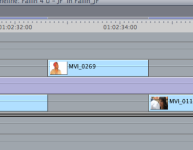
The only difference I see is those certain clips that are having color issues have grey bars over them in my timeline instead of having light-bluish bars. I posted a picture so you can see my timeline of the clip I posted.

attachment.php
 

Attachments

  • Picture 2.png
    Picture 2.png
    13 KB · Views: 0
Last edited:
Is there a video link?

Also, "export as a quicktime movie" provides virtually no information.

Is it current settings, a conversion, or what? If so, to what codec, etc.
 
Is there a video link?

Also, "export as a quicktime movie" provides virtually no information.

Is it current settings, a conversion, or what? If so, to what codec, etc.

Yes i exported quicktime movie, current settings, H.264 codec once I load the footage on my computer, convert it to prores422 with mpeg streamclip and import the prores422 footage in my timeline.

VIDEO LINK: http://www.vimeo.com/13137609
 
wow im surprised there are 2 threads on this issue and people seem to brush it off...i guess ill have to deal with it =(
 
Well, I brush it off because I don't have that issue. It doesn't happen to me. IN fact, I can assure you that this isn't common at all. If it was, there'd be far more than two threads. I'm not sure what to suggest. Trash preferences? That solves a lot of odd issues.
 
does this only happen when you export? does it happen in the timeline? Try to create a new sequence then put your footage in it and export it again. Does it still do it?
 
Yes i exported quicktime movie, current settings, H.264 codec once I load the footage on my computer, convert it to prores422 with mpeg streamclip and import the prores422 footage in my timeline.

VIDEO LINK: http://www.vimeo.com/13137609

I'm sorry, I'm confused.

If you export current settings, then it isn't to h.264, it's to pro res.

And why are you using MPEG Streamclip instead of the Canon EOS plug in?
 
I'm sorry, I'm confused.

If you export current settings, then it isn't to h.264, it's to pro res.

And why are you using MPEG Streamclip instead of the Canon EOS plug in?

I said I load the clips from my camera on my computer as H.264, use streamclip to convert to prores 422, load the prores422 clips in my timeline to edit, when im done editing i export as quicktime movie, press current setting, then when I open the quicktime movie the colors are washed out. I was just trying to give you my full work flow from camera to export.

What's the difference between canon EOS plug in and streamclip? it wouldn't matter now since I have already converted all my files and edited them.
 
does this only happen when you export? does it happen in the timeline? Try to create a new sequence then put your footage in it and export it again. Does it still do it?

it only happens when i export, and there is another thread on here with someone having the same problem with the same workflow as me.
 
Open the QT preferences. Look for the button called ENABLE FINAL CUT PRO COLOR COMPATIBILITY. Click it.

QT displays the gamma different than FCP does. Fact of life. Avid displays the gamma differently than QT. Not sure about Adobe, but you have to know that the CANVAS and VIEWER are only ways to VIEW what you have. They are in no way an accurate representation of the color of the image you are working with. That is not what they are designed for. They are designed for you to see what you are cutting.
 
Try using Export as Quicktime Conversion and then set the settings to ProRes whatever you were previously using.
 
BTW my suggestion is for troubleshooting the changing saturation problem at the 3second part of the video. My suggestion is NOT to troubleshoot the fact that your whole film doesn't look as saturated as you'd like which seems to be your more recent question. I'm responding to your original question.
 
Possible issue?
The only difference I see is those certain clips that are having color issues have grey bars over them in my timeline instead of having light-bluish bars. I posted a picture so you can see my timeline of the clip I posted.

attachment.php

it's like that because you have a timecode overlay over the other clips but not the one in the middle.
 
thanks for the advise guys, for some reason moving the clip below my time code overlay fixed the problem with the color jumping i have no idea why, it my be a bug in fcp who knows. however my colors are still a tad bit washed out when i export quicktime movie but its only noticeable when I compare it to my canvas. Oh well.
 
Canvas isn't a good source for video quality at all.

Just a low res proxy.

BTW, what is the purple track below clip mvi_0269?
 
Canvas isn't a good source for video quality at all.

Just a low res proxy.

BTW, what is the purple track below clip mvi_0269?

it is my time code overlay because I am editing a music video i need a time code to match the music to the mouths.
 
Back
Top