GH4 Very Disappointed

That's for HD, not 4K. At 4K it's 880 mbps.

Yup, I wasn't thinking about 4K.

Still, I'd think the GH4's 200 Mb/s would fare better than I'm seeing. That's why I'm looking for folks to upload some original media, so I can compare what other people think is a great image to what I'm seeing from my camera.
 
Last edited:
GH4 4k is from different planet compared to hacked GH2.

I do agree that high ISO is noticeably better on the GH4, but at 200 ISO, I'm finding the GH4's image to be unexpectedly noisy and artifacty compared to Moon T7 on the GH2.
 
Last edited:
The internal 1080p is not worth moving from MOON T7.
The 4k scaled down does show more detail, but I really didn't find it to be THAT much better an overall image than MOON T7

So it's not just me, then.

I have been looking at the BMPCC. From an image quality perspective, I like what I see. All of the original issues that would disqualify this camera from my list have now been corrected with firmware updates. And the BMPCC has a couple features I really like that the GH4 doesn't have. Like 2.39:1 framing guides. And the ability to punch in for focus while recording.

There are still quite a few features I'd be giving up moving from the GH4 to the BMPCC, though, and the usability factor is no small issue for my line of work. Being able to frame, focus, expose and begin recording in 2 seconds or less is critical to my work. The GH4 is worlds better than the GH2 in that regard. Just...not blown away by the IQ, especially at low ISO, which I'm finding to be something of a step back.
 
Last edited:
I'm thinking the same thing, Mark. I have a line on a used BMPCC for $550. Might be worth it.

Still, I would love to get some more examples of short clips that people consider to have really good image quality.
 
Yup, I wasn't thinking about 4K.

Still, I'd think the GH4's 200 Mb/s would fare better than I'm seeing. That's why I'm looking for folks to upload some original media, so I can compare what other people think is a great image to what I'm seeing from my camera.

Screen Shot 2016-08-17 at 8.33.49 AM.jpg

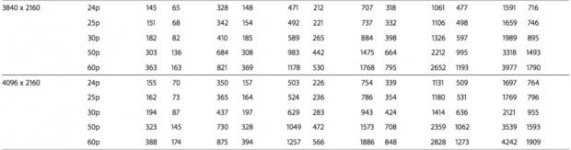
4k 30p PR422 HQ is 884 mbps. 24p is 707 mbps so ok 1/7th the size. This is a screenshot from apple's own PR spec PDF.

200mbps is not always 200mbps and you cannot compare that number alone as an indicator of what the quality will be like. While it is intra frame compression and 200mbps it is still based on a H264 encoder and has the same bit saving methods that H264 typically uses. This is a realtime encoder that needs to process frames 60 times a second and Panasonic always strives for stability and consistency with their encoders. I honestly rarely see any use at all for the 200mbps mode and consider it more of a marketing tool than anything of any productive value. For $295 plus $70 for a HDD you can record vastly superior HD in every possible way to the internal 200mbps mode. Minus 1080p 60p of course. The BMD 5" Video Assist does take in 1080p 60p however at $495.00. So if you need 60p that is also an option and it may likely work with some of the same SDHC cards you are already using with the GH4.
 
Last edited:
I'm thinking the same thing, Mark. I have a line on a used BMPCC for $550. Might be worth it.

Still, I would love to get some more examples of short clips that people consider to have really good image quality.


I still say it would be cheaper to get an Atomos Ninja 2 for $295.00 and record HD externally. What it sounds like here is you are not happy with the encoder in the GH4. Welcome to the club. It does a good job but it isn't a miracle worker. Certain hacks on the GH2 really dug deep into the science of getting as clean of an image as possible. When I first got my GH3 I was equally disappointed but then learned to enjoy what I have because I no longer needed to worry about a hack or my camera crashing. I could use the camera as is as it was intended to be used. Besides any hack will never take the place of a 10bit 4:2:2 external recorded video anyway and the GH2 had no decent way to do that externally. Neither did the GH3. The GH4 was the first camera that allowed us to open up a whole new world of DSLR quality with external recording.
 
I've shot with bmpcc, gh2, and gh4. I will pick up GH4 C4K at 24fps internal codec over bmpcc (it has its own issues) and gh2 hacked or unhacked any day.
 
BMPCC seems to have been BM's biggest seller by a large margin. Disappointed they put resources into developing all these other cameras instead of coming out with a solid mkii of the BMPCC. Really hope they have a solid replacement in the next six months or so. Because the BMPCC is still a brilliant idea and could be an amazing camera.
 
The Ninja 2 wasn't on my radar. Thanks, Thomas.

Though, I am still wondering if the issue is with the encoding, or the sensor. Still not sure.

One thing I noticed is that the V-Log footage with Leeming LUT looked really good from one shoot, but not for two others. Then I realized the one it looked good for was shot in 4K, and the others were shot in 1080.
 
Last edited:
One thing I noticed is that the V-Log footage with Leeming LUT looked really good from one shoot, but not for two others. Then I realized the one it looked good for was shot in 4K, and the others were shot in 1080.

Yeah, 1080p from the GH4 is basically taking away the best feature. Avoid the 200mbps All-I and always use 100mbps as it's a much more efficient codec. Stay with 4K for everything unless you need high speed, and then try to keep it at 60fps or below. Reduce 4K to 1080p in post for much cleaner HD than shooting it in camera.

Also related to your earlier histogram comment - I primarily use the zebras to guide me for exposure, not the histogram, as the histogram is too small and chintzy. For V-Log, set the zebras to 75%, then expose until you see the zebras, pull back just a touch on exposure to get rid of the zebras (unless you want to blow out that particular portion of the shot) and you're golden. Quick, efficient and accurate :)

Do that in 4K and you'll probably be quite happy with the camera. Oh, and I use the following ISO values which seem to give cleaner results: 320, 640, 1250, 2500. Base ISO is 400 so I don't normally shoot ISO 200 as it's also reducing dynamic range slightly.

Hope this all helps!

Cheers,

Paul :)
 
So I was looking at some footage of my kids swimming and splashing around in the water, which is my go-to test for encoders as any weaknesses in the codec will handily show up. To my surprise and delight, the image looked really good, with no visible artifacts even at 200% magnification. That's the level of quality I'm used to with the hacked GH2.

But then another shot from the same day showed exactly what it was that's been bothering me - noise. Waaaaay too much noise at 400 ISO, especially in the shadows (though not exclusively). And it's that noise that's not only really ugly, but also sometimes tripping up the encoder, even where the very difficult to encode splashing water did not.

So while the GH4 easily beats the GH2 at high ISO, the GH2 seems to handily beat the GH4 at low ISO. I don't like that, and I'm wondering if others have observed the same, or is my camera misbehaving at low ISO? Are others getting really clean images from low ISO, or am I spoiled by the hacked GH2 here?
 
Looking at some more footage, it seems the other issue I'm running into are the limitations of 8 bit video when shooting V-Log. Looking close, it's not an especially good image when expanded back out to Rec. 709. Here I see some pretty ugly banding. Combine that with the noise previously mentioned, and perhaps it's no wonder I wasn't all that happy with some of my results.

So it's looking like 4K, Cine D is the best way to go here. I'll stick to that, and see what's what.
 
Yep, 8 bit V-Log is a mess with ugly banding and chroma blocking artifacts everywhere. In 10 bit it's fine. Stick with my recommended settings and try the intermediate ISOs along with zebra based ETTR and I think you'll be pretty happy with the camera, barring any edge cases.

Cheers,

Paul :)
 
I added a ninja 2 when I got my V-Log update so I could have a false color monitor. But the benefit of 10-bit recording was undeniable.
In addition, if you do not absolutely nail exposure with V-Log, it will have noise like crazy. Try the Cine D LUT from Paul and you'll see how noisy V-Log can really be.
 
8bit alone isn't the culprit to the color artifacts when shooting v-log. The GH4 can also send an 8bit HDMI signal to an external recorder which will record as 8bits and even that will look much better than internal 8bit v-log material.

While I would typically always want to have 10bit over 8bit for many reasons, 8bit external is still a pretty decent way to go. Especially considering the GH4 reduces some functionality when in 10bit mode. Mainly autofocus performance is greatly reduced (not a big deal for me) and manual white balance no longer works (major bummer).
 
Back
Top