Vertical lines with footage capture issue

omnidecay

Active member
Lines.jpg

I've noticed some weird lines showing up on my footage. I've attached a picture so you can get a better understanding of what I mean. The weird part is that the lines do not move. Meaning they are in the same spot no matter where the camera is almost like they are etched into the sensor. Look at the white wall between the paper and the hair to notice it. The lines are actually more pronounced when viewing the full picture.

I am testing low light capabilities and this shot was taken with lpowell's anamorphic patch (thanks!). This is using the MJPEG version of the patch. The lines aren't there when shooting in more well lit areas however I still think they are there but hidden by the light. Anyone know what this could be and how to fix it?
 
Sadly i think you've just discovered the Fixed Pattern Noise which most GH1s suffer from... do a search on Fixed Pattern Noise.
 
Thanks...this is an annoying issue. I am doing the burn in test now but I have to shoot this weekend so it might be pointless right now. Luckily I'm not shooting anything that needs to be 100% perfect.
 
For what its worth, I've had some success in combatting the vertical lines and the horizaontal strobing that my GH1 has been doing. Firstly the strobing, I used the focus assist to see a zoomed in section of the image before filming. This helped me to easily identify the one or two stops that I could use to avoid the issue. Likewise the vertical banding issue I found was a lot less prominent in a certain range. Obviously adding as much lighting as possible helped too. I've not tried the burn in method yet, but will probably do so.
 
Thanks for the tip! The screen grab I included obv is not with proper lighting but its not like there wasn't light there. It was shot with a 50mm 1.4 wide open but noticed when I moved the lens the patterned moved with it in sync. This seems like a very unnatural thing to happen for a camera but then again what do I know....
 
shooting with a higher contrast setting like standard will help hide banding, you just have to get it looking as close as you want to avoid too much post. shooting in smooth or nostalgic tends to show more banding.
 
My camera had even worse vertical streaking. As far as I know, some cameras are way worse than others. I read somewhere that the streaks are caused by some residue from the manufacturing process. I just sent it to Panasonic to get it fixed. I told them not to update the firmware, I hope they listen...

By the way, everybody always says that you just need to light better. It's not that easy, unless you want a very evenly lit image. If you need moody lighting, you can't just add more light, else you loose the dark shadows.
 
Thats exactly my problem cord. I would love to just "add light" to make these bands go away.. but for some stuff, I can only light so much before it doesn't look right anymore.
 
that video is very hard to judge. hey overlays two footages at the same time for most of the clip. we just need someone with a gh2 to shoot something at iso1600 and if its clean then we know its been fixed or improved cause we all know shooting at iso1600 on a gh1 is pointless =)
 
we just need someone with a gh2 to shoot something at iso1600 and if its clean then we know its been fixed or improved cause we all know shooting at iso1600 on a gh1 is pointless
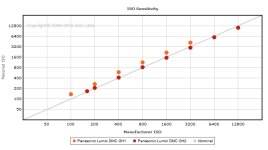
GH2 @ ISO 1600 = GH1 @ ISO 1200

dxomarkgraph.jpg
 

Attachments

  • dxomarkgraph.jpg
    dxomarkgraph.jpg
    71.7 KB · Views: 0
Last edited:
thanks lpowell. i read the graph as gh2 1600 = gh1 greater than 1600. It has been a while since i read graphs though. That said, a visual comparison between the two in terms of footage is what would be nice to see.
 
Back
Top