Vegas Studio 9 Platinum AVCHD render.

BhambuNath

Well-known member
Hello Friends,

I have Vegas Studio 9 Platinum which has limited options for rendering to AVCHD. I have installed Lagarith which does looseless compression but the file size is huge.

I'm looking for some AVCHD encoder that I can use within Vegas Studio 9 Platinum which can render the edited AVCHD footage without recompressing it at the same rate as it is in the original files I'm editing.

Is there any other format I can encode to without rerendering with same quality as GH1 shoots originally?

Thanks.
 
Hello Andor,

I've already followed that thread and it's about removing the pulldown from NTSC video. I'm working on the PAL footage and I do not have any issue of pulldown removal.

The vegas platinum 9 does not allow you to use the custom settings for AVCHD export. I'm looking for way to export the edited footage from Vegas Platinum 9 into AVCHD at higher bit rate than the templates that are available without transcoding it again.

The only way I've found to do it till now is to export the footage uncompressed and then use some other program to transcode into AVCHD again.

Thanks.
 
Hello Andor,

I've already followed that thread and it's about removing the pulldown from NTSC video. I'm working on the PAL footage and I do not have any issue of pulldown removal.

Actually, that thread is about more than pulldown removal, as one user had a pulldown issue, and the other did not. The thread is really more about finding a solid workflow. But it doesn't address your problem specifically.

The vegas platinum 9 does not allow you to use the custom settings for AVCHD export. I'm looking for way to export the edited footage from Vegas Platinum 9 into AVCHD at higher bit rate than the templates that are available without transcoding it again.

Then you need to step up to a professional application. This is one reason I generally don't recommend these stop-gap consumer oriented programs. They work fine until you actually want to do something serious with your video, then you find out you have to go buy the program you should have gotten in the first place.

The only way I've found to do it till now is to export the footage uncompressed and then use some other program to transcode into AVCHD again.

Thanks.

And that is the only workflow you can use unless you step up to a professional application.
 
Good luck trying to get Vegas to render a whole timeline to AVCHD with any setting. It seems to be agreed on their forums that it's broken, and it certainly didn't work here. I've now uninstalled it.
 
Then the chart comparison of various vegas versions on their site is very deceptive.

They should mention it clearly that with platinum version it is not possible to render to high quality AVCHD.

Since I've already paid for it and I can't afford the pro version, I guess I should get used to rendering uncompressed and convert to AVCHD using a different software.

Thanks.
 
Good luck trying to get Vegas to render a whole timeline to AVCHD with any setting. It seems to be agreed on their forums that it's broken, and it certainly didn't work here. I've now uninstalled it.

Well, I don't know who agreed to that. I've been rendering AVCHD videos for the past several weeks in Vegas 9 pro 32 and 64 bit just fine.

What you can't do is throw long GOP on the Vegas timeline with a machine with inadequate RAM and try to render to another long GOP codec and expect it to work. Vegas 9 demands a real video editing machine unlike previous versions.

In fact, I just rendered a nearly 2 hour conference in 720p for our streaming server this week. That's nearly feature length movie territory.
 
Then the chart comparison of various vegas versions on their site is very deceptive.

This chart?

http://www.sonycreativesoftware.com/vegaspro/compare

If so, there is nothing deceptive there at all.


They should mention it clearly that with platinum version it is not possible to render to high quality AVCHD.

What is "high quality AVCHD"? Commercial BluRay is typically encoded at 18-20 Mbps and I think Platinum can do that.


Since I've already paid for it and I can't afford the pro version, I guess I should get used to rendering uncompressed and convert to AVCHD using a different software.

Lot's of people work this way. Including me. But I don't use uncompressed. That's just silly and pointless.
 
That chart does not mention that you can't use the custom encoding rate for rendering in Platinum edition(I'm trying to encode to 720/25p for which there are very low bitrate encoding presets).

I know it's pretty useless to do uncompressed encoding but that is the only option I have if I want to encode to the blue-ray specs from Platinum edition.

Or is there anything else that I can encode to from Platinum edition except fully uncompressed footage which does not go through recompression so I do not loose any quality?

Thanks.
 
That chart does not mention that you can't use the custom encoding rate for rendering in Platinum edition(I'm trying to encode to 720/25p for which there are very low bitrate encoding presets).

What encoder is included with Platinum? The Mainconcept or the Sony or both? And what are the bitrates that are available? Can you post a screen shot?


I know it's pretty useless to do uncompressed encoding but that is the only option I have if I want to encode to the blue-ray specs from Platinum edition.

This doesn't jibe. Can you encode to any quicktime codecs from Platinum? What .AVI codecs are available? I'd think the Sony YUV codec would be included in ANY Vegas edition.

Or is there anything else that I can encode to from Platinum edition except fully uncompressed footage which does not go through recompression so I do not loose any quality?

I'm sure you can do this, but I need to get the aforementioned screen shots to see what you actually have available. Worst case you can buy Cineform.
 
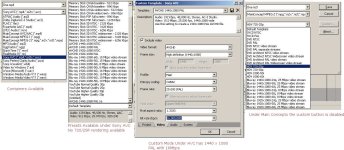
Here's the screen shot of all the different things available:

OK, I was making a mistake when I said that I want to render to Blue-ray as I forgot about the HDV(I see that there is one HDV 720-25p render option available in the main concepts, but I would like to have full control on this render setting, which I do not have due to main concepts custom button being disabled).

What I'm looking for is to render a file from Vegas in 720/25p which is equivalent to quality of the original files I drop in Vegas for editing.

For now I will just be editing in HD and making the SD DVD.

Thanks.
 

Attachments

  • Vegas1.jpg
    Vegas1.jpg
    140.3 KB · Views: 0
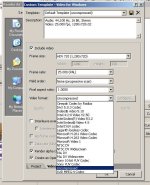
Here's the list of codecs available. From these, following are not configurable:

Intel 4:2

Intel Indeo(R) video R3.2

Intel Indeo 4.5

Microsoft H.261

Microsoft H.263

NTSC DV

PAL DV

Both sony.
 

Attachments

  • Vegas2.jpg
    Vegas2.jpg
    51.2 KB · Views: 0
Ok, two things.

1. On the second screenshot, you've got Lagarith which is lossless. And you've got Sony YUV and Sony 10bit, which are both nearly lossless (and essentially lossless if you're putting something as compressed as AVCHD into them). ANY of those will work just fine.

2. On the AVC options screenshot, you've got a 16 Mbps option. That is not lossless, but you'd likely need a computer to see the differences between your original footage and the output from that codec at that bit rate.

So you've got plenty of options to use. Can you show me what codecs are available under the .mov container? You likely have more good options there, and you can install some GREAT ones like Avid's DNxHD to use. That is what I use instead of lossless most of the time.
 
Thanks a lot Perrone, I rendered with Lagarith and it works great - 720/25p comes around 1 gb per minute which is not bad and plays fine with media player and Virtual Dub.

Before I was doing something wrong with Lagarith and whenever I choose Lagarith, I was getting very large files.

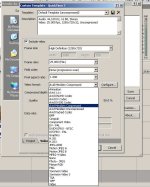
I've also installed Avid's DNxHD LE and here is the screen shot of what's available under .mov container.

As you mentioned that you use Avid's DNxHD most of the times, please do educate me about that too if it helps to further decrease the file size and smooth up the workflow...

I'm also checking out your messages on dvinfo.net regarding how to convert HD to SD DVD using Virtual Dub. I'll try it later as you have mentioned it there.

You are very help full person.

Thanks.
 

Attachments

  • Mov.jpg
    Mov.jpg
    59.2 KB · Views: 0
In Vegas you choose container first, codec second. Judging from your second screenshot, you chose to export to AVI container. Why? If you want to export to AVCHD, you need M2TS/MTS container, or you can export to MOV/x.264, which is not AVCHD, but still AVC. Sony's codec is better suited for M2TS export (meaning, it supports MPEG transport stream) while Mainconcept is better for MOV.
 
I posted these screen shots so that Perrone could see what codecs are available on my computer.

I'm avoiding to export to AVC directly because in Vegas Platinum edition you can't choose custom bit rates for export.
 
As you mentioned that you use Avid's DNxHD most of the times, please do educate me about that too if it helps to further decrease the file size and smooth up the workflow...

DNxHD is what I use for intermediate files BUT Vegas has a really hard time playing them back. It is only available in the .mov container and so Vegas must use Quicktime to play them. Nearly anything in the .AVI container will be smoother. BUT DNxHD delivers excellent quality.

The numbers with DNxHD give you the Mbps rate. So DNxHD36 is 36 Mbps. This is what I usually use because my Sony EX1 records at 35 Mbps. So I don't lose anything really in using that. It's the smallest of the DNX codecs. It gives about 15.8 GB/hr. and will look darn near lossless for your AVCHD video. If you can live with it not playing smoothly in Vegas (works fine outside of Vegas) then you're all set.

If you use DNxHD then anyone you need to share files with will need the codecs installed. This is not true for some of the other quicktime codecs. Lagarith is the same though, and so is Huffyuv. But if you are just worried about having something to use as an intermediate before you go render a higher bitrate AVCHD, then any of these will work nicely. DNxHD 36 will be nearly ideal for the purpose, and I before I settled on Jpeg2000, I used it for archiving my footage.
 
I can't thank you enough Perrone, if I were in Florida, I would've bought you few drinks :beer:

I tried everything including SD conversion and it works like charm.

Thanks again.
 
I can't thank you enough Perrone, if I were in Florida, I would've bought you few drinks :beer:

I tried everything including SD conversion and it works like charm.

Thanks again.

SWEET! Like to see people having success. Glad I could help you out.
 
DNxHD is what I use for intermediate files BUT Vegas has a really hard time playing them back. It is only available in the .mov container and so Vegas must use Quicktime to play them. Nearly anything in the .AVI container will be smoother. BUT DNxHD delivers excellent quality.
I use Batch Intermediate Creator for full-sized DNxHD as well as for small proxies: http://www.hv20.com/showthread.php?t=25044 I use Vegas Pro, but I believe that Platinum should work as well. What I do is I have proxies and main files named the same. I move proxies in a working directory and work with them. When I want to render, I close the project, move proxies out, move large files in, open the project, and render. If names and file types are the same, Vegas does not mind.
 
Back
Top