
Navigation
Install the app
How to install the app on iOS
Follow along with the video below to see how to install our site as a web app on your home screen.
Note: This feature may not be available in some browsers.
More options
You are using an out of date browser. It may not display this or other websites correctly.
You should upgrade or use an alternative browser.
You should upgrade or use an alternative browser.
Vegas Pro GUI setup
- Thread starter TR16MM
- Start date

Well, using multiple monitors, I generally have all windows open, so I don't switch between layouts -- it's all there all the time.
Not saying this is the ideal layout, just one that I've developed over the years which works for me.

Not saying this is the ideal layout, just one that I've developed over the years which works for me.
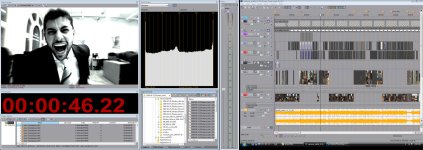


My current setup.
You know, I've toyed with the idea of getting a third monitor involved so that one can be all timeline.

Efexone
Well-known member
You know, I've toyed with the idea of getting a third monitor involved so that one can be all timeline.
I've also been thinking about it. I've run a 1920x1200 before as a timeline screen. it was very useful, at least until the monitor died. dell has some deals on H-IPS 24". I might celebrate my birthday early.

macgregor
Veteran
Well, using multiple monitors, I generally have all windows open, so I don't switch between layouts -- it's all there all the time.
Not saying this is the ideal layout, just one that I've developed over the years which works for me.
My god the trimmer window!!!! You are the only human using that... :cheesy:

iHartVideo
Well-known member
My god the trimmer window!!!! You are the only human using that... :cheesy:
After seeing his layout I was gonna ask if/what anyone uses it for.
Glad to see I'm not the only one who doesn't.

El Director
Veteran
I use the trimmer too.


El Director
Veteran
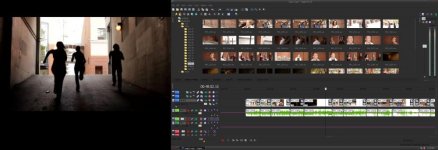

El Director
Veteran
The Media Manager allows you to enter metadata for your shots and to sort them by any of the paramerters that you've entered. I usually just use different bins and find that's enough for me.what DO you use trimmer for? I don't get that or Media Manager...
Trimmer: The trimmer allows you to take a shot and grab what you need without having to drag the whole clip to the timeline. It keeps your timeline less cluttered and works great if you have a few shots in one take. It's kind of like the source window in Premiere. You double click a clip, select what you want, and drag that to the timeline. It's the only way I edit. I honestly can't see why anyone would want to whittle away at all their clips on one timeline, espcially if you're shooting out of order.
I honestly can't see why anyone would want to whittle away at all their clips on one timeline, espcially if you're shooting out of order.
bcuz i have sync multi cam shoots
El Director
Veteran
Forgive my ignorance. I tend to forget about event videographers.