Vegas on my PC: THIS IS MADNESS !

ndquan

Member
I have used to using Sony Vegas Pro 9.0c for months. With this software, my PC rendered hundreds of short clips with variable lengths from one to ten minutes.

Some weeks ago, I upgraded my PC. Originally, it was an AMD Phenom II X4 920 , 2Gb RAM and Geforce 8600GT 512Mb. I added more 2 Gb RAM To have 4 Gb RAM and replace the Geforce 8600GT with Radeon HD 5770 512 Mb.

And lately, I found that my Vegas could never render successfully a clip , even when the clip was just less than 30 seconds long.

It always crashed during rendering like what you can see from the following print-screen.
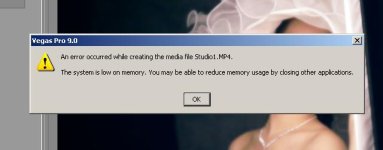
49376583.jpg

I cannot understand this ! Really crazy !

Thinking that my PC might got some virus or some errors, I restored the Ghost Image of the hard disk like before (except that I had to install new driver for the lately newly installed Radeon card).

Nothing changed ! It still crashes !

I updated (free) Vegas 9.0e from the homepage. But nothing changed.

Then I borrowed from my friend his Vegas Pro 10.0 . The problem is still the same.

What is the problem with my poor PC ? Because Radeon HD 5770 is not compatible with Sony Vegas Pro 9.0 ??? That must be crazy because this is among the high-end cards these days.

I searched around on the internet and so many people got the same problem as mine.

Please help me any idea ! I need to make some wedding clips for my sister but it has been already 2 weeks that I could not complete any.
 
Supplementary information. Nothing changed although I have done these following suggestion.

1/ Reducing the Dynamic RAM preview to 16, then 0 Mb.

2/ Reducing the maximum rendering threads from 4 to 2.

3/ Set the Priority of Vegas in the Windows Task Manager to Low .

4/ Set the Affinity of Vegas in Windows Task Manager to only 2 or 1 logical CPU.


I also tried with my office PC (Pentium D 3.0 GHz , 1 Gb RAM). The same problem happened although before I also could do sometimes very well on that PC.
However, with my office PC , after I did 1/ and 2/ , it could render all the project with 5 minute-long clips, EXCEPT another problem : the PC keep beeping if I run at the same time Firefox or Internet Explorer.

What happened with Vegas these days ? A live-update has bugs ???
 
Last edited:
It may be a RAM issue, especially if you're mixing RAM brands. They may have different voltages or timings and some mobos can't handle it efficiently enough for rendering, especially those on the lower end.

So, this could be hardware, not software. Try pulling out the new RAM and see if you get the same problem. If you don't, it's probably the RAM.

Also, consider that (it looks like) you're using a 32-bit version of Windows. A 32-bit OS can only use 4 GB of RAM total, and that INCLUDES the GPU -- so 512MB is eaten up by the graphics card and can't be accessed by Vegas at all. Don't know if that's a factor, but it could be.
 
Yes, I also planned to order Vegas 64 bit and install to my secondary OS (Windows 7 64 bit). However, this strange issue really depresses me.

I tried to recall what was different between my current system and my previous. It seems that nothing except the new Radeon HD 5770.

All four of my RAM have same brand and same speed (Samsung DDR2-6400 ). I do not think that it could be due to physical problems.

I can see from the Task Manager that the rendering process dominate increasing memory ---> after 10-second length of the clip, it took around 300 Mb , after 20-second length, it took around 500 Mb and then the rendering could not go further.

UPDATED INFORMATION :

It seems that Magic Bullet and the blurring effect of this plugin is the killer of the memory (I applied Soft Edge effect in Magic Bullet 2.0 to the clips).

After I remove this effect, everything seems much better. The memory usage was less than 300 Mb after 40 second length of the rendered clip.
 
Last edited:
Every time I read a thread about Vegas Pro instability, it always has something to do with Magic Bullet. While no one but the Magic Bullet developers can help with the slowness and instability, you can get rid of some rendering headaches by this simple fix:

- Download a program called CFF Explorer
- Open as Administrator
- File > Open
- Browse to Vegas Pro folder and select vegas90.exe or vegas100.exe or whatever it may be.
- Select File Header under NT Header on the left bar.
- "Click here" next to Characteristics
- Check "App can handle >2gb...", OK and save the file.

The real fixes have to come from Red Giant who have been neglecting Vegas Pro support for Magic Bullet...
 
Sadly, CFF Explorer could not help me in this case. I have tried.

All of today from the morning to midnight, I set up Windows XP Professional x64 on my PC as the secondary OS. Everything is ok but ... Magic Bullet is not shown in Vegas 9.0e as well as 9.0c .

It seems that it is the time I have to say goodbye to my favorite Sony Vegas ! And Magic Bullet Looks 2.0 does not work with what I have : After Effects CS3 . That is so sad !!!!

I think I should look for something better, such as After Effects CS4.

These two softwares (Magic Bullet and Vegas) really tease me ! :Drogar-BigGrin(DBG)
 
UPDATED INFORMATION

No doubt anymore ! Vegas Pro really has problems.

I set my virtual memory (page file) up to 8 Gb (my HDD has 200 Gb free).
And I download Free Ram Optimizer , a freeware, which helps the system to free RAM by utilizing the virtual memory.

I ran Vegas Pro 10.0 and kept and eye watching the Task Manager + Free Ram Optimizer

The free memory did not drop below 1800 Mb when the program crashed again (same as the previous tests, the rendering could not go any further), which means that it does not make sense that Vegas prompted "... low memory ..."

--------------> this is something not right as what we can see.

Too many people get the same problem like mine. And today I lost my holiday just to heck around this crazy issue.
 
Did you remove the new RAM and try it without it? You really should give that a shot -- you should at least eliminate it as a possible cause.
 
Did you remove the new RAM and try it without it? You really should give that a shot -- you should at least eliminate it as a possible cause.

Yeah, people get bad RAM all the time. Apparently he didn't want to think that could be an actual cause and just blame it on Vegas.

NDQUAN, Its not necessarily a Vegas issue. But maybe you should dump Vegas and go spend hundreds of dollars on a new NLE and take the time to learn it. Switch to Adobe or something. Forget listening and taking suggestions about the RAM. When your next NLE crashes too, you can start another thread on how it is Adobe's fault.

ALL of the problems you are exhibiting can be chalked up to bad RAM. I'm not saying thats the problem, but try to replace it with some other RAM to at least eliminate it. Changing settings won't make a bit of difference if the RAM is bad. This is the 3rd time it's being suggested. Might be worth a shot?
 
I welcome the new day with still thinking of this issue !

Thank you . I am removing the new Ram sticks now. I will update the story later. :thumbup:

UPDATED INFORMATION

It seem that the new Ram sticks are not the problem. I ordered them couple of weeks ago and during that time I still succeeded rendering some clips.

However, I removed them and tried again. Sadly, exactly the identical problem happened. Vegas crashed due to "low memory" after it rendered 40% of my project (exactly the same).

Ok friends, just consider this as a bad experience of mine. That is crazy but somehow interesting.
 
Last edited:
Magic Bullet (Soft Esge effect) is applied to a couple of clips . Yes, that is the direct cause of the crash. When I removed Magic Bullet , it could go better.

However, what makes me really angry is that I have used Magic Bullet and Vegas Pro 9.0e for hundred of times successfully. This issue just came 2 weeks ago no matter I tried recovering the system identical as before.
 
I have used to using Sony Vegas Pro 9.0c for months. With this software, my PC rendered hundreds of short clips with variable lengths from one to ten minutes.

Some weeks ago, I upgraded my PC. Originally, it was an AMD Phenom II X4 920 , 2Gb RAM and Geforce 8600GT 512Mb. I added more 2 Gb RAM To have 4 Gb RAM and replace the Geforce 8600GT with Radeon HD 5770 512 Mb.

And lately, I found that my Vegas could never render successfully a clip , even when the clip was just less than 30 seconds long.

It always crashed during rendering like what you can see from the following print-screen.

View attachment 27738

I cannot understand this ! Really crazy !

Thinking that my PC might got some virus or some errors, I restored the Ghost Image of the hard disk like before (except that I had to install new driver for the lately newly installed Radeon card).

Nothing changed ! It still crashes !

I updated (free) Vegas 9.0e from the homepage. But nothing changed.

Then I borrowed from my friend his Vegas Pro 10.0 . The problem is still the same.

What is the problem with my poor PC ? Because Radeon HD 5770 is not compatible with Sony Vegas Pro 9.0 ??? That must be crazy because this is among the high-end cards these days.

I searched around on the internet and so many people got the same problem as mine.

Please help me any idea ! I need to make some wedding clips for my sister but it has been already 2 weeks that I could not complete any.

Find the setting in the preferences or options and select use ONE cpu to render. This is assuming you have a multiple core chip. See if this helps it render without a crash. If so search for Eugenia's Vegas info on Vimeo (settings for hd render for Vimeo) - there is a note about a similar issue. Sorry I did not read your whole post so sorry if I missed something.
 
I work for MSFT and can advise based on the data gathered so far. First of all, "RAM Optimizers" are garbage pure and simple, don't use them. They flush standby pages so you have more "free" memory, but free simply means unused, and therefore wasted RAM that could be being used as cache. Just avoid them.

The screenshot of the error message (thank you!!) indicates the process cannot address any more memory. This MAY be being boiled up from a malloc() call or similar from the operating system, or Vegas could just be smoking crack. It is unlikely it is physically bad RAM as the OS will mark those pages as Bad and not use them if it detects problems with the data in that page. The memory manager would never show "bad" ram at a user-mode processes as it simply doesn't need to know or deal with that kind of low-level hardware issue. Also, you would be seeing the problem in other things as well - like web browsing, sound editing, etc - unless the bad RAM has a grudge exclusively against Vegas (which is technically speaking VERY unlikely) :-)

More than likely the process is running out of virtual address space - 32-bit processes can only address 2GB maximum of private RAM, and that includes loading all binary images, movies, data, etc. Use Process Explorer from Sysinternals (now MSFT) at http://live.sysinternals.com/procexp.exe. Right-click on the column headers, click the "Select Columns..." link, then "Process Memory" tab, then check "Virtual Size". It will show up on the far right, so you may need to drag it closer to the left or just slide the slider bar to the right to see it.

If you see Virtual Size go above 1800mb for the Vegas process, lack of virtual address space is the cause of this error. This is a 32-bit limitation and moving to both a 64-bit OS and 64-bit Vegas should work around it...although whatever Vegas is doing is probably less than efficient as well.
 
Back
Top