Various Mac Prores conversions

ryansheffer

Well-known member
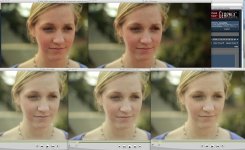
Thought this was interesting and I haven't read too much about it. It seems that media manager can convert to prores without crushing blacks. Below are various encode processes.

From top, left to bottom, right:
1. compressor
2. mpeg streamclip
3. original
4. media manager
5. Cineform
 

Attachments

  • all different transcodes.jpg
    all different transcodes.jpg
    118.8 KB · Views: 0
Just so there is no confusion - the Media Manager I was referring to is Media Manager within Final Cut Pro.

The quicktime update made it so quicktime will read the files correctly, but when you compress to prores through compressor is still crushes blacks. I will check if exporting simply through quicktime gives the same results as Media Manager.
 
Straight exports from quicktime to Prores also crush blacks. So far I have tested, Mpeg streamclip, Quicktime, Compressor, Final Cut's Media Manager, and Cineform. Only Media Manager and Cineform have retained the same contrast and saturation.

I would love anyone else's thoughts or findings.

One benefit to a Media Manager batch export is the ability to put Final Cut data on clips before batching - reel number, clip name, comments, etc.
 
Is that actually crushing the blacks? Just looks like it's normalising the gamma to me.
 
Yes. Definitely crushing blacks. But even if it isn't the point is that some conversions change the image to something different than what it is out of the camera.

Also - the image you are seeing is a jpeg taken off my monitor. It is definitely not a reference for what the actual image is.
 
It's not crushing the blacks - it's changing the gamma - which has been a horrible QuickTime curse for the last few years. Depending on which app you use to export out to ProRes and depending on the app you use to play that file back, the gamma will be shifted. It's maddening.
 
As far as workflow goes, could one do the base edit natively in h.264, then media manage to Pro Res with handles for transitions, CC, etc.?

Or does editing in h.264 - just basic cuts - require render time?

I could see this as a win-win. Save time and space by NOT converting every file to pro-res before editing.
 
I make timelapses with my dslr and I noticed this problem after saving the image sequences in ProRes using Quicktime.

What do you think would be the best format to save the image sequences in .mov to avoid that color problem?
 
You could easily edit H.264 native, but you would need a very fast machine. You could also start the edit H.264 and then convert later. A reconnect is simple as long as the files share the same names.

As far as timelapses go - though I have no experience - I would suggest trying the animation codec.
 
Thanks for the tip. I also noticed a gamma shift when converting from compressor but wasn't sure exactly what was happening.
 
Back
Top