

I've created maps similar to this before and they can be a great resource for understanding who else is operating in your area or in another / state / country should you need second camera or operator.
There are a couple of rules to map usage.
YOU MUST READ THE FOLLOWING BEFORE ADDING YOURSELF.
This is a PUBLIC MAP. Meaning anyone can edit it.
DO NOT EDIT THE MAP NAME OR DESCRIPTION (If you do so it records your user name and you will have permission to access it removed).
DO NOT EDIT OR ALTER SOMEONE ELSES ENTRY IN ANY WAY (If you do so it records your user name and you will have permission to access it removed).
YOU WILL NEED TO LOG INTO YOUR GOOGLE ACCOUNT TO EDIT IT.
To add yourself do the following
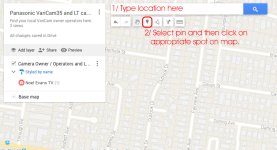
3/ Edit your details in the pin pop up. It looks like a call out box from the pin. Be sure to add your details as set out in the following.
Title: Your name or Company Name
Details:
Camera: (PUT YOUR CAMERA HERE)
ph: (PUT YOUR PHONE NUMBER HERE)
e: (PUT YOUR EMAIL HERE)
w: (PUT YOUR WEBSITE HERE)
So in my case it looks like:
Noel Evans TV
Camera: VariCam LT
ph: 61 408 455374
e: noel@noelevans.tv
w: www.noelevans.tv
Do not add 1000 other pieces of information about yourself as it dilutes the result. Have had this happen before. This is not a map about what edit suite you have or if you have a Red Epic as well. If you have multiple VariCams however, please note them all.
Once complete click save. Note: In your panel you will see an option to edit style and add photos. Knock yourself out.
Its important to follow the above. Again, its a public map so for everyone to use it we just need to take a moment to ensure we follow the process so we dont mess up other peoples details etc.
Map is here: https://drive.google.com/open?id=1bVibLhV2K7kj_KJ32dR9pRiljSo&usp=sharing
There are a couple of rules to map usage.
YOU MUST READ THE FOLLOWING BEFORE ADDING YOURSELF.
This is a PUBLIC MAP. Meaning anyone can edit it.
DO NOT EDIT THE MAP NAME OR DESCRIPTION (If you do so it records your user name and you will have permission to access it removed).
DO NOT EDIT OR ALTER SOMEONE ELSES ENTRY IN ANY WAY (If you do so it records your user name and you will have permission to access it removed).
YOU WILL NEED TO LOG INTO YOUR GOOGLE ACCOUNT TO EDIT IT.
To add yourself do the following
3/ Edit your details in the pin pop up. It looks like a call out box from the pin. Be sure to add your details as set out in the following.
Title: Your name or Company Name
Details:
Camera: (PUT YOUR CAMERA HERE)
ph: (PUT YOUR PHONE NUMBER HERE)
e: (PUT YOUR EMAIL HERE)
w: (PUT YOUR WEBSITE HERE)
So in my case it looks like:
Noel Evans TV
Camera: VariCam LT
ph: 61 408 455374
e: noel@noelevans.tv
w: www.noelevans.tv
Do not add 1000 other pieces of information about yourself as it dilutes the result. Have had this happen before. This is not a map about what edit suite you have or if you have a Red Epic as well. If you have multiple VariCams however, please note them all.
Once complete click save. Note: In your panel you will see an option to edit style and add photos. Knock yourself out.
Its important to follow the above. Again, its a public map so for everyone to use it we just need to take a moment to ensure we follow the process so we dont mess up other peoples details etc.
Map is here: https://drive.google.com/open?id=1bVibLhV2K7kj_KJ32dR9pRiljSo&usp=sharing
