

BillP
Well-known member
Hello all,
I've been trying for a few days to tweak my UX180 so it can handle blown out highlights better. When using the stock profiles the highlights would make ugly color changes which Panasonic camcorders are notorious for. In the past (on my HMC150 and AC160A) I would just lower the knee compression, and that was usually all it took. But this camera wasn't so cooperative.
I had heard that the 'Filmlike Gammas" were good for highlights, but not in my testing.
I noticed that the "Still-Like" F4 file gave the best looking highlights for my taste, but provided too much saturation and contrast.
So I tweaked it a bit.
Here are my preferred settings/tweaks so far:
Scene File F4
Chroma -5
Master Ped +10
Black Gamma +4
The rest of the settings left alone.
High Sensitivity On
DRS Off
I tested this in the studio and was happy with highlights and skin tones, and gave me a good overall image.
I still need to test these settings in outdoor sun to see how it looks.
Curious to see what others think of these settings.
Update:
Upon further testing, something a little weird is going on with skin tones. A little too orange and flat. Will tweak some more tomorrow.
But noise is reduced and is less colorful so that's a plus.
Scene File 4 Tweaked
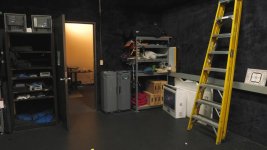
And to compare, here is Scene File 1

I've been trying for a few days to tweak my UX180 so it can handle blown out highlights better. When using the stock profiles the highlights would make ugly color changes which Panasonic camcorders are notorious for. In the past (on my HMC150 and AC160A) I would just lower the knee compression, and that was usually all it took. But this camera wasn't so cooperative.
I had heard that the 'Filmlike Gammas" were good for highlights, but not in my testing.
I noticed that the "Still-Like" F4 file gave the best looking highlights for my taste, but provided too much saturation and contrast.
So I tweaked it a bit.
Here are my preferred settings/tweaks so far:
Scene File F4
Chroma -5
Master Ped +10
Black Gamma +4
The rest of the settings left alone.
High Sensitivity On
DRS Off
I tested this in the studio and was happy with highlights and skin tones, and gave me a good overall image.
I still need to test these settings in outdoor sun to see how it looks.
Curious to see what others think of these settings.
Update:
Upon further testing, something a little weird is going on with skin tones. A little too orange and flat. Will tweak some more tomorrow.
But noise is reduced and is less colorful so that's a plus.
Scene File 4 Tweaked
And to compare, here is Scene File 1
Last edited:

