
Nicholas Natteau
Veteran
If you don't happen to have a light meter handy or a portable waveform monitor, and you had to rely on only the Canon 1DC's histogram, and you were shooting in Canon C-Log, what would the equivalent of 33% (18% grey card) and 62% IRE look like on the 1DC's histogram?
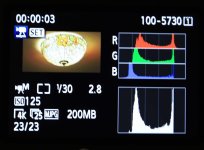
Assuming that the 4 vertical lines inside the histogram represent 20%, 40%, 60%, 80% image exposure.
Am I correct in assuming that to achieve proper image exposure in C-Log, an 18% (33% IRE) grey card would have to show up slightly more than half way between the 20% and 40% vertical lines on the 1DC's histogram? And that 90% white would have to show up just beyond the 60% vertical line (where 90% white in C-Log is at 62% IRE on a waveform monitor)?
Thank you in advance.
Assuming that the 4 vertical lines inside the histogram represent 20%, 40%, 60%, 80% image exposure.
Am I correct in assuming that to achieve proper image exposure in C-Log, an 18% (33% IRE) grey card would have to show up slightly more than half way between the 20% and 40% vertical lines on the 1DC's histogram? And that 90% white would have to show up just beyond the 60% vertical line (where 90% white in C-Log is at 62% IRE on a waveform monitor)?
Thank you in advance.
