Using Handbrake With Master ProRes Exports

hopkins802

Well-known member
Hi all,

I've been wanting to try this method for awhile, but just haven't had the time to tinker with settings. Is anyone here using Handbrake to break out a master ProRes export into high res H.264 files? I have my own method of cranking out a high res H.264 from Adobe Encoder by using Max Render quality (helps with scaling done within the project), as well as a color adjustment LUT built right into the export to bring back some saturation and contrast lost when encoding to H.264. I still want to compare it with using Handbrake and ProRes master files.

What would you recommend for H.264 settings in Handbrake? There are a lot more to choose from than I was expecting.

Thanks,
Dan
 
Woah! That's a big complex topic. There are a lot of Handbrake tutorials out there but it's a bit of a minefield if you are new to HB. I've been using HB for about ten years now so am pretty familiar with it. Done many hours of online learning videos for medical education using HB. There is so-o-o-o much to explain. Far more than is addressable in any meaningful manner in a couple of posts.

Might I suggest that maybe the easiest and simplest way is to tell me what your end target use is, YouTube, Vimeo or basic web embedded MP4 etc and the sort of bit rate you are thinking off and what dimensions and frame rates, i.e. 1920 x 1080, 24p/30p etc that you are after and I can create a preset that can deliver you the optimum Profile, Level, bit depth, quality etc. You could then just import that preset into HB save it and and try it out. Once you have a good working preset it's just a matter of adjusting mainly bit rate depending on end use if you need a higher quality file. Note: There is a performance/size balance point which if you go over there is no real added visual quality improvement when increasing bit rate. The Guru on H.264 encoding is probably Jan Ozer. I learnt most of my encoding knowledge from him. Handbrake's x264 is a more efficient library for encoding H.264 and is still considered the best library for MP4 encoding along with Vidcoder which is even more configurable. One of Ozer's most comprehensive reads on MP4 encoding can be downloaded here. As you see it's about as big as a basic understanding can get on MP4 encoding. It's a couple of years old now but the basic fundamentals still apply. It will give you a good understanding of MP4 encoding that is totally applicable to Handbrake.

https://www.streamingmediablog.com/wp-content/uploads/2013/07/2013SMEast-Workshop-Encoding.pdf

Who is Jan Ozer?

https://streaminglearningcenter.com/about-jan-ozer

More useful fundamentals on quality vs streaming here.

https://www.ezs3.com/public/What_bi...eo_How_do_I_optimize_my_video_for_the_web.cfm

Chris Young
 
The most important settings to learn and master are "Average Bitrate" and "Preset" under "Encoder Options." Slower settings will take longer to render but yield better results on quality video hosting platforms such as Vimeo. Youtube will chew out and mangle everything that you feed it, regardless of the settings. It's free for a reason...
Are you suggesting that Vimeo does not re-encode the videos available for streaming?
Because if you do I think you are mistaken, they do the same thing as YouTube.

A slow encoding setting will make the video file slightly smaller with the same quality, not really an issue if your objective is to upload.
For uploading the best option is to use a constant quality profile.
 
Did I suggest that Vimeo doesn't re-encode? All video platforms do, but Vimeo is far superior -- why do you think they charge $? Anyone that suggests otherwise is full of s*%t and most likely a lobbyist.

Also, anything that you do in this world at a slower setting will yield better results: cooking, cleaning, sex, etc. Live in the real world for a while and quit trolling, loser.

Hahahah, the last part of this post is amazing. I agree that slower encoding will look better, especially in videos with a lot of movement, dynamic range, small details (water, trees, grass, wedding detail type shots etc.). I'll have to read up on everything above. I've gotten pretty good results using Encoder with maxed out settings plus a color correction LUT built in, but I know it can be better. Like you said, Youtube's re-encoder kind of destroys anything we try to do beforehand, so I really only worry about getting picky on my export settings for my wedding films, which is primarily what I push to Vimeo.
 
Woah! That's a big complex topic. There are a lot of Handbrake tutorials out there but it's a bit of a minefield if you are new to HB. I've been using HB for about ten years now so am pretty familiar with it. Done many hours of online learning videos for medical education using HB. There is so-o-o-o much to explain. Far more than is addressable in any meaningful manner in a couple of posts.

Might I suggest that maybe the easiest and simplest way is to tell me what your end target use is, YouTube, Vimeo or basic web embedded MP4 etc and the sort of bit rate you are thinking off and what dimensions and frame rates, i.e. 1920 x 1080, 24p/30p etc that you are after and I can create a preset that can deliver you the optimum Profile, Level, bit depth, quality etc. You could then just import that preset into HB save it and and try it out. Once you have a good working preset it's just a matter of adjusting mainly bit rate depending on end use if you need a higher quality file. Note: There is a performance/size balance point which if you go over there is no real added visual quality improvement when increasing bit rate. The Guru on H.264 encoding is probably Jan Ozer. I learnt most of my encoding knowledge from him. Handbrake's x264 is a more efficient library for encoding H.264 and is still considered the best library for MP4 encoding along with Vidcoder which is even more configurable. One of Ozer's most comprehensive reads on MP4 encoding can be downloaded here. As you see it's about as big as a basic understanding can get on MP4 encoding. It's a couple of years old now but the basic fundamentals still apply. It will give you a good understanding of MP4 encoding that is totally applicable to Handbrake.

https://www.streamingmediablog.com/wp-content/uploads/2013/07/2013SMEast-Workshop-Encoding.pdf

Who is Jan Ozer?

https://streaminglearningcenter.com/about-jan-ozer

More useful fundamentals on quality vs streaming here.

https://www.ezs3.com/public/What_bi...eo_How_do_I_optimize_my_video_for_the_web.cfm

Chris Young

Thank you!

To answer your question. In the cases where I use Handbreak vs Encoder, it will be for videos that I push to Vimeo. I'm not worried about the ones I push to Youtube, as it will just get squashed anyway. I'm thinking of a bitrate between 50-60mbps for videos I push out in 1080p, and 80-100mbps for videos I push out in 2K or UHD. All published videos are in 24p. It would be super helpful, and much appreciated if you wanted to create a preset with optimum profile, level, bit depth, quality for both 1080p and 1440p. I hardly ever push out an edit in UHD, because even when all my media is 4k for a project, I like to be able to have that extra 30-40% to crop in and then publish in 2k.

Thank you so much for offering to do this. I'll definitely study the preset you send me, and see what's under the hood. Much appreciated!

-Dan
 
Unless you want to make your video available for download (Vimeo pro) using ProRes or any other all-intra file only wastes upload bandwidth.
For uploading a 4K video using H.264 long GOP you should target a crf of 16-17 anything over that is just wasting upload bandwidth.
 
Unless you want to make your video available for download (Vimeo pro) using ProRes or any other all-intra file only wastes upload bandwidth.
For uploading a 4K video using H.264 long GOP you should target a crf of 16-17 anything over that is just wasting upload bandwidth.

So you've tested at 17mbps vs 50mbps 4k clip on Vimeo and saw no difference? Even in shots with highly detailed areas, or fast moving shots?
 
In the cases where I use Handbreak vs Encoder, it will be for videos that I push to Vimeo.

With regard to coming up with a HB preset for HD video using the x.264 library that is easy enough to do. I would agree with CK that for upload to Vimeo that there is no great benefit to going much above Vimeo's recommended bit rates for HD and 2K. Sticking to the higher rates for hi complexity hi motion vision. I've tried higher bit rates and never really seen any noticeable difference from a viewers point of view. Just for clarification When you say all published videos are 24p do you mean "Hard 24p" the DCI spec for DCP or 23.976 for most other distribution channels?

You mention UHD. That can be a totally different kettle of fish. If you only want to create UHD with Rec 709 characteristics your basic 8-bit Rec 709 Color Primaries and matrix coefficients out of Handbrake will produce a good encode if it is being viewed on a basic Rec 709 range PC monitor I'm pretty sure would suffice for most people.

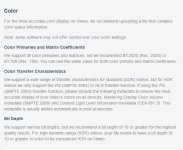
But and it is a BIG but are you wanting to create UHD dimension videos that comply with HDR display requirements? If so and are uploading to Vimeo you really need to comply with Vimeo's recommended 10-bit HDR requirements so that your videos are interpreted correctly if viewers are watching those videos on HDR TVs/monitors that support PQ SMPTE 2084 or HLG transfer function. If this is your aim then Handbrake won't make the grade as 10-bit HDR Mastering Display Color Volume metadata (SMPTE 2086) and Content Light Level Information metadata (CEA 861.3) is required for the correct display of HDR material when uploading to Vimeo. This metadata is usually added automatically in post-production.

HDR metadata brings up another question. Is the software, the NLE you are editing with embedding the above SMPTE 2086 and CEA 861.3 information into your UHD master file encode data stream?

Advice on complient H.265 UHD/4K 422 10-bit PQ SMPTE 2084 HLG master encoding I can't advise on as so far I have never been pushed to learn this due to lack of demand my end for such encodes. I have experimented with Handbrake's x265 in 10-bit encoding and it is pretty good but it is still delivers a Rec 709 420 color set with BT.709 Color primaries, Transfer characteristics and Matrix coefficients. At this point in time Handbrake doesn't appear to support full 10-bit color Color primaries, Transfer characteristics and Matrix coefficients for HDR output. Hopefully it will eventually.

So yes I can knock out an HD x264 preset of around 50-60Mbps and a UHD preset of between 80-100Mbps as long as you are aware that the UHD preset will be limited to HD Rec 709 color space. Would you want a 10-bit 420 x265 preset? If you can confirm on the above I will create the presets you require.

https://vimeo.com/help/compression

Edit: Just doing some experimentation in Resolve 16 and using color transforms you can select your HDR 2084 output so, I haven't tried it, but would assume then that any render output from Resolve should be carrying the necessary HDR information flags.

Chris Young

Vimeo color.JPG
 
Last edited:
Advice on complient H.265 UHD/4K 422 10-bit PQ SMPTE 2084 HLG master encoding
There are two main HDR encodings one using a PQ gamma curve (Rec.2100 ST2084) and one using a hybrid Rec.709 and log curve (Rec.2100 HLG).

Both Vimeo and YouTube support HDR10 and HLG.
Resolve version 16, which is in early beta, supports encoding with the right metadata for direct upload provided you set the correct colorspaces (make sure to use the Rec.2100 ST2084 for HDR10).
 
Last edited:
Where did you get 17mb/s from?

Sorry I read CRF 16-17 as CBR 16-17 (constant bitrate or 16-17mbps), vs the constant rate factor. I'm still super new to Handbrake, but I'll start messing around with it I guess. Other than that CRF recommendation, do you have any others? End deliverable is usually at 1080p or 2K 16x9, uploaded to Vimeo.

Thanks!
 
Sorry I read CRF 16-17 as CBR 16-17 (constant bitrate or 16-17mbps), vs the constant rate factor. I'm still super new to Handbrake, but I'll start messing around with it I guess. Other than that CRF recommendation, do you have any others? End deliverable is usually at 1080p or 2K 16x9, uploaded to Vimeo.
Since everything is re-encoded by YouTube and Vimeo the focus should be on a constant quality encoding.
Note that there is an exception for Vimeo but only if you want to make a video available for download, in that case providing a high-quality source is warranted.
 
Back
Top