Let me say first i realize this is totally unprofessional, cheesy, amateurish, etc. Question is, DOES IT WORK? Can you ever use the autofocus while shooting video on a 5dm2 as a poor mans follow focus? It doesnt track with a moving subject, right? You have to use the little white marker and hit the "af on" button? Just wondering if this could ever work and under what conditions.

Navigation
Install the app
How to install the app on iOS
Follow along with the video below to see how to install our site as a web app on your home screen.
Note: This feature may not be available in some browsers.
More options
You are using an out of date browser. It may not display this or other websites correctly.
You should upgrade or use an alternative browser.
You should upgrade or use an alternative browser.
using autofocus as poor mans follow focus...viable?
- Thread starter Josh Bass
- Start date
Will Turner
Well-known member
The 5DII autofocus, along with all the canon lines autofocus, is completely useless/functionless in video mode.

gonzo_entertainment
Veteran
There's the original follow focus which is to reach around and grab the lens with your hand. I have a FF unit, but we don't mount it most of the time unless there is a really tough rack focus or something. DP usually just does it the old fashioned way.

Paul Hudson
Vacuum Tube Member
Electronic follow focus will never be able to replace the brain hand follow focus...or will it?
Will Turner
Well-known member
Magic Lantern gives some nice rack focus options.
It does indeed, but rack focus is not the same as follow focus.

kgimedia
Well-known member
It does indeed, but rack focus is not the same as follow focus.
Ok you are right but it also has a Follow Focus option. For complete disclosure I use my hand as well with manual primes.
Ok i was wondering if af worked in video mode at all. Heres the thing...just finished a 3 day shoot with a japanese crew. Dp has two cams going during interviews, a wider mcu that i babysat without really ever touching, and a cu cam he manned and adjusted while shooting. On my cam, the static cam, he would center the little white box on the subjects face, and hit the "af on" button. He would hold it for maybe two seconds, the box would turn green, and you could see the exposure on the lcd change for a moment, and hear something whirring. So SOMETHING was happening. Was that magic lantern or was this guy just wrong? Im pretty familiar with the 5dm2 but ive never messed with af or ml so ignorant on both subjects.

Emanuel
Cross-Examiner
http://www.dvxuser.com/V6/showthrea...anon-0&p=1986097300&viewfull=1#post1986097300
Here is the quote on the 5DIII:
This is what I'd like to see on Canon side. It will be enabled on still photography mode, but disabled with motion. Clean HDMI output follows. Not on Nikon though. Available on Live View Shooting Mode. Therefore, during the HD video recording as well, where Nikon offers clean HDMI output.
If Canon wouldn't figure how to get a way to cripple their camera in order to protect their high-end video (now also known as cinema division only because 5DII sold thousands of units in hands of moviemakers), this would be available in the package the customers as myself, that is, we pay. A perfect shame.
View attachment 49089View attachment 49090View attachment 49091View attachment 49092View attachment 49093View attachment 49094View attachment 49095View attachment 49096View attachment 49097View attachment 49098View attachment 49099View attachment 49100View attachment 49101View attachment 49102View attachment 49103View attachment 49104View attachment 49105View attachment 49106View attachment 49107View attachment 49108View attachment 49109View attachment 49110View attachment 49111View attachment 49112
excerpt from Nikon D3S promo ©2010 Nikon Professional Services Germany
Here is the quote on the 5DIII:
This is what I'd like to see on Canon side. It will be enabled on still photography mode, but disabled with motion. Clean HDMI output follows. Not on Nikon though. Available on Live View Shooting Mode. Therefore, during the HD video recording as well, where Nikon offers clean HDMI output.
If Canon wouldn't figure how to get a way to cripple their camera in order to protect their high-end video (now also known as cinema division only because 5DII sold thousands of units in hands of moviemakers), this would be available in the package the customers as myself, that is, we pay. A perfect shame.
View attachment 49089View attachment 49090View attachment 49091View attachment 49092View attachment 49093View attachment 49094View attachment 49095View attachment 49096View attachment 49097View attachment 49098View attachment 49099View attachment 49100View attachment 49101View attachment 49102View attachment 49103View attachment 49104View attachment 49105View attachment 49106View attachment 49107View attachment 49108View attachment 49109View attachment 49110View attachment 49111View attachment 49112
excerpt from Nikon D3S promo ©2010 Nikon Professional Services Germany
I guess I'm not sure exactly what you're trying to say there. In Live View on the 5D, you have a little white box that you can move around the screen. The DP on this shoot was using that box to frame the subject's face, and then he'd press and hold the "AF on" button for a few seconds 'til the white box turned green.
Now that I think of it, I don't think it could have been ML. Cause you have to reload that every time you turn the camera off and then back on, right? Pretty sure he wasn't loading anything.
Now that I think of it, I don't think it could have been ML. Cause you have to reload that every time you turn the camera off and then back on, right? Pretty sure he wasn't loading anything.
gonzo_entertainment
Veteran
Doing any kind of narrative stuff, music videos, or commercials (understand the utility for event and doc work) you should have your DP card pulled for even thinking about using auto focus.
If you have a tough focus pull, the old school DIY way to do it is a narrow strip of gaff tape. When the tape is fully stretched out you are at the end of the pull.
If you have a tough focus pull, the old school DIY way to do it is a narrow strip of gaff tape. When the tape is fully stretched out you are at the end of the pull.
Last edited:

MadHMC150
DVXuser Sponsor
OP, are we all talking about the same thing? A Follow Focus is a device that attaches to your lens and controls the focus ring of the lens. Its just as manual as turning the focus ring yourself.

Auto focus will never be a type of follow focus. Auto focus however can replace the need to manually focus either normally or with a follow focus. So using the Picture AF feature you can set your focus... then start your recording. But you cant do this while recording so its not really a type of auto focus... just a work around of pulling focus manually?
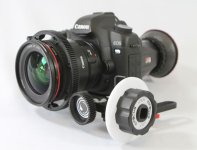
A poor mans follow focus is something like using a thick zip cord, gaff tape, wheels or anything under say $50 that turns the focus ring without actually touching it. Skate wheel example: http://vimeo.com/1616370
Lol, second that..
Auto focus will never be a type of follow focus. Auto focus however can replace the need to manually focus either normally or with a follow focus. So using the Picture AF feature you can set your focus... then start your recording. But you cant do this while recording so its not really a type of auto focus... just a work around of pulling focus manually?
A poor mans follow focus is something like using a thick zip cord, gaff tape, wheels or anything under say $50 that turns the focus ring without actually touching it. Skate wheel example: http://vimeo.com/1616370
Doing any kind of narrative stuff, music videos, or commercials (understand the utility for event and doc work) you should have your DP card pulled for even thinking about using auto focus.
Lol, second that..
Attachments
Last edited:
That is the regular AF function available in Live View. From your description he was using the slower less accurate contrast detect AF which can also be used while shooting video. I don't know why he didn't use the vastly superior Quick AF which flips the mirror down & hits focus just like when you take a still & goes beep to confirm. We use the Quick AF method all the time.Ok i was wondering if af worked in video mode at all. Heres the thing...just finished a 3 day shoot with a japanese crew. Dp has two cams going during interviews, a wider mcu that i babysat without really ever touching, and a cu cam he manned and adjusted while shooting. On my cam, the static cam, he would center the little white box on the subjects face, and hit the "af on" button. He would hold it for maybe two seconds, the box would turn green, and you could see the exposure on the lcd change for a moment, and hear something whirring. So SOMETHING was happening. Was that magic lantern or was this guy just wrong? Im pretty familiar with the 5dm2 but ive never messed with af or ml so ignorant on both subjects.
Last edited:
Does quick AF work WHILE the video is recording?
I understand it's a cheesy, amateurish, etc. way to do it (as I said in the original post), but I'm wondering if it might be a last resort for a shot where I'm both operating handheld, and moving (walking) at the same time. I don't see how I can watch focus marks/sticky arrows/anything on the lens and frame a shot at the same time. I'm trying to get an extra crew person for that day but as it's an unpaid production with a constantly fluctuating schedule, you never know. I do like the idea of using a piece of gaff tape and knowing that when it's stretched, you're on your second mark.
I understand it's a cheesy, amateurish, etc. way to do it (as I said in the original post), but I'm wondering if it might be a last resort for a shot where I'm both operating handheld, and moving (walking) at the same time. I don't see how I can watch focus marks/sticky arrows/anything on the lens and frame a shot at the same time. I'm trying to get an extra crew person for that day but as it's an unpaid production with a constantly fluctuating schedule, you never know. I do like the idea of using a piece of gaff tape and knowing that when it's stretched, you're on your second mark.
Quick AF doesn't work while shooting but the slower Live AF & Face Detection AF can still be used.
In Quick AF mode the mirror flips down so that phase detection autofocus can be used just like when you are taking stills. Live and Face Detection Live use contrast detection autofocus because the mirror is kept up and out of the way. Contrast detection is a slower mode of autofocus than phase detection but is certainly somewhat usable. It's not continuous autofocus like you would get on a proper camcorder. It's more like Push AF that you get on proper camcorders. It is slow & tends to hunt especially if there is not a lot of light or contrast so it will screw up your shot for a second or two which is OK if you have a second camera or can drop in a cutaway during the edit. From some brief testing I did on the Canon booth at an exhibition the Live AF mode seems much faster & quieter on both the 1DX & 5D3.
One gotcha is that you must delve down in the menus to select which AF mode you will use so you cannot easily use Quick AF prior to rolling & then Live AF while shooting.
In Quick AF mode the mirror flips down so that phase detection autofocus can be used just like when you are taking stills. Live and Face Detection Live use contrast detection autofocus because the mirror is kept up and out of the way. Contrast detection is a slower mode of autofocus than phase detection but is certainly somewhat usable. It's not continuous autofocus like you would get on a proper camcorder. It's more like Push AF that you get on proper camcorders. It is slow & tends to hunt especially if there is not a lot of light or contrast so it will screw up your shot for a second or two which is OK if you have a second camera or can drop in a cutaway during the edit. From some brief testing I did on the Canon booth at an exhibition the Live AF mode seems much faster & quieter on both the 1DX & 5D3.
One gotcha is that you must delve down in the menus to select which AF mode you will use so you cannot easily use Quick AF prior to rolling & then Live AF while shooting.
Thanks. I'm wondering if the cam was moving one could hide the autofocus hunting by pressing the button at the right time during the move. These scenes WILL be lit, so we'll see if that helps. At any rate, it's worth 5 or 10 minutes of trying rather than not messing with it at all.
Ok, so, if anyone's interested, I did got ahold of a 5D and did a little test movie trying to use the Live AF (I'm not posting it so you won't see a link). Focusing issues aside, it doesn't matter 'cause THE ENTIRE EXPOSURE CHANGES FOR A MOMENT WHENEVER YOU ENGAGE THE AF! So, that's a dealbreaker. A little focusing hunting in the middle of a move I would have at least entertained as being usable. The image magically brightening then darkening again during a shot. . .no.

thatwalshguy
Member
You can auto-focus all you want, but after the rolling starts she won't focus again.
I [am lazy and] sometimes do that, but it's best to start training yourself to get used to it! After a couple hundred follow focus moves, you should be keeping subjects in your DoF like a champ
I [am lazy and] sometimes do that, but it's best to start training yourself to get used to it! After a couple hundred follow focus moves, you should be keeping subjects in your DoF like a champ
One gotcha is that you must delve down in the menus to select which AF mode you will use so you cannot easily use Quick AF prior to rolling & then Live AF while shooting.
This was true of the 5D2. With the 5D3 when set to Quick AF it also has Live AF active while shooting. It's not perfect & does screw up the video for a second or two but in a run & gun situation can be easier &/or quicker than whipping round & hunting for focus manually.You can auto-focus all you want, but after the rolling starts she won't focus again.