Just a quick question and excuse my ignorance (i'm use to using mini dv tape and firewire). How can i upload footage to my pc with the sdhc cards? I know card readers built into the computer can be used but i dont own one currently. How else can i do it is there a standard usb 2.0 cable every one uses or a sdhc card usb stick thats great for uploading? I dont want to buy something rubbish so any products or links would be much appreciated..... I feel so helplessly clueless but im learning!

Navigation
Install the app
How to install the app on iOS
Follow along with the video below to see how to install our site as a web app on your home screen.
Note: This feature may not be available in some browsers.
More options
You are using an out of date browser. It may not display this or other websites correctly.
You should upgrade or use an alternative browser.
You should upgrade or use an alternative browser.
Uploading footage to the computer
- Thread starter taras4444
- Start date

Yea .. you just need a SDHC card reader for your computer. Connect the reader via USB cable
and slap the SDHC card in there and it will look like a new disk drive. You can copy the contents
to a folder on your hard-drive. I recommend copying the card in its entirety (all folders) (although
you can just copy the PRIVATE folder and FCP will be happy).
jeff
and slap the SDHC card in there and it will look like a new disk drive. You can copy the contents
to a folder on your hard-drive. I recommend copying the card in its entirety (all folders) (although
you can just copy the PRIVATE folder and FCP will be happy).
jeff
Sweet thanks ill buy that lexar thing on amazon, it should be fine with both lexar and panasonic cards right? And what is this whole shot put pro software thing? Would i copy the card entirely onto the pc then do the shot put pro thing for analysing it or something? And adobe should be ok to get the footage right off the computer shouldnt it? Wow its so strange from not using mini dv tapes!
Also for back up if i got the following cable http://www.argos.co.uk/static/Product/partNumber/6763664/Trail/searchtext%3EUSB+2.0+CABLE.htm that should be able to connect the cam directly to a pc yeah? As i might buy one quick just to check something while i wait for the reader.

Oliver Rush
Well-known member
Also for back up if i got the following cable http://www.argos.co.uk/static/Product/partNumber/6763664/Trail/searchtext%3EUSB+2.0+CABLE.htm that should be able to connect the cam directly to a pc yeah? As i might buy one quick just to check something while i wait for the reader.
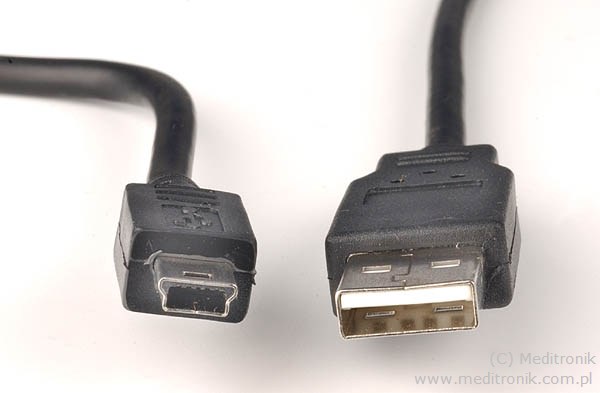
That will not work. You need a USB to Mini-USB cable. It looks like this:
Last edited:
Oliver Rush
Well-known member
cheers dude for that! saved me some cash, any good brands i should buy for best data transfer?
No Problem...
Honestly, it is a USB cable. Don't over think it. As long as it connects and stays connected as long as you need it to be, it will work. Buy whatever is cheapest with the proper connectors.