Upgrading Intel i3 in mid 2010 iMac to i7 for FCP7, Premiere, and AE

BrandonT

Well-known member
Hello all. I have a mid 2010 iMac. Model 11,3. It has an Intel i3 at 3.2 GHz.

http://www.everymac.com/systems/app...e-i3-3.2-27-inch-aluminum-mid-2010-specs.html

I bought it in an emergency in Oct. 2010 (had two large projects with deadlines approaching and my MBP died). So I had to get a new credit card and didn't have the extra $300 to upgrade past the i3. I still love the machine, but render times are really agitating me. I do a lot of batch encoding. And I color grade everything that I do. I'm currently using FCP7. I'll eventually force myself to Premiere CS6, which I understand works better with rendering and using gfx card (question about that coming up).

I'm already convinced that I'm going to replace the processor. Here's the guide that is getting me started if anyone is interested.

http://www.ifixit.com/Guide/Upgrade+iMac+Intel+Core+i3+CPU+to+Core+i7/8670/1

This is the processor that I have to use as the replacement. About $200 USD for a used one. I don't believe there is any other model that I can use (besides the same line of i5). It is an Intel i7-870 at 2.93 GHz. From what I have read, it can be OC'd, but I don't care to do that.

http://ark.intel.com/products/41315/Intel-Core-i7-870-Processor-(8M-Cache-2_93-GHz

So I was just curious if anyone had any idea what the step up would give me-- how much better it would be. For example: I just rendered a 3 minute video in FCP7 that was color graded (red line above everything). Also, it was 1080p source video in a 720p timeline (so I can "zoom" in the edit). ProRes 422 LT. Before I stepped away to let it render for playback, the bar said 20+ minutes.. probably was a little more.

I believe that FCP7 ONLY uses processor power and doesn't tap into the graphics card resources. Is this correct? And that Premiere does do this with certain types of cards. This has a Radeon HD 5670 with 512 MB. I've kind of looked into what it would take to upgrade this, but I'm thinking that would be significantly more of a task than changing out the processor. And I use the MDP as an input.. i.e., my Windows PC can use the 27" iMac as a monitor for video games. I would be afraid that that kind of manipulation might break that functionality.

So am I right in my thinking that the processor is the more important component for my uses vs the gfx card?

I don't use AE extensively. I want to use it more, but I don't know if I'll get the chance to learn it more any time soon.

I'm also thinking about upgrading the 4 GB of RAM to 16 GB. Would the difference be significantly noticeable?

Thank you!!
 
Last edited:
Premiere Pro will NOT use your GPU. It will only use NVidia CUDA cards, with the exception of a couple of late model MBP ATI chips (which you don't have).

While Premiere Pro will attempt to play a LOT more without rendering AND edit native footage, it's not going to be significantly faster when actually rendering, which includes export. You may also have to edit at 1/4 res for it to play at all with an i3.

I went from FCP7 to Premiere Pro because I needed to edit a lot of native footage and FCP X sucked big time. the latest updates to FCP X have made it significantly more usable and on regular Mac hardware it's also significant;y faster. If you looked at FCP X and dismissed it in the past, take another look before making your mind up for Premiere Pro. you may just be pleasantly surprised.

Upgrading RAM will make a significant difference to both FCP X and Premiere Pro. Running Premiere Pro in 4GB would be far less than optimal. We won't run Premiere Pro on anything less than 12GB, but you could take your chances.... :)

Download both trials and see how they go :)
 
Computers need a system approach. Upgrading one component is usually not going to net you much.

Ideally you want internal RAID but 3 internal drives (system/program, media drive and a drive to render to) will help immensely.
A CUDA card if you use Premiere.
You could probably get by on Premiere with 8 gigs but AE loves memory.
For color grading you really need to dump the 6 bit low gamut iMac monitor.
If you have any plans on using DaVinci lite think 2 graphics cards.
 
Computers need a system approach. Upgrading one component is usually not going to net you much.

Some years back, someone I worked with decided to upgrade his processor. Then he had to upgrade his motherboard to accomodate the CPU he wanted. Then he decided needed a bigger hard drive. And while he was at it, should probably get a bigger power supply, which required a new case that would fit the MOBO and PSU better...

At the end of the day, I think that the only thing he kept was his old keyboard and mouse.
 
In reply to nw and arnie-- it's an iMac, so there's only so much I can do. RAM is easy, processor is doable, and I could even add an internal SSD, but I'm not going to. But nw, I'm not going to scrap a two year old $2000 machine. I don't edit in 10 bit color-- really the majority of my work goes to web and on the occasions that I do have something on the air, it's in standard definition (no infrastructure for local HD commercials.. grrr). So I do agree on your systematic approach in general, but I'm just trying to improve what I have. arnie-- lol, yeah, I'm used to that with my gaming rig. Really, if I stuck Premiere on it, it would fly. But I would start getting frustrated having to work in Windows for very long.

Exact-- thanks for all of the helpful info. It's hard to keep track of which NLE's will or won't use GPU and if they do, which models, etc. I'm liking what I'm seeing with FCPX a lot more than when it came out. But it still comes down to one very simple thing for me: being able to selection a range (in point/ out point) in the timeline and just export that. As far as I can tell, it doesn't have that capability yet.

One other question, do you recommend a certain brand of RAM? This model uses PC3-10600 DDR3-- not sure if yours would use the same or if you even have anything besides Mac Pros. I upgraded the RAM in my MBP a while back and ended up with some issues that made me just go back to the stock. It was compatible and I'm sure the highest rated for Mac on Newegg. Probably just some issue with that model of MBP.

Alright, I think I'll buy the parts I need and open this thing up as soon as I wrap up my current big project. Wish me luck! lol.
 
Exact-- thanks for all of the helpful info. It's hard to keep track of which NLE's will or won't use GPU and if they do, which models, etc. I'm liking what I'm seeing with FCPX a lot more than when it came out. But it still comes down to one very simple thing for me: being able to selection a range (in point/ out point) in the timeline and just export that. As far as I can tell, it doesn't have that capability yet.


It absolutely DOES have that capability and I use it quite often.

On the sequence / timeline / project (call it what you will) you simply set an In and an Out then go to Export, just like any other NLE. Granted, this wasn't there in the earlier versions, but it's there now. FCP X has made big strides lately and there is a lot more in there than most people realise.

For RAM I typically buy Crucial and haven't had any problems. YMMV.
 
My thoughts.... Save your cash for a new iMac and use your old iMac as a second monitor.

My new iMac 13,2 Core i7 3.4GHz runs rings around my old iMac 11,1 Core i7 2.8GHz model.
 
As with almost everyone, I love to have the newest/biggest/best of everything. And just as most people, I havent got the money to feed those cravings.
The i3 is perfectly fine for general editing and some light rendering. With a good chunk of RAM you should be fine for most projects, but yes... rendering things will go slow.
I work on both an i5 Thunderbolt iMac and an older Intel Core Duo... right before the i3.
Between the two, the only REAL difference is when it comes to rendering (almost 3 times faster). But general editing, there isn't a noticeable difference between the 2.
Mind you, im usually working in FCPX and some flavour of ProRes.
I think my old Duo will be perfectly fine for at lest another year or 2...for FCPX and Premier CS6.
I frankly cant do much with my Duo when I work in After Effects, its just too slow. Consider your software needs and go from there.
On a side note, I installed a SSD via Thunderbolt (Segate Flex - Crucial SSD) and my i5 is a monster! A SSD will do wonders for ANY computer... it wont speed your renders, but you'll save so much time navigating and loading... even with an older computer. (Home Brew Fusion Drive)
 
On a side note, I installed a SSD via Thunderbolt (Segate Flex - Crucial SSD) and my i5 is a monster! A SSD will do wonders for ANY computer... it wont speed your renders, but you'll save so much time navigating and loading... even with an older computer. (Home Brew Fusion Drive)

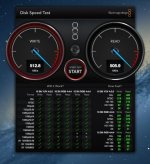
Here is a Thunderbolt speed test of a low cost 9TB RAID from 3 Seagate Backup Plus Desktop drives.
 

Attachments

  • iMac Speed Test.jpg
    iMac Speed Test.jpg
    73.2 KB · Views: 0
It absolutely DOES have that capability and I use it quite often.

On the sequence / timeline / project (call it what you will) you simply set an In and an Out then go to Export, just like any other NLE. Granted, this wasn't there in the earlier versions, but it's there now. FCP X has made big strides lately and there is a lot more in there than most people realise.

For RAM I typically buy Crucial and haven't had any problems. YMMV.


AWESOME! It may not sound like it, but I actually taught FCPX in a few beginners/ novice production courses last spring. When I was still in undergrad, I taught FCP 7 (and/ or lower) on an individual basis. The old version was pretty difficult for students to get the hang of starting out-- it took the one-on-one approach for it to work. But FCPX was significantly easier to teach to a class of 15 or more at a time and almost all of them could pick it up in two or three class sessions and start picking up the more advanced stuff. Most of them had used iMovie (a few hadn't), but other than one or two, hadn't ventured into anything more complex. But I only spent enough time to get acquainted with it from the students' perspective and not to use it for a real job with workflow and efficiency being tested. Plus I don't know how up to date the tech services had it and which features have been added since then.

I see that you can get a 30 day trial-- I'm going to try it out for some real work and see how it goes.


My thoughts.... Save your cash for a new iMac and use your old iMac as a second monitor.

My new iMac 13,2 Core i7 3.4GHz runs rings around my old iMac 11,1 Core i7 2.8GHz model.

David, while I can see where you're coming from, buying a new iMac to replace my not quite 2.5 years old iMac that cost $2,000 would be wasteful and not financially responsible. I have done well, especially in the 4th quarter of 2012 and can definitely afford it. But that's money that I could spend on a new GH3 or nicer lenses, software, etc. Especially when the machine still works great-- it's just not quite as fast as I would like in one aspect. The better buy would be a Mac Pro, which I could update the hardware on easily (and use the iMac as a monitor). I'm not there yet, either, though.

I do appreciate your giving your POV, though. As far as using it as a monitor, I actually do that with my PC (for gaming, yeah, I know.. :P). It works really well for anyone interested. The gfx card has to support mini display port out or (full size) display port out, which isn't something every card has, so you have to buy specifically with that.


As with almost everyone, I love to have the newest/biggest/best of everything. And just as most people, I havent got the money to feed those cravings.
The i3 is perfectly fine for general editing and some light rendering. With a good chunk of RAM you should be fine for most projects, but yes... rendering things will go slow.
I work on both an i5 Thunderbolt iMac and an older Intel Core Duo... right before the i3.
Between the two, the only REAL difference is when it comes to rendering (almost 3 times faster). But general editing, there isn't a noticeable difference between the 2.
Mind you, im usually working in FCPX and some flavour of ProRes.
I think my old Duo will be perfectly fine for at lest another year or 2...for FCPX and Premier CS6.
I frankly cant do much with my Duo when I work in After Effects, its just too slow. Consider your software needs and go from there.
On a side note, I installed a SSD via Thunderbolt (Segate Flex - Crucial SSD) and my i5 is a monster! A SSD will do wonders for ANY computer... it wont speed your renders, but you'll save so much time navigating and loading... even with an older computer. (Home Brew Fusion Drive)

Yeah, exactly how I feel. I'd love to buy something new, but there's just no reason at all to do so right now. I can get the processor for about $200 USD and the required tools (suction cups for the front glass, torx screw driver set, thermal paste remover, etc.) will be less that $50 USD. So that's $250 versus ~$2000. Still, I appreciate everyone's comments-- I don't want it to sound like I don't.

daihard, do you think going from this i3 to that particular i7, that I could expect rendering to go 3x faster? I do a lot of batch encoding with Compressor, besides the aforementioned color grading in FCP7.

Also, at the risk of sounding less knowledgeable about computer hardware than I actually am, what exactly does RAM contribute when it comes to editing? As in, what aspect of it will be faster/ have better performance with more RAM?

As far as SSD, I missed out on the first model with Thunderbolt by just a few months. Grr! But I really can't complain because this machine saved me when the logic board failed on my MBP while I had two large (in money and in scope) narrative shoots that had just finished that needed to be wrapped up, as well as saving me from losing the client who has been my best by far right now because of the delay on something that needed quick, weekly turn arounds.
 
@BrandonT Well, frankly... i comes down to patients. Even with my i5 and working in FCPX... ill still apply my grading and sweeping effects last, hit render and go make some coffee/shower/bike ride.
But yes, the i5 is much faster when im applying effects compared to my Duo. But I can get work down at almost the same rate if i plan how I want to use the computer. Generally, I can do most editing and smaller scale effects just fine with the Duo and when i need a break I apply the larger effects. Your i3 is probably 10-15% faster then my Duo. However my i5 is probably around x2-X3 times faster still.
Keep in mind, i have a pretty decent setup which saves me a few mins here and there. A Strip raided FW800 2TB drive for storing my reference files, My OS on a SSD drive, and the internal SATA 3 Hard Drive as my main editing disk.
When im using the Duo, i just have a single FW800 drive as my editing target and the OS and scratch disk is the main internal drive.

RAM will help with general things. Such as rendering, opening various plug'ins, and running a few programs at once. Your using FCP7, and i think the least amount of beneficial RAM was around 8Gigs. After that, there was no noticeable improvement in FCP performance However the newer applications will use up almost all the RAM you have which will result in faster performance.
A good research tool would be to check out:
http://www.barefeats.com/
They will compare your i3 to i7 computers using FCP and Adobe products... and you will see, there is at least a 50%-100% gap between your older i3 and the i7.
But like I said. If the i3 gets you through another year, you may have a MUCH better iMac with RETINA coming out... Thunderbolt will be cheaper and you'll have USB 3 ports. So basically everything will be faster and cheaper in a year...all for under $1500 and 300%-600% faster as well. Dont forget, most all the apps now rely on having a HUGE graphics card and will run sometimes twice as fast even if the CPUs are even.
 
Last edited:
Great website! Thanks for sharing that. Here's the particular article pertaining to my situation. Definitely worth it after looking at this.

http://www.barefeats.com/imac10v.html

Wow, you really think it'll have all that and be under $1500 (for the 27")? That will probably be upgrade time, then. But in the meantime, $200 for CPU and $100 to max out the RAM-- totally worth it.
 
David, while I can see where you're coming from, buying a new iMac to replace my not quite 2.5 years old iMac that cost $2,000 would be wasteful and not financially responsible. I have done well, especially in the 4th quarter of 2012 and can definitely afford it. But that's money that I could spend on a new GH3 or nicer lenses, software, etc. Especially when the machine still works great-- it's just not quite as fast as I would like in one aspect. The better buy would be a Mac Pro, which I could update the hardware on easily (and use the iMac as a monitor). I'm not there yet, either, though.
.

I understand, money is tight and we all must pick our battles when it comes to upgrading gear. If you feel a GH3 & lenses is a better purchase then you know best. I will say from experience though that throwing money at older technology by upgrading the processor can really be hit or miss, and usually the performance gains go unnoticed, or worse if an accident happens during the install. In my little world a computer for business use has roughly a 3 year lifespan before technology changes enough to warrant a new unit, and with you posting this thread it appears you have come to that point with your computer. Yes buying a new computer along with software upgrades is a hard pill to swallow. But if its for a business add it to the schedule and its all deductible business expenses. If it's a hobby then no it doesn't make sense to buy a new computer.

For what it's worth, I have a computer graveyard in my attic containing some of the most expensive setups of the day, AVIDs, Media 100, Silicon Graphics workstations, ProTools rigs, render farm boxes, along with tape decks like D1 & D2 that cost a small fortune. One thing is for sure... Technology sure has gotten faster cheaper better than it was 30 years ago! Or even 5 years ago for that matter!

Good Luck with your upgrades!

Dave
 
Last edited:
Thanks, Dave! Hearing about your expensive equipment graveyard is both depressing and kind of makes me feel better. That sounds really bad of me, but I guess just knowing that everyone who does this for a living is constantly sinking money into equipment that will be replaced a few years later. It's the thinking about the surplus of income that I have accrued in my bank account lately and how I could easily spend all of that in a day on equipment. lol. Yeah, I've been doing video production since 2005, and since 2010 professionally, on my own, as my main source of income (the other being teaching video production in college courses). Thank you for your well wishes!
 
Back
Top