Universal Color Correction after a Multiclip Edit

DNathan

Well-known member
I've got to be doing this wrong:

1. Sync clips
2. Make Multiclip
3. Edit Multiclip
4. Color correct individual clip and Copy it
5. Painstakingly select every clip from that camera angle and Paste Attributes to make the color correction universal.

Being self-taught has its drawbacks.
 
That's what I do currently, but it's tedious to go through a timeline clicking every second or third clip. I'm thinking there has to be a universal way to color correct one of the clips used in a multiclip. Color correction is easier for me after cuts because I can compare shots throughout the scene, but then I have to hop through the whole thing with the apple key down. Seems goofy.
 
Very easy!

Correct the first clip. Copy the clip. Cmd+F to bring up the Search function in the Timeline, search for that clip's name. Every instance is highlighted. Paste Attributes to one, they all are done. Be sure to collapse your multiclip FIRST.
 
Really helps if you know what to look for in the clips metadata, or if you name each camera's clips with a unique name (b_cam_2011_4_3_001.mov)

Otherwise yes, it is a bit of a pain in the ass, but at least you don't have to CC hundreds of different clips from different times!
 
ECSTATIC!

BenB, thank you. OMG, I knew it had to be possible!!! I tested it and it worked. One caveat to others: Be aware that it if you Find, say Clip #1, it will select every clip on every tab -- not just the one you're on. So if you want to be just *mostly* universal, go to the other tabs and Deselect All.

It's dangerous to try to peck out every 'Clip #1' from the timeline because some of them are very small and it's easy to leave one.

BTW, what do you mean by collapse the multiclip?

@Calomile, I name things 1, 2, 3, etc. I then sort by reel and it shows me where everything is. I bet you're a LOT more organized than I am though!!!
 
If you're editing, all shots from the same Master clip will have the same name in the Sequence. Thus naming and metadata is a non-issue with the technique I described.

Select All, right-click, Collapse Multiclip. Turns it into regular clips. If you need a multiclip function later, Select All, right-click, Uncollapse Multiclip. Saves stress on your CPU, also.

Then, use the frame comparison and hue matching tools in FCP to match the next "angle" with the first one you color graded, and repeat the Find/Past Attributes process. Super fast, super easy.
 
Could this affect the final render files? I get artifacts on Sequences over 1hr, even though Compressor has a two pass VBR, a 7.0 ave bitrate and an 8.5 max. If that's the result of uncollaped multiclips, that would change everything.
 
No, Compressor does not look at render files in FCP, multiclip editing of itself has no effect on Compressor. The content of what specifically you're editing could, though.

If you get artifacts, what type of artifacts? Does it happen on action shots, or still shots, or at transitions? Is the video going to/from interlaced to progressive?
 
artifacts.jpg


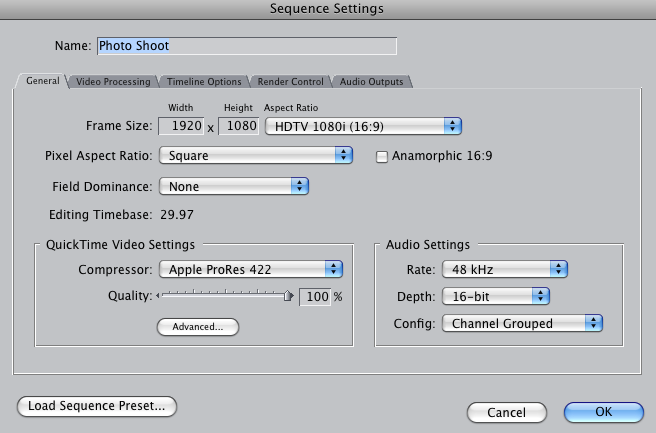
This kind of stuff. Wedding videos. Random times. Not in transitions or stills. The only interlacing appears in the settings in a place where I've been told it doesn't make it interlaced. The source is 1080p AVCHD:

picture10.png
 
Last edited:
Back
Top