Understanding "RAID" and the reasons/benefits of it vs Non Raid?

life4eva

Carbonite Member
Ok so I have always worked with a single drive. I just recently bought a raid enclosure which operates in Raid 0. To my understanding this requires two HDs and the data is split up between both of them allowing for faster read/write times.


Now the disadvantage I see to this is that you will fill up two Hds instead of 1. So can anyone who does video editing in FCP please tell me if Raid is worth it and why? Even if the write times were faster HDs cost money and I don't want to fill up two instead of one.
 
There are several types of RAID configuration. You're working with RAID 0, which splits the data evenly across multiple drives. It's not that you "fill up two drives instead of one." If you have two 500GB drives striped for RAID 0, and you ingest 150GB of footage, you're still only going to fill up 150GB between the two drives. They won't fill up any faster. They function together as a single 1TB unit.

RAID 0 does allow for faster performance. The downside is that, if one drive fails, the data on the other drive cannot be used.

RAID 1 is mirrored, meaning that everything is captured to both drives. In that case, two 500GB drives striped for RAID 1 only allow for 500GB of storage, thus you will fill up two drives instead of one. The benefit with RAID 1 is that, if one drive fails, you have the other as an exact duplicate and can keep working.

Either way, as there are good and bad points to each RAID configuration, it does speed up drive performance for editing.
 
Last edited:
There are several types of RAID configuration. You're working with RAID 0, which splits the data evenly across multiple drives. It's not that you "fill up two drives instead of one." If you have two 500GB drives striped for RAID 0, and you ingest 150GB of footage, you're still only going to fill up 150GB between the two drives. They won't fill up any faster. They function together as a single 1TB unit.

RAID 0 does allow for faster performance. The downside is that, if one drive fails, the data on the other drive cannot be used.

RAID 1 is mirrored, meaning that everything is captured to both drives. In that case, two 500GB drives striped for RAID 1 only allow for 500GB of storage, thus you will fill up two drives instead of one. The benefit with RAID 1 is that, if one drive fails, you have the other as an exact duplicate and can keep working.

Either way, as there are good and bad points to each RAID configuration, it does speed up drive performance for editing.


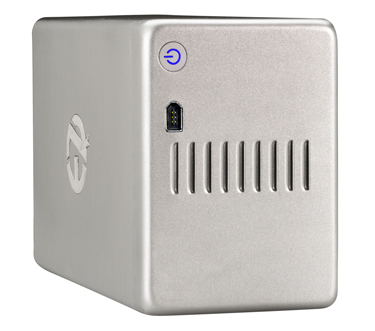
Thank you. I just bought this enclosure
http://eshop.macsales.com/item/EZ Quest/E61302/


ThunderPro.jpg


I installed one hard drive in there and it did not work. I was told that I need two drives in there so it can work as it is a raid enclosure that will only work with two drives?
 
I installed one hard drive in there and it did not work. I was told that I need two drives in there so it can work as it is a raid enclosure that will only work with two drives?

Pretty much. If you bought a RAID enclosure, it is designed to function as RAID array. That requires a second drive, without which it has no place to put the other half of the data.

But again, at RAID 0, adding the second drive adds more storage capacity. In the video editing world, the rule of storage really is "the more, the merrier."

EDIT: The other major benefit here is that purchasing new Sata drives each time you fill the previous drives is much less expensive than buying entire new FireWire drives each time you fill one up. In the long run, this is a much more cost-effective way to archive your projects.
 
Last edited:
I just don't feel comfortable nor like the idea of having my material spilt into two drives. Because that means each they would always have to be together. I just wanted to buy a firewire 800 enclosure kit to use with my Mac. When one drive fills up , I archive it and buy another. With this option I would have to have two drives together I don't want that.


Since I am on a new iMac all I want is a firewire 800 enclosure so I can work. I am currently using a 2.5" Lacie rugged external drive and it works great, but within the next project or two it will fill up. Ideally I would love to use my eSata enclosures but my iMac does not have an eSata port :(

I would have loved to buy Mac Pro but I did not have the money . In the future I might sell my iMac and buy a Mac Pro which would help me with a lot of my headaches right now. Even an older Mac Pro might have been better than this new iMac as speed isn't everything.

I could have installed 4 internal Hds inside of an old Mac Pro and still have all kind of options for expanding.........


FYI... here's some good info. on all types of RAID:
http://emusician.com/gencomput/back_up_backup/index1.html

Thank You
 
I just don't feel comfortable nor like the idea of having my material spilt into two drives. Because that means each they would always have to be together. I just wanted to buy a firewire 800 enclosure kit to use with my Mac. When one drive fills up , I archive it and buy another. With this option I would have to have two drives together I don't want that.

Yeah, you'll need to keep two drives together when you archive them... but that's where clear labeling comes in handy.

Yeah, you fill up two drives instead of one... but you still get the total storage space of two drives. You may be buying two drives at a time, but you buy only half as often. Plus you get the faster performance. And with FW800 and HD video, that does matter.
 
If you only wait until a drive or drives are filled to make an archive or backup copy, then expect for the worst. RAID 1 is the simplest form of protection of data, or using a sync app on a very regular basis. I look at that $59 enclosure and just wonder when you won't be able to access the drives, it's just a matter of time, also on top of that is if and when a drive itself may fail.

Data is the single most important thing. Insurance can replace a computer, cameras, all physical goods, but nothing will give you back your data if the most basic steps of protection aren't practiced.

If you have 2 drives in RAID 0 in that enclosure then I say have one other external of equal cumulative size that syncs regularly as a backup.

Backing up comes first, archiving comes second.

I run 3 drives for all data, 2 drives for all OS's. Data is on mirrored pairs in a RAID box while the third bare drive is synced regularly via a SATA dock and kept offsite. To me that's minimum protection from fire, damage, drive failure, raid box failure, bridge component failure. None of this stuff is cheap, generally why client work pays for all this and not just a hobby.
 
I agree with photonashville. You really need to worry about backing up or having some kind of redundancy with your RAID.

RAID 0 will give you more speed, but if one of those drives fails you're screwed.
 
If you only wait until a drive or drives are filled to make an archive or backup copy, then expect for the worst. RAID 1 is the simplest form of protection of data, or using a sync app on a very regular basis. I look at that $59 enclosure and just wonder when you won't be able to access the drives, it's just a matter of time, also on top of that is if and when a drive itself may fail.

Data is the single most important thing. Insurance can replace a computer, cameras, all physical goods, but nothing will give you back your data if the most basic steps of protection aren't practiced.

If you have 2 drives in RAID 0 in that enclosure then I say have one other external of equal cumulative size that syncs regularly as a backup.

Backing up comes first, archiving comes second.

I run 3 drives for all data, 2 drives for all OS's. Data is on mirrored pairs in a RAID box while the third bare drive is synced regularly via a SATA dock and kept offsite. To me that's minimum protection from fire, damage, drive failure, raid box failure, bridge component failure. None of this stuff is cheap, generally why client work pays for all this and not just a hobby.

I completely understand but we all know if a Drive will fail it will fail in it's first months of life. Also I buy the best internal 7200 rpm drives out ( reviews, performance , etc. )

Finally by the grace of life I have never had a drive fail on me in 10+ years of professional applications that I have been using them as I only use them for work and nothing else. While it's easy for you to say that a client pays for everything, that is not always the case and in this economy sometimes I work just to break even.

While things can/do get better over time right now this is my method for archiving and there is no need for me to store my material on a 3rd drive. I keep all of my files on 2 hard drives while doing a project , then when it is done I archive the files to only one drive but I keep multiple copies of the final edit on 2/3 drives + online.


So yeah I'm not going to back up to 3 hard drives, I only back up to one and use my computers hard drive as a second backup but only while I'm working on the project. Finally stop thinking or worrying about the price of this enclosure ( $59 ) as that has NOTHING to do with performance or the excellent reviews this enclosure has received.

I agree with photonashville. You really need to worry about backing up or having some kind of redundancy with your RAID.

RAID 0 will give you more speed, but if one of those drives fails you're screwed.

Which it the reason I will not use Raid 0. I will only use 1 Hard Drive for backup + my internal computer Hard Drive while I am working on a project giving me a total of two Hard Drives while working currently on one project at a time.
 
Drives do not ONLY fail in the first few months of life. The 2 Seagates I got replaced this past year were both about 4 years old (Seagate 5 year warranties). And so far the only drives I have ever needed to get replacements AND still under warranty for such replacements.

One of the failure points for tons of external enclosures is simply the bridge and whether quality components were used. OWC's own brand of enclosures use far higher quality of bridge components. Not sure how a $59 multi drive enclosure package could. That's my concern.
 
Drives do not ONLY fail in the first few months of life. The 2 Seagates I got replaced this past year were both about 4 years old (Seagate 5 year warranties). And so far the only drives I have ever needed to get replacements AND still under warranty for such replacements.

One of the failure points for tons of external enclosures is simply the bridge and whether quality components were used. OWC's own brand of enclosures use far higher quality of bridge components. Not sure how a $59 multi drive enclosure package could. That's my concern.

I understand but as you can see this is only an enclosure, which does not need to be expensive = quality. Regardless thank you for your help and real life problems that have happened!
 
I will only use 1 Hard Drive for backup + my internal computer Hard Drive while I am working on a project giving me a total of two Hard Drives while working currently on one project at a time.

As a word of caution: never put working media on your operating drive. If you use it as your editing drive, you're going to bog the drive's read/write down too much for the NLE to function. And if you fill up your OS drive even just for storage, you'll slow the system down.
 
Buy two of these and get so more use for the long term: http://eshop.macsales.com/item/Newer Technology/FWU2ES2HDK/

I have two and can drop in any pair of drives as RAID 1 and connect to any computer. I think a much better use of money. No further enclosures needed and QUAD interface. They are $10 less each for email subscribers.

An enclosure is just a plastic or metal housing, the bridge is what you're really paying for. So cheap price, much less reliable and quality components. Best of luck.
 
Buy two of these and get so more use for the long term: http://eshop.macsales.com/item/Newer Technology/FWU2ES2HDK/

I have two and can drop in any pair of drives as RAID 1 and connect to any computer.

I'm a bit confused on that - aren't you having to setup a software based RAID using those docks (seeing as they are just docks, no hardware RAID capability)? In which case, while your system might recognize the RAID 1, you can't just take those docks to any other system and boot up the RAID can you?
 
Yes. I have Apple Disk Utility created RAID 1 pairs. I can plug those into another mac and they run. I have done that going from my G5 to Mac Pro. The only hardware RAID 1 I have is an OWC dual drive unit that I use as a mobile RAID to work at home if needed.
 
Last edited:
Interesting - hadn't occurred to me that any mac would recognize the raid.
I have one of those Voyager docks, and they're absolutely indispensible - never thought about using two to create a raid. Interesting idea.

Thanks for the tip.
 
Back
Top