C70: understanding AF

morgan_moore

Major Contributor
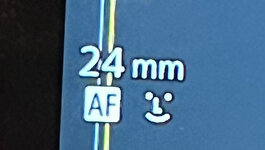
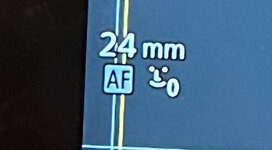
Dummy Alert! I have a little time with the C70 and am trying to understand AF, I have my r6 do two things.. 1) focus on a face if you can find one 2)focus continuously on whatever is in the box. I toggle through these two modes using the lens wheel. On the C70 Im struggling to understand how to do this and the iconography, maybe someone would be kind enough to step me through. and explainge the icons? Surely Im after AF (iluminated to 'focus on the box) and AF and Face illuminated to focus on the face if there is one. I dont see why AF is ever not illuminated I have no idea why the face blows a smoke ring. (lens is rf24-70)

edit
I now know that face blowing smoke is face only. - im not sure what the other is or what 'focus on the box' would look like..
 

Attachments

  • WhatsApp Image 2026-02-05 at 15.56.35.jpeg
    WhatsApp Image 2026-02-05 at 15.56.35.jpeg
    97.9 KB · Views: 3
  • WhatsApp Image 2026-02-05 at 15.56.48.jpeg
    WhatsApp Image 2026-02-05 at 15.56.48.jpeg
    137.4 KB · Views: 3
Dummy Alert! I have a little time with the C70 and am trying to understand AF, I have my r6 do two things.. 1) focus on a face if you can find one 2)focus continuously on whatever is in the box. I toggle through these two modes using the lens wheel. On the C70 Im struggling to understand how to do this and the iconography, maybe someone would be kind enough to step me through. and explainge the icons? Surely Im after AF (iluminated to 'focus on the box) and AF and Face illuminated to focus on the face if there is one. I dont see why AF is ever not illuminated I have no idea why the face blows a smoke ring. (lens is rf24-70)

edit
I now know that face blowing smoke is face only. - im not sure what the other is or what 'focus on the box' would look like..

Page 84

Focusing starts on Page 78
 
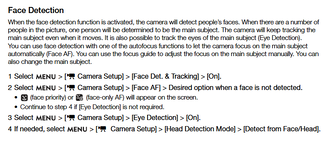
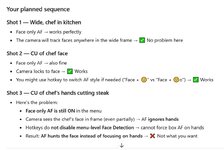
OK .. I (and chat GPT) seem to detect the anomaly. When Face detect is on one can select via hotkey "face only" or "face or box" but the only way to select "box only" is to do a menu dive. I would expect to do a hotkey between shot 2 and 3.. but none is apparently availabe!
c70_chat.JPG
 
WIthout a menu dive exiting "face detect" any shots with faces in will not concentrate on an object... trophy, gun, steak knife, pole dancers curvy bottom - can this be correct!
 
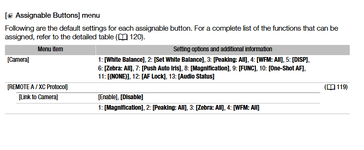
SOLUTION! to exit (or not) face or box mode ,.. one assigns not 'face' but 'face det and tracking'

(**** gpt was wrong)
 
Last edited:
Chat GBT knows better than the camera manual. I prefer how Sony does tap to focus on what you want to track. AF has gotten complicated.
 
Last edited:
The Canon AF face settings are often best thought of in the context of, "what happens when the face/subject leaves the frame?"

Face-only AF (the icon + "o") is literally just that, face only. It helps prevent the focus shifting elsewhere, e.g. to the background, if the subject leaves the frame.

Face Priority, looks for a face but if not found looks for the next best thing dependent upon the size and placement of the focus area you've selected. So, if no face is found or if the subject leaves the frame the focus shifts to whatever is within the focus area you selected. That could be the background or an object currently within the focus area.

A Canon, like a Sony, can also do tap to focus on what you want to track. To do so off face detect must be turned off, put the focus zone in "Whole Area", and tap the screen on the item you want to track. To exit the tracking hit the cancel button.
 
The Canon AF face settings are often best thought of in the context of, "what happens when the face/subject leaves the frame?"

Face-only AF (the icon + "o") is literally just that, face only. It helps prevent the focus shifting elsewhere, e.g. to the background, if the subject leaves the frame.

Face Priority, looks for a face but if not found looks for the next best thing dependent upon the size and placement of the focus area you've selected. So, if no face is found or if the subject leaves the frame the focus shifts to whatever is within the focus area you selected. That could be the background or an object currently within the focus area.

A Canon, like a Sony, can also do tap to focus on what you want to track. To do so off face detect must be turned off, put the focus zone in "Whole Area", and tap the screen on the item you want to track. To exit the tracking hit the cancel button.
Whatever.

I know how I shoot and what I want. and it doesn include "the next best thing"

Wide, Med, CU of face, CU of hands OTS.

Any camera that cannot accomodate this is going in the trash.

As it happens the canon C70 can accomodate this.

by toggling ''face det and tracking'" whatever the fk that means, but not by toggling Face "AF on" whatever the fk that actually means :)
 
Back
Top