GH3 Underexposed areas in Photos

heyrobert

Well-known member
Hey Everyone,

Just saw something. Note, I'm not a pixel-peeper, but this one bothered me a bit.

P1000311.jpg

I've noticed that sometimes, underexposed areas tend to gradient in a really weird/obvious way. Look at the bottom right corner. I shot this at a stop underexposed to exaggerate it a bit.

Is it just me? Or is this normal for anyone else. I've just seen it in a a couple higher-contrast photos I've taken. It's just annoying looking when a spot looks like a noisy mess. It's not a high ISO thing for me either which is what's weird about it. This was at ISO 500
 
sample.jpg

This is (I think) the picture where I noticed it first. Shot in RAW. 0 detail in the stuff that are a few stops lower. It's hard to see it here because it's a bit resized for some reason, but the edges look like the edges above in that lower exposure area. Shot at ISO 1600

Just weird because my videos look great/have solid dynamic range
 
Last edited:
heyrobert:

Check your monitor settings (Contrast, Brightness, and Sharpness controls available on the monitor itself). I don't see anything like you're describing but Contrast and Sharpness that is set too high on the monitor (and they come this way out of the box in a lot of cases) will "play games" with very minor artifacting and turn it into overly accentuated noise, gradients, and edge detail.

"Pull" everything back to "midpoint" and tweak from there in very small increments (with a good jpeg or tiff on the screen) until you get the desired amount of sharpness without anything messing with edge outlines or digital noise.

I've had to do this with my TV's, a Blu-ray of "Clash Of The Titans" showed way too much "grain" until I pulled sharpness back to around midpoint, I had one monitor that came out of the box with Contrast, Sharpness, and Brightness set to over 80%.

In your posted images I don't see anything like you're describing.
 
First, I need to say I am very pleased with my GH3. My prior camera was a hacked GH1. I've gotten some excellent stills from my GH1 by shooting raw, and never trying to push the image sensor beyond ISO 800. If I needed ISO 1600 for shots, then I knew I would lose detail and color saturation, and I would have to work like heck in LR to balance noise reduction with detail retention. In other words, ISO 1600 was a last resort for the GH1.

Now, with the GH3, it is possible to get reasonably detailed stills even at ISO 3200. It's so much nicer. The noise is very fine grained and almost film grain like, even at ISO 3200. The GH1 noise at ISO 800 and ISO 1600 was, 'blotchy' (for lack of a better term). It was not uniform and grain-like, like the noise I see at high ISOs with the GH3.

I don't have time to post any samples, so, I'll only describe a couple things folks might want to look into once they get their GH3s?

1) Just like the GH1 and GH2, adjusting the Noise Setting from -5 to +5 *does* affect the RAW image output. It seems to be more subtle than on my GH1 (and, in the GH3 the NR moves in the 'correct' direction, with -5=Less Noise Reduction="more" fine grain noise, with the ability to discriminate more fine details (be sure to test on a textured subject, like a doll's hair, or wood grain.) NR=+5 results in More Noise Reduction=Less fine detail detection. Again, this effect is much more subtle in the GH3 than in the GH1, but, as with the other GH cameras, the RAW files *are* affected by the NR setting (which you would think should only impact JPGs).

2) I accidentally seriously under-exposed a shot of my daughter in a snowy yard with some neighbor kids. When I pushed the exposure by about +2 stops, I immediately noticed a colored mottling to the snow. This was using the default settings of LR 4.3 for the GH3. There were pinkish and bluish blotchy areas in what should have been the white snow. The only way to remove them was to move the LR Vibrance slider from the default 0 setting to -50. I played with the Color NR in LR, but, it did not help this 'mottling' pattern.

3) Since then, I've experimented with shooting a flat subject like my bedroom wall. You need to look at 100%, and intentionally under-expose then push back up by +1 or +2 stops, but, inevitably there is a colored mottling pattern visible. It is only an issue if you serioulsy under expose and then push the exposure in LR, and, it's only really apparent if you look for it at 100% mag. But...it does seem to place a limit on the image sensor's ability to do certain things. So...I already know I can't recover a serioulsy uner-exposed image if I ever need it to be cropped such that it is ~ 100% size (but...how often would that happen?) Again..I can reduce the appearance of the color mottling by reducing the vibrance in the image but, of course that sacrifices some of the vibtance for truly colorfol objects.

As homework, any GH3 owners who are so inclined can try to reproduce my results. Try ISO 3200, shoot a flat neutral color surface like a wall (our walls are sort of off-white yellow), and, of course since the GH3 uses Contrast AF, you might need a light switch or some target with contrast to acquire focus :-) . Then, intentionally under expose the image and push it back up in LR (or Aperture or whatever). Then look at the image at 100% (yes, do some serious 'pixel peeping). I see distinct colored mottled patterns. Sometimes I can imagine that they are radial, perhaps from a spin-coated color filter array? It's something I never saw with my old GH1 (which I was kind-hearted enough to give to my friend, so, I can no longer do side by sides. But...I had my GH1 for 3 years +, and I know I would have seen it if this occurred with the GH1.
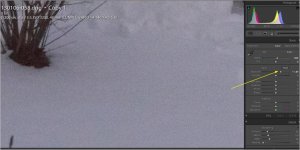
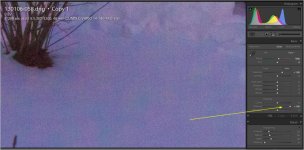
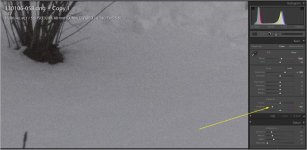
Again...the GH3 is a much more capable camera then my GH1, but...I do find this "color mottling", which can be created by intentionally under exposing, then pushing the exposure in post, somewhat disturbing. No way is it a show stopper. But...I made a mistake and accidentally under exposed a shot I wanted to catch...and then found I could not "correct" for it in post b/c of the color mottling when I boosted exposure, so...it was a 'real life' event. I was able to somewhat 'save the shot' by taking the vibrance slider down to -50, which attenuated the color mottling to the point it was not visible to me.

I'd be interested to hear if anyone else can reproduce such results?

ISO 3200, Under exposed, push +1 or +2 in post, look at 100%. I always see colored mottle patterns at 100%. Settings I used were Standard {0, 0, 0, 0, and -5} or Standard {0, 0, 0, 0, and +5} (just to investigate the SUBTLE difference in RAW images when adjusting the NR in the GH3.)

But, again..I want to repeat...the GH3 gives me much better stills then the GH1, and, I still haven't learned how to squeeze the most out of the GH3. I'm confident that in the 3 years I had my GH1 that I learned how to get the best out of it. And...yes...I realize that by under-exposing, then pushing in post, I am violating all the rules of ETTR and all that, but...it happened by accident in a real life quick shot I took at ISO 3200, (in S Priority with a much too fast shutter speed).

So. Long winded as usual, but...can anyone else with a GH3 reproduce the color mottling? Again, I don't see this as any kind of a show stopper, since it just prevented me from fully recovering from a terribly under exposed, hastily snapped shot. After all, it is up to the guy who clicks the shutter to make sure the exposure is correct! :-)

But...I haven't seen this interesting color mottling before, and wondered if other GH3 owners (or maybe, many other cameras?) have seen it as well?

Below I posted a portion of the blown image at 100%. Notice the cyan and magenta tints! What's up with that?

ColorMottlingInSnow_Default.jpg

Below I show the same image with the vibrance pushed to 100% (to emphasize the color mottling). No one would ever do this, but...I don't recall ever seeing this with my GH1?

ColorMottlingInSnow_Defaul_Boost_Vibrance_to_100t.jpg

Finally...lowering the vibrance to -50 seems to cure the mottling?

ColorMottlingInSnow_Defaul_Lower_Vibrance_to_minus60.jpg
 
Last edited:
I just received my GH3 3 days ago. I'm still learning its quirks as it is a bit different than the GH2 (and GH1). I don't think I would be too concerned with the "color mottling" as you call it. At the very least, I wouldn't consider it a problem specific to the GH3. Judging by your Lightroom screen capture, the photo was shot at 3200 ISO and then boosted almost 2 stops, and judging by the histogram, is still underexposed for snow. So, to see color mottling at what is still an underexposed shot at 12,800 ISO is not out of the question for a micro 4/3 sized sensor. I would assume that, given a healthier amount of light at a more reasonable exposure, this problem would be buried so far down in the shadows as to be invisible.
 
Yes, I agree. I've never seen any sign of this 'mottling' in any reasonably well exposed shot. It is not a real problem, more a curiosity. I probably never saw it in my GH1 because I never shot with very high ISO. This is just a case of too much pixel peeping, I think. :-)

As I repeat several times, I'm very happy with the GH3. I guess I shouldn't expect 'miracles' from an image sensor when trying to correct a grossly under exposed, mistake of a shot! :-)

No need to go here, but, I do have some GH3 example stills that I think show how well the GH3 performs. Here is a link to a Smugmug Gallery of a few shots with the GH3. The SmugMug Gallery is Password Protected. That PW is: GH3_Tests

http://www.smugmug.com/gallery/26804554_xk9F5f

Note: if you are unfamiliar with SmugMug, if you want to "pixel peep" and see the 100% Original size photo you first click on the image. Then, at the top of the pane, click on the "O" for original size. You can easily switch between the photos (even at original size) by using the arrow keys on your keyboard.

So, overall I am VERY VERY Happy with the GH3! I mentioned the color mottling only as a curiousity.

Below is a screenshot of one of the images that shows the GH3 can capture a wide dynamic range:

GH3_WDR.jpg
 
Last edited:
I was poking around in forums that focus on the still photography side of the GH3 and learned something. RAW photos have about an extra stop of dynamic range compared to JPEG. I knew this already. But I learned that the GH3's built-in meter and highlight clipping indicators are for JPEG. So, if you expose correctly for JPEG, you are technically underexposing by one stop in RAW. Therefore, for best RAW photography, increase exposure by 2/3 of a stop to one full stop over what the meter indicates. The photo in the LVF will look overexposed, but in Lightroom or any RAW developing program, if you dial the exposure back down, all the detail is there, nothing is clipped and you have less noise.

I did a quick test. Here is the out-of-camera JPEG and RAW of the same exposure.

from RAW.jpgfrom JPEG.jpg

I bring this up because this could be another reason why the "color mottling" is so apparent on the OP's photos, even in RAW. Because not only are they intentionally underexposed...but the RAW photo is one more stop underexposed compared to JPEG. So, given something close to proper exposure with a more reasonable ISO setting, I'm quite confident this "mottling" problem will be a non-issue.

Bottom line: if you shoot RAW with the GH3, for best results, shoot images 2/3 to a full stop brighter than you would if shooting JPEG.
 
Last edited:
That's actually a very interesting post dvbrother. I'll be trying that. It's very interesting. As far as the monitor adjustment, it doesn't really help. The speckles are there, and its hard not to notice. Again, its only visible in higher-contrast scenarios. I'll try pushing my RAW.
 
Back
Top