wilecoyote
Member
I've reading and testing during the last few days about the oh-so-celebrated SLog2 in my new A7S, trying to wrap my head around it.
First of all: my only previous experience with log formats was with the Cinestyle preset in Canon DSLRs. In those days, I just added a contrast curve at the end of my grade, and graded "before" it; for example, in After Effects I'd use the Master Curve in Colorista II, or I'd add a adjustment layer on top of my footage with my curve. Then, when I started using Resolve, I'd add a node with just my contrast curve at the end of my grade, *after* all the other nodes.
This seemed to be the recommended way to work, according to Stu Maschwitz and also this thread:
https://forums.creativecow.net/thread/277/22579#22579
Where Alexis von Hurkman seems to imply that the contrast curve or LUT is better applied after all the other nodes.
(Note that, when I talk about LUTs here, I mean 1D LUTs, i.e., contrast curves, not 3D LUTs).
So now I get my Sony A7S, I shoot Slog2 tests with it and I import them into Resolve… except that in it, the only SLog2-to-709 LUT that I find is in the "Input LUTs" section, which suggests that the way to work with it is to apply the LUT *before* start grading, i.e., in the first node, and then proceed as if you were dealing with a regular 709 video file. Note also that, in the previous link, Mike Most says that SLog2 is actually designed for that:
…Except that, when I do that, I can't seem get any of the supposed advantages that SLog2 has, specially the higher dynamic range in the highlights.
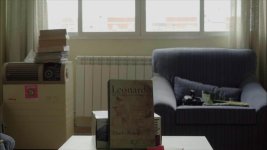
For example, consider this Slog2 clip:

(The book is the closest thing I had to a human face in my house :cheesy .
.
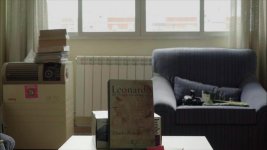
After I apply to it the SLog2-to-709 LUT built into Resolve, I get this: highlights completely blown.
I then add a node after it and try to recover the highlights, while keeping the book (the "human face") in the 40% range in the waveform monitor. And I do this with the video color controls, not the log ones, as per the quote above...
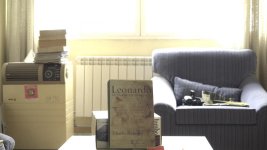
…Except that everything is a mess. I need to bring down the gain to ridiculous levels to recover the highlights, and then I have to stretch the difference between lift and gamma so much, that all the noise in the shadows shows up:

Look at the bottom of the blue couch. The noise is even worse in motion. The impression I get, while playing with the image, is that there simply isn't enough information in that part of the shot (between shadows and midtones), and I'm almost tearing it apart when grading it.
So, what am I doing wrong? Are you supposed to use LUTs at the beginning or at the end of the grade? Is it better to design your own curve instead of using the factory-supplied one in Resolve? How is everyone else doing it? Or am I asking too much of the camera, and there's simply too much dynamic range in this image?
First of all: my only previous experience with log formats was with the Cinestyle preset in Canon DSLRs. In those days, I just added a contrast curve at the end of my grade, and graded "before" it; for example, in After Effects I'd use the Master Curve in Colorista II, or I'd add a adjustment layer on top of my footage with my curve. Then, when I started using Resolve, I'd add a node with just my contrast curve at the end of my grade, *after* all the other nodes.
This seemed to be the recommended way to work, according to Stu Maschwitz and also this thread:
https://forums.creativecow.net/thread/277/22579#22579
Where Alexis von Hurkman seems to imply that the contrast curve or LUT is better applied after all the other nodes.
(Note that, when I talk about LUTs here, I mean 1D LUTs, i.e., contrast curves, not 3D LUTs).
So now I get my Sony A7S, I shoot Slog2 tests with it and I import them into Resolve… except that in it, the only SLog2-to-709 LUT that I find is in the "Input LUTs" section, which suggests that the way to work with it is to apply the LUT *before* start grading, i.e., in the first node, and then proceed as if you were dealing with a regular 709 video file. Note also that, in the previous link, Mike Most says that SLog2 is actually designed for that:
"… In fact, one of the design criteria for both Panalog and Sony's Slog was the ability to be corrected directly in a video environment with "normal" video scaled controls,"
…Except that, when I do that, I can't seem get any of the supposed advantages that SLog2 has, specially the higher dynamic range in the highlights.
For example, consider this Slog2 clip:
(The book is the closest thing I had to a human face in my house :cheesy
.After I apply to it the SLog2-to-709 LUT built into Resolve, I get this: highlights completely blown.
I then add a node after it and try to recover the highlights, while keeping the book (the "human face") in the 40% range in the waveform monitor. And I do this with the video color controls, not the log ones, as per the quote above...
…Except that everything is a mess. I need to bring down the gain to ridiculous levels to recover the highlights, and then I have to stretch the difference between lift and gamma so much, that all the noise in the shadows shows up:
Look at the bottom of the blue couch. The noise is even worse in motion. The impression I get, while playing with the image, is that there simply isn't enough information in that part of the shot (between shadows and midtones), and I'm almost tearing it apart when grading it.
So, what am I doing wrong? Are you supposed to use LUTs at the beginning or at the end of the grade? Is it better to design your own curve instead of using the factory-supplied one in Resolve? How is everyone else doing it? Or am I asking too much of the camera, and there's simply too much dynamic range in this image?