True HDR and True 10 bit monitors. Is this possible?

offbeatbryce

Well-known member
Hello,

Hopefully I'm posting this in the right section.

I am looking into buying an HDR 10 bit 4k monitor but I've read many of them are not true HDR or true 10 bit and are fake knock offs. How do I verify which is really 10 bit and what is really HDR? I know an editor that has this monitor. https://www.bhphotovideo.com/c/product/1457462-REG/lg_49wl95c_w_49_class_32_9_ultrawide.html/specs Is this really true 10 bit and true HDR? Also I was told by some random person on reddit that no real colorists should ever color on anything but a reference monitor because HDMI, display ports never output true HDR or true 10 bit regardless of what monitor is sold for computers and that if they do the colors won't be right on a regular computer monitor or standard TV and that reference monitors require SDI for real true output. This slightly confuses because no computer graphics card has SDI to my knowledge. My colorist friend is telling me to ignore this person on Reddit and they don't know what they are talking about.

Premiere Pro has SDR conversion built into the export mode as an option specifically for HDR to SDR content. If this option is here but is totally useless like some the redditor tells me then why is it there?

Also how is YouTube supposedly supporting HDR content when it's all one file uploaded to YouTube? I tried watching a YouTube video with the HDR setting turned on in YouTube on a non HDR montitor and all the brightness levels were too dark. There was no way to fix this. So how can anyone on Youtube watch a video that's made for HDR on a non HDR display if there is no option to shut it off?

Can someone here please help me understand this and set this straight?

Thanks,

Bryce
 
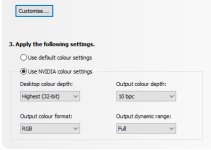
If you buy a monitor like the one below, there are obviously other brands, then yes you can get a true 10-bit PQ HDR/HLG display but you wont be running it through an HDMI connection it will need to be driven via a Display Port from a graphics card that can deliver a full 10-bit signal. I'm currently doing that with a Nvidia GTX1080Ti. See the JPG below. The output levels can be FULL or LIMITED depending on whether you are working 0-1023 data levels or 64-940 video levels. This 10-bit color depth selection in the Nvidia control panel is NOT accessible unless the graphics card and the monitor handshake with one another and confirm that there is indeed a true 10-bit graphics path in place. Once you have that full 10-bit 422 workflow in place it's hard to go back to anything else. 10-bit HD SDI is what I was used to with reference SDI CRT monitors so the whole PC monitor 8-bit viewing workflow was something I found hard to work with because I never knew exactly how my footage was going look. So often I found that color banding in 8-bit and even 10-bit workflows were introduced by the limitations of the 8-bit graphics path in most case where I saw this problem. The same footage on the 10-bit path exhibiting none of the artifacts seen on the 8-bit path.

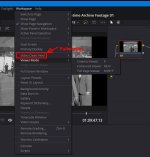
One thing to note if using Resolve. Up until v16.1 of Resolve you had to have a BM video card or breakout box to be able to output a 10-bit signal. Now with 16.1 you have the option to output via a new option a separate "VIDEO CLEAN FEED," see the JPG. What I haven't confirmed yet is whether this new output feature IS actually a 10-bit output or not. Prior to Resolve 16.1 I know all the GUI outputs were only 8-bit.

Re the YouTube thing if the upload has the embedded HDR10 or HDR10+ or HLG information then HDR sets or monitors viewing this feed will see the embedded metadata and display the vision at the correct levels. Note: Not all HDR sets can display HLG yet. If you watch these videos on non HDR sets they will look flatter and less vibrant because they don't recognize the signal and just treat it as a 709 signal. If the embedded metadata is HLG and an HLG (Hybrid Log Gamma) TV is used then yes the full HLG signal will be decoded for display. If the TV is only a 709 HD TV then it will see the 709 level content embedded in the HLG stream and it will look a lot better but its still a bit flatter than a normal 709 encode.

If you need to get a better handle on this whole HDR Hornets nest, we had to recently on a broadcast delivery, you may find Mystery Box's walk through series pretty helpful. Helped me no end. Here is one of their overviews. BTW the Mystery Box outlined HDR workflow is what we used in Resolve and it worked perfectly and the program sailed through the network's technical HDR QC without a hitch or query.

https://www.mysterybox.us/blog/2016/10/27/hdr-video-part-5-grading-mastering-and-delivering-hdr

https://www.eizo.com/news/2018/04/06/eizo-releases-311-dci-4k-monitor-with-hdr-gamma/

Nvidia 10-bit.jpg Resolve output.jpg
 
Last edited:
If you buy a monitor like the one below, there are obviously other brands, then yes you can get a true 10-bit PQ HDR/HLG display but you wont be running it through an HDMI connection it will need to be driven via a Display Port from a graphics card that can deliver a full 10-bit signal. I'm currently doing that with a Nvidia GTX1080Ti. See the JPG below. The output levels can be FULL or LIMITED depending on whether you are working 0-1023 data levels or 64-940 video levels. This 10-bit color depth selection in the Nvidia control panel is NOT accessible unless the graphics card and the monitor handshake with one another and confirm that there is indeed a true 10-bit graphics path in place. Once you have that full 10-bit 422 workflow in place it's hard to go back to anything else. 10-bit HD SDI is what I was used to with reference SDI CRT monitors so the whole PC monitor 8-bit viewing workflow was something I found hard to work with because I never knew exactly how my footage was going look. So often I found that color banding in 8-bit and even 10-bit workflows were introduced by the limitations of the 8-bit graphics path in most case where I saw this problem. The same footage on the 10-bit path exhibiting none of the artifacts seen on the 8-bit path.

One thing to note if using Resolve. Up until v16.1 of Resolve you had to have a BM video card or breakout box to be able to output a 10-bit signal. Now with 16.1 you have the option to output via a new option a separate "VIDEO CLEAN FEED," see the JPG. What I haven't confirmed yet is whether this new output feature IS actually a 10-bit output or not. Prior to Resolve 16.1 I know all the GUI outputs were only 8-bit.

Chris Young

https://www.eizo.com/news/2018/04/06/eizo-releases-311-dci-4k-monitor-with-hdr-gamma/

View attachment 137517 View attachment 137518

Thanks,

How come this person on reddit is telling me Colorists and editors don’t use hdr monitors as it will look wrong? I’m confused. He even told me that he would never pay an editor or colorist who uses an hdr monitor unless they are using a reference monitor vi Sdi. Confused where his info comes from? There are fake hdr monitors correct?

Can you explain the YouTube issue with hdr video on YouTube being too dark on non hdr monitors?
 
If you buy a monitor like the one below, there are obviously other brands, then yes you can get a true 10-bit PQ HDR/HLG display but you wont be running it through an HDMI connection it will need to be driven via a Display Port from a graphics card that can deliver a full 10-bit signal. I'm currently doing that with a Nvidia GTX1080Ti. See the JPG below. The output levels can be FULL or LIMITED depending on whether you are working 0-1023 data levels or 64-940 video levels. This 10-bit color depth selection in the Nvidia control panel is NOT accessible unless the graphics card and the monitor handshake with one another and confirm that there is indeed a true 10-bit graphics path in place. Once you have that full 10-bit 422 workflow in place it's hard to go back to anything else. 10-bit HD SDI is what I was used to with reference SDI CRT monitors so the whole PC monitor 8-bit viewing workflow was something I found hard to work with because I never knew exactly how my footage was going look. So often I found that color banding in 8-bit and even 10-bit workflows were introduced by the limitations of the 8-bit graphics path in most case where I saw this problem. The same footage on the 10-bit path exhibiting none of the artifacts seen on the 8-bit path.

One thing to note if using Resolve. Up until v16.1 of Resolve you had to have a BM video card or breakout box to be able to output a 10-bit signal. Now with 16.1 you have the option to output via a new option a separate "VIDEO CLEAN FEED," see the JPG. What I haven't confirmed yet is whether this new output feature IS actually a 10-bit output or not. Prior to Resolve 16.1 I know all the GUI outputs were only 8-bit.

Chris Young

https://www.eizo.com/news/2018/04/06/eizo-releases-311-dci-4k-monitor-with-hdr-gamma/

View attachment 137517 View attachment 137518


Here is the full Reddit discussion. Is this guy that keeps telling me info wrong? I’m trying to understand what this person means. He literally told me editors don’t use hdr 10 Monitors. https://www.reddit.com/r/editors/co...urce=share&utm_medium=ios_app&utm_name=iossmf
 
Sorry to say but in Australia putting it politely we may call guys like him Muppets. Muppets aren't too bright. In other words don't worry about his view point. It's your judgement that matters once you have researched the subject properly There are a number of post houses using a range of HDR flat panel monitors from TVs to to $40K bank buster studio reference monitors.

Editors don't use HDR monitors? You 'gotta be kidding. Ask him to explain these anomalies to his obviously highly researched blanket statement that editors don't use HDR 10-bit monitors. Ask him why these guys are using HDR panels then? Why do one of the leading lights in the world of color imaging and image delivery use them, that would be Technicolor. I wouldn't even bother to listen to his reasons because it is obvious from the get go he is somewhat under informed on the subject.

Senior Colorist Stephen Nakamura Discusses HDR and Panasonic OLED at Deluxe’s Company 3
https://vimeo.com/301259898

Technicolor punches high-def video into higher dynamic range
https://www.cnet.com/news/technicolor-wants-to-turn-high-def-video-into-hdr/

I guess someone should tell Canon not to use HDR monitors for grading!
How-To: Canon EOS C200 and C200B Video Training Series- Cinema RAW Light & Post Production
https://www.youtube.com/watch?v=O9DZ87cusiU

Another "non expert" viewpoint on HDR monitors (couldn't resist the sarcasm) Blake Jones a legend in the grading business.
https://www.redsharknews.com/production/item/6776-grading-on-the-move-with-the-asus-proart-pq22uc

https://www.displayspecifications.com/en/model/830518cd

I guess these guys are making these monitors for fun. Both SDI and HDMI 2.0. HDMI 2.0 significantly increases bandwidth to 18Gbps and includes the following advanced features: Resolutions up to 4K@50/60 (2160p), which is 4 times the clarity of 1080p/60 video resolution.

Up to 512 Zones Backlights
17, 24, 31, 55" monitors
1,000,000:1 Contrast ratio
1000nits Display Brightness
AtomHDR
HDR Technology
15 Stops Dynamic Range

https://www.atomos.com/neon

available from
https://www.bhphotovideo.com/c/product/1483648-REG/atomos_neon_24_4k_hdr.html?sts=pi&pim=Y

https://www.provideocoalition.com/X300_Technicolor

A great variety of HRD monitoring from various viewpoints. But then who am I to advise you? What do I know? I'm only a film/video/cameraman/editor/TD and ex SMPTE registered engineer with fifty years experience in the business. His viewpoint is just as valid as mine. It's up to you to learn and research where the truth lies. There is enough information out there to form a valid judgement... which in the end is what you have to do. Just be aware of the 'Fake News,' be discerning in you evaluation and research, cross check information :)

Chris Young
 
Last edited:
Sorry to say but in Australia putting it politely we may call guys like him Muppets. Muppets aren't too bright. In other words don't worry about his view point. It's your judgement that matters once you have researched the subject properly There are a number of post houses using a range of HDR flat panel monitors from TVs to to $40K bank buster studio reference monitors.

Editors don't use HDR monitors? You 'gotta be kidding. Ask him to explain these anomalies to his obviously highly researched blanket statement that editors don't use HDR 10-bit monitors. Ask him why these guys are using HDR panels then? Why do one of the leading lights in the world of color imaging and image delivery use them, that would be Technicolor. I wouldn't even bother to listen to his reasons because it is obvious from the get go he is somewhat under informed on the subject.

Senior Colorist Stephen Nakamura Discusses HDR and Panasonic OLED at Deluxe’s Company 3
https://vimeo.com/301259898

Technicolor punches high-def video into higher dynamic range
https://www.cnet.com/news/technicolor-wants-to-turn-high-def-video-into-hdr/

I guess someone should tell Canon not to use HDR monitors for grading!
How-To: Canon EOS C200 and C200B Video Training Series- Cinema RAW Light & Post Production
https://www.youtube.com/watch?v=O9DZ87cusiU

Another "non expert" viewpoint on HDR monitors (couldn't resist the sarcasm) Blake Jones a legend in the grading business.
https://www.redsharknews.com/production/item/6776-grading-on-the-move-with-the-asus-proart-pq22uc

https://www.displayspecifications.com/en/model/830518cd

I guess these guys are making these monitors for fun. Both SDI and HDMI 2.0. HDMI 2.0 significantly increases bandwidth to 18Gbps and includes the following advanced features: Resolutions up to 4K@50/60 (2160p), which is 4 times the clarity of 1080p/60 video resolution.

Up to 512 Zones Backlights
17, 24, 31, 55" monitors
1,000,000:1 Contrast ratio
1000nits Display Brightness
AtomHDR
HDR Technology
15 Stops Dynamic Range

https://www.atomos.com/neon

available from
https://www.bhphotovideo.com/c/product/1483648-REG/atomos_neon_24_4k_hdr.html?sts=pi&pim=Y

https://www.provideocoalition.com/X300_Technicolor

A great variety of HRD monitoring from various viewpoints. But then who am I to advise you? What do I know? I'm only a film/video/cameraman/editor/TD and ex SMPTE registered engineer with fifty years experience in the business. His viewpoint is just as valid as mine. It's up to you to learn and research where the truth lies. There is enough information out there to form a valid judgement... which in the end is what you have to do. Just be aware of the 'Fake News,' be discerning in you evaluation and research, cross check information :)

Chris Young

I understand all of that but why is it that some hdr displays aren’t true hdr and some are? I’ve researched that if an hdr monitor advertised as hdr but doesn’t have a certain nits range it’s not real hdr. I also don’t understand how youtube is playing back hdr content way too dark on non hdr monitors. Also isn’t there true 10 bit vs fake 10 bit?

Here a couple more articles I found. https://referencehometheater.com/2017/commentary/lies-hdr-and-statistics/ https://www.pugetsystems.com/labs/a...o-Understanding-8-bit-vs-10-bit-Hardware-987/

Are these legit articles?

Also
 
Some supposed "10 bit HDR" monitors are actually 8+2 FRC (Frame Rate Control) panels so not are not true 10-bit. They use a dithering algorithm. FRC is a form of temporal dithering which cycles between different color shades with each new frame to simulate an intermediate shade. Unless you know the authenticity of YouTube videos and whether they complied with the YouTube HDR metadata upload requirements you won't know if what you are looking at is true HDR and therefore it's impossible to know whether your screen is receiving HDR. If it is you should get an HDR notification on screen when the signal first hits.

The best thing to test a screen with is to view an HDR video from a known reliable HDR source such as the Sony channel. Watch the following video, link below, on an HDR screen and then a 709 HD screen and you will see a stark difference. The necessary HDR10+ metadata will be recognized by a true HDR panel and the image will be displayed correctly. Then again most HDR OLED panels range from around 500 to 800 nit while the accepted LCD domestic panel is on average 1000 nit whereas Dolby vision is based around 4000 nit. Bear in mind a lot of people are unaware that the Dolby 4000 nit standard is designed to be viewed in almost dark conditions. Basically cinema ambient light levels. So HDR vision on one HDR technology can look quite different on a different HDR technology. To test things out what we did in the early stages was to edit in Resolve using Color Managed to the HDR10+ standard at 1000 nit and then output to Rec.2100 ST2084 for the broadcaster. In the end that all worked perfectly. For viewing on an HLG compatible TV we output the file to Rec 2020 HLG ARIB STD-B67.

The best thing you can do is to edit something to the HDR standard making sure you embed the necessary HDR10+ metadata in the render and strictly follow YouTube's "Upload High Dynamic Range (HDR) videos" workflow then download the video and then inspect it in something like MediaInfo to confirm it is Rec 2020 compliant with the correct color primaries and secondaries. If it is then you have hit a home run.

Re your links. The Puget Systems link is nearly three years old. It was very accurate at the time but display cards and panels have experienced a quantum advance since then so it is no longer a definitive resource, still useful though. The Home Theater link is again a couple of years old and as to their reference to "Fake HDR" I think that is a bit over the top. There is nothing 'fake' about 8+2 FRC panels. They are just a cheaper not as efficient technology. "Caveat Emptor," buyer beware. Learn and understand the technology and you make your own decision as to whether to buy FRC or full 10-bit technology.

Chris Young

Sony HDR video
https://www.youtube.com/watch?v=aCr2lfMoMPY

YouTube HDR upload specs.
https://support.google.com/youtube/answer/7126552?hl=en
 
Some supposed "10 bit HDR" monitors are actually 8+2 FRC (Frame Rate Control) panels so not are not true 10-bit. They use a dithering algorithm. FRC is a form of temporal dithering which cycles between different color shades with each new frame to simulate an intermediate shade. Unless you know the authenticity of YouTube videos and whether they complied with the YouTube HDR metadata upload requirements you won't know if what you are looking at is true HDR and therefore it's impossible to know whether your screen is receiving HDR. If it is you should get an HDR notification on screen when the signal first hits.

The best thing to test a screen with is to view an HDR video from a known reliable HDR source such as the Sony channel. Watch the following video, link below, on an HDR screen and then a 709 HD screen and you will see a stark difference. The necessary HDR10+ metadata will be recognized by a true HDR panel and the image will be displayed correctly. Then again most HDR OLED panels range from around 500 to 800 nit while the accepted LCD domestic panel is on average 1000 nit whereas Dolby vision is based around 4000 nit. Bear in mind a lot of people are unaware that the Dolby 4000 nit standard is designed to be viewed in almost dark conditions. Basically cinema ambient light levels. So HDR vision on one HDR technology can look quite different on a different HDR technology. To test things out what we did in the early stages was to edit in Resolve using Color Managed to the HDR10+ standard at 1000 nit and then output to Rec.2100 ST2084 for the broadcaster. In the end that all worked perfectly. For viewing on an HLG compatible TV we output the file to Rec 2020 HLG ARIB STD-B67.

The best thing you can do is to edit something to the HDR standard making sure you embed the necessary HDR10+ metadata in the render and strictly follow YouTube's "Upload High Dynamic Range (HDR) videos" workflow then download the video and then inspect it in something like MediaInfo to confirm it is Rec 2020 compliant with the correct color primaries and secondaries. If it is then you have hit a home run.

Re your links. The Puget Systems link is nearly three years old. It was very accurate at the time but display cards and panels have experienced a quantum advance since then so it is no longer a definitive resource, still useful though. The Home Theater link is again a couple of years old and as to their reference to "Fake HDR" I think that is a bit over the top. There is nothing 'fake' about 8+2 FRC panels. They are just a cheaper not as efficient technology. "Caveat Emptor," buyer beware. Learn and understand the technology and you make your own decision as to whether to buy FRC or full 10-bit technology.

Chris Young

Sony HDR video
https://www.youtube.com/watch?v=aCr2lfMoMPY

YouTube HDR upload specs.
https://support.google.com/youtube/answer/7126552?hl=en


How would I create the proper metadata info in a render using premiere pro? I do see a sdr conversion but it creates a separate file. I was told you need one file that has both sdr and hdr metadata so YouTube can detect what display you have but when i googled this YouTube says they have no such feature and you just upload hdr to YouTube but when I go to the link you sent me everything is dark even if I select regular 1080p.
 
Anything to do with Premiere I couldn't help you. Premiere 6 was the last time I crossed its path:)

With YouTube If you upload an HLG file then HDR TVs that can decode HLG will display an HDR signal albeit an HLG encoded one. Embedded in an HLG render is the information for Rec 709 TVs. A pure HDR10 signal does not have the ability to display the 709 information as such. A quick simplified overview here of what the signal differences are and what their cross compatibility is:

Chris Young

https://www.cnet.com/news/hdr10-vs-dolby-vision-vs-hlg-how-do-hdr-formats-compare/
 
Can someone here please help me understand this and set this straight?

Misinformation about HDR has swirled since I started with it in 2015. I've converted, transformed, graded HDR in all the major formats, Dolby Vision, HDR10, HDR10+, HLG, YouTube, Amazon. Some of it has played around the globe on Sony Television sets in the Best Buy Magnolia showrooms. If you are wanting a recommendation for a HDR display, PM me and I'll tell you of the low cost one that Technicolor uses. There are other good choices as well.

As for YouTube, under help you can keyword "HDR" and find out how they do it, or I'll give you the spoiler alert here...and this is a YouTube only workflow, you upload a HDR version of your video, YT will automatically generate a SDR copy. But any time you convert from a larger color volume (gamma+gamut) i.e. (ST-2084/2020) to a smaller one (709), there can be out of bounds values (clipping), of chroma and luma. So the YT generated SDR copy is a reasonable approximation but if you want the SDR copy to actually look as you intended, you upload a lut attached to your HDR file with metadata. Container, file, metadata, Lut. YouTube will automatically stream the appropriate version for the viewer's device, HDR, SDR, iPhone, tablet, whatever.

When I first started, I had a display that supported HDR but I didn't have a proper way of grading the content, so I actually learned by trial and error, creating and grading in SDR, exporting in HDR and seeing how that looked. I would have two versions up at the same time on different displays, the SDR and the HDR. It was a pain but I got my first break for a Spanish film maker. That work went on to be sold to Sony and played around the globe. But it couldn't go on like that; a trial and error workflow. Then I bought BMD Decklink card and it got much easier. Resolve has gotten so good today with its tone mapping, it's possible to grade a project entirely in SDR and make an HDR conversion that is excellent, although I don't recommend it. It's possible, but backwards. From creation to delivery there are a lot of potential traps along the way, most of them related to levels mismatches, how the levels can be interpreted differently from encoding to playback, from camera log to NLE, the intermediate, HEVC, h.264, DNxH, sometimes between RGB and YUV, and playback too, Edge, Explorer, TV apps, wifi streaming, USB, HDMI. When it looks too dark, or it looks too bright, it is assuredly a levels mismatch somewhere in the chain from the creator's desk to the viewer's tv. Levels can go from Full (pc) to Video (tv), and back...multiple places in the chain. The biggest challenge is making sure the levels are correct for as many devices as possible, some of them you are not in control of like the viewer's tv. And it takes knowledge of how it's going to be input, different for a USB flash (Full) than for HDMI (Video). And if the levels are mismatched out of your control, that the content still doesn't look too bad, not overly crushed, nor overly grayed.
 
Nice to have another opinion from someone else who has been through the minefield. As you say a lot of minefields and like you a lot of it has been trial and error to get there from my end. How else do you get there otherwise? You learn from others. There are so many permutations and there are that many opinions out there and from all of that you just have to work out a workflow that does it for you and your client/network both technically and aesthetically.

Chris Young
 
Nice to have another opinion from someone else who has been through the minefield. As you say a lot of minefields and like you a lot of it has been trial and error to get there from my end. How else do you get there otherwise? You learn from others. There are so many permutations and there are that many opinions out there and from all of that you just have to work out a workflow that does it for you and your client/network both technically and aesthetically.

Chris Young

Just sent you a message.
 
Nice to have another opinion from someone else who has been through the minefield. As you say a lot of minefields and like you a lot of it has been trial and error to get there from my end. How else do you get there otherwise? You learn from others. There are so many permutations and there are that many opinions out there and from all of that you just have to work out a workflow that does it for you and your client/network both technically and aesthetically.

Chris Young

Exactly, and there are so many places where it can go wrong, from metadata to the display. For example, Windows 10 will play HDR10 files but you have to have it enabled in the settings. You can't just give someone the file, they'll come back with a complaint about the grade, "it looks flat!" when it had nothing to do with the grade, they just aren't configured to see it in HDR, but they don't know that. Google Chromecast Ultra, TV apps, some support HDR and some don't. A lot of people don't even know what metadata is, but without it, the tv doesn't switch to the correct mode. Some people get fake HDR because the TV itself has a switch that turns SDR into a HDR lookalike. The most reliable way for most people is probably the Netflix/Amazon app in their smart TV; YouTube is going to be hit or miss for many people with the misses outnumbering the hits. There is a lot of stuff on YouTube that's mislabeled as HDR or poorly done, some of it mine even. I had one of the very first 5 or 10, actually I think it was number 3 or 4 YouTube HDR videos from when they made it available, about 2016 as I remember. I can hardly stand looking at it now, it seems so bad. Lot's of horribly done YouTube HDR, much of it blazed neon, some would find it pretty unless it was your face getting sunburned by HDR overdone or wrongly done. Others complain it's too dark. It's piece of cake now, but considering that most people will view your video in SDR, it's truly far more important that it looks good, and since it is a subset of the HDR to SDR down conversion process by YouTube, your 3D cube lut attached to the file is important that it has been created properly.

As you say it is truly a minefield, or was. It's gotten a lot easier now, certainly the tools are worlds better, but a comfort level with the command line apps, even making your own libx builds, muxing your own audio with video, inserting metadata, attaching files, ffmpeg, mkvmerge, x265, x264 are pretty much mandatory for anyone doing HDR seriously. And they need to read up on all the white papers from Dolby, BBC/EBU, SMPTE and let's not forget HDMI 2.0a as a minimum starting point.
 
Yes it is bar brightness levels where it is at the lower end at peaks at 330 nit. That is why hi end outfits like Technicolor will use hi end reference panel like below plus hi end consumer panels like outlined below

https://pro.sony/en_AR/products/broadcastpromonitors/bvm-x300-v2

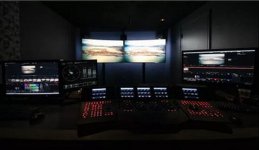
as their primary grading monitor but will also use domestic panels like the 65-inch Samsung JS9500 SUHD TVs as their final arbiter as to what the end viewer is going to see. If Technicolor see panels like the Samsung JS9500 panels good enough to judge the final result from and end viewer point of view then that is good enough for me as I can't justify $30K plus for an HDR reference monitor. I do work for a government production facility where we use two of the BVMx300 monitors and indeed they are a beautiful thing but have their annoyances like going into a sleep mode to protect the OLED when they don't detect any movement on screen. Can be very annoying when working on docos using a lot of stills al la Ken Burns style. The Technicolor link I provided earlier shows how two of these JS9500s sit front and center in the grading suite. A lot of monitor snobbery permeates this industry like with a lot of other aspects of this industry such as sensor size, number of photosites, number of Mbps etc, etc. You are doing the right thing. Continue your research and eventually you will find though many knowledgeable posts in various places such as Tom's post the path to a decision. Filter carefully everything you research and eventually you will find the answers you are after.

Chris Young

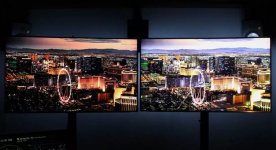
"The demo

Both Samsung TVs were running the same demo reel. It consisted of a series of clips, commissioned by Technicolor, and edited and processed in house. Each version of this reel was created from the same camera files. Each version was "tuned" to look as good as possible in its specific color space and dynamic range.

https://www.cnet.com/news/technicolor-wants-to-turn-high-def-video-into-hdr/

"The left JS9500 was running a standard image, with the Rec 709 color space It was essentially HD-quality, and looked good. The right JS9500 showed a split screen image. The right half was true HDR content displayed in the P3 color space. It looks fantastic, as HDR can, with rich cyan skies, deep red bathing suits, bright highlights on metal that really pop and more."

Tecnicolor monitors.jpgTecnicolor monitors 02.jpg
 
Having just set up a new 4k HDR projector and checking various media, HDR seems wildly inconsistent from film to film and a giant pain in the ass to deal with. I have to change my brightness and contrast settings all over the place every movie or program I put in to avoid clipping whites. Also, some devices will only stream in 60hz 4:2:0 color space which causes awful magenta blocking on white surfaces. I tried watching Empire Strikes Back in 4k HDR on Disney Plus, and the snow was a pink blotchy mess. I also saw this at first on The Irishman, but I streamed it from another device which can stream it at 24hz, which then switches it to 4K 4:2:2 HDR and makes the magenta blocking disappear. The Disney Plus App only works at 60hz.
 
Hello,

Hopefully I'm posting this in the right section.

I am looking into buying an HDR 10 bit 4k monitor but I've read many of them are not true HDR or true 10 bit and are fake knock offs. How do I verify which is really 10 bit and what is really HDR? I know an editor that has this monitor. https://www.bhphotovideo.com/c/product/1457462-REG/lg_49wl95c_w_49_class_32_9_ultrawide.html/specs Is this really true 10 bit and true HDR? Also I was told by some random person on reddit that no real colorists should ever color on anything but a reference monitor because HDMI, display ports never output true HDR or true 10 bit regardless of what monitor is sold for computers and that if they do the colors won't be right on a regular computer monitor or standard TV and that reference monitors require SDI for real true output. This slightly confuses because no computer graphics card has SDI to my knowledge. My colorist friend is telling me to ignore this person on Reddit and they don't know what they are talking about.

Premiere Pro has SDR conversion built into the export mode as an option specifically for HDR to SDR content. If this option is here but is totally useless like some the redditor tells me then why is it there?

Also how is YouTube supposedly supporting HDR content when it's all one file uploaded to YouTube? I tried watching a YouTube video with the HDR setting turned on in YouTube on a non HDR montitor and all the brightness levels were too dark. There was no way to fix this. So how can anyone on Youtube watch a video that's made for HDR on a non HDR display if there is no option to shut it off?

Can someone here please help me understand this and set this straight?

Thanks,

Bryce
The monitor you listed only has 350 nits brightness, far below the required minimum for HDR. As far as I can tell, it also lacks FALD, so it is absolutely not HDR. LCD monitors require full array local dimming to reproduce rich blacks. If you are serious about HDR grading, you will want to work in Resolve - I don’t think Adobe will cut it. If you have a Mac, you’ll also need to set aside an extra grand for an i/o device to connect the monitor. Practically all mirrorless cameras today now shoot HLG, which can be uploaded directly to YouTube for a gorgeous HDR image, assuming white balance and exposure are correct to begin with.

The Asus PA32UC has 1,000 nits brightness, 384 local dimming zones and can handle HDR10. It runs $1,200. AFAIK, it does not do HLG or Dolby Vision. It is also FRC. For around $4,000, the UCX has greater brightness, 1,152 local dimming zones, true 10-bit and can handle all flavors of HDR except HDR10+.

The PQ22UC has a peak brightness of only 330 nits, so technically does not even meet the minimum standard for HDR displays.
 
Last edited:
Back
Top