Trouble With FS700 4k Raw from O7Q in Resolve

EAumen

Member
I have been able to import and grade 2k raw and 4k2hd without any problems. For some reason, when i import clips into the media pool that are 4k (4096x2160) they show up all pixelated and unrecognizable. I have the lite version of resolve. So, I can only set the project up for UHD, not 4k DCI. I have it set to crop in, but I am wondering if resolve is not letting me even view the clips because its 4k DCI, is it a setting problem, or is my computer (2012 MBP i7 with 8GB ram) not able to see these because of the size?? Has anyone else had any issues? Here is a screen shot.
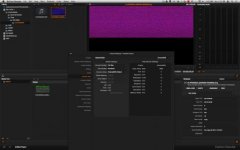
Screen Shot 2014-09-28 at 2.22.51 PM.jpg

Thanks for any help you guys can provide. Also, I do not need 4k raw at this point, but I want to test it out so I can offer it to clients were applicable. My brother lives a few hours away and he edits on a beastly machine. So it wont be a problem for him. I would just like to be able to view the files on my computer if possible.
 
I have been able to import and grade 2k raw and 4k2hd without any problems. For some reason, when i import clips into the media pool that are 4k (4096x2160) they show up all pixelated and unrecognizable. I have the lite version of resolve. So, I can only set the project up for UHD, not 4k DCI. I have it set to crop in, but I am wondering if resolve is not letting me even view the clips because its 4k DCI, is it a setting problem, or is my computer (2012 MBP i7 with 8GB ram) not able to see these because of the size?? Has anyone else had any issues? Here is a screen shot.
View attachment 91822

Thanks for any help you guys can provide. Also, I do not need 4k raw at this point, but I want to test it out so I can offer it to clients were applicable. My brother lives a few hours away and he edits on a beastly machine. So it wont be a problem for him. I would just like to be able to view the files on my computer if possible.

The Q7 4K works fine on Windows with the Lite version.
 
Your MBP 2012 GPU memory of 1GB is to low for 4K DNG in Resolve, I have the same - for 2K its enough. I use the nMP and 4K works great (37fps) thanks to its 12GB of GPU memory. If you don't want to change your system check external GPU options via thunderbolt.
But you can convert 4K DNGs via After Effects.
 
Timeline resolution 4K UHD (3840x2160).
Image Scaling Center crop with no resizing.

Check if you graphics card to capable.
 
I also have a 2012 MacBook Pro w/ 1GB GPU... Couldn't do 4K in Resolve, I had the exact same garbled footage. I used After Effects but it's outrageously slow (about a half hour per 1min of 4K RAW.)

It was definitely worth upgrading to the 2013 Mac Pro. I can render 4K in real time and 2K renders about 2x-2.5x realtime. Super fast.
 
McReedy and jshbckr thanks for confirming it is my computer. I am hoping to have some investment money soon and that is way up on the list.
 
There are no external solutions. The Mac OS doesn't support external GPUs over TB.
As far as I know, it only (kinda) works when you run Windows on your MBP.
But actually TB is much to slow for GPUs, so there is not much gain.
 
I think it's a bug of Resolve. When I installed beta version of Resolve 11 I had the same problem (I'm on MBP Retina - graphic card is good for Resolve). Then I moved down to 10 and after several days using I installed again 11 and it works well. My friend had the same on his iMac - after reinstalling this bug disappeared.
 
Back
Top