Trouble getting to first base with PTool v3.40d

Roderz

Member
Please help.

On a Windows 7 PC I have done the following :

1. Downloaded PTool v3.40d
2. Downloaded the latest firmware version (GH1__132.bin) from Panasonic
3. Started PTool v3.40d and imported the original firmware file.
4. Then I get stuck!

While I can check or uncheck the various boxes under "Patches for end users", I cannot seem to activate any of the A, B, C, etc presets.

To be clear, I can check the relevant boxes, say for example "Video Bitrate FHD/SH" under "AVCDH Compression" and can see the default parameters thereunder , but all the A,B,C,D...J buttons along the bottom are red and nothing happens AT ALL when I click on them, ie, they do not affect the parameters and nor do they change colour indicating they have been selected.

Presumably I am doing something totally stupid, so apologies in advance, but any help would be much appreciated.

I've also tried the same on my Mac and I get stuck with exactly the same problem (and noting strangely that with my Mac running "Wine" all the buttons on PToolv3.40d are only half filled in with colour???). But still, whenever I click on the A,B,C...J buttons, nothing happens, the same as in Windows??!!
 
For AVCHD compression changes you have to tick the item you want changed, click on the whole line and a popup info box appears with the setting recommendations. You enter the numbers for the setting you want changed manually after the line thats says Input video bitrate. That goes for Video birate FHD/SH, Overall Bitrate and Limiting Birate.
 
Last edited:
Thanks John. I could have sworn I saw some posts here (of course I cannot find them now) showing screen shots of PTool with some of the letters along the bottom checked (particularly "C") intimating that they were presets of some kind?

Have I got this totally wrong ? If so, what are the letters for and how does one activate them.

Thanks again for your help here.
 
Have you tried to move mouse on this buttons and wait a little?
Clicking work only on green buttons - this means that you have stored settings.
Only Alt-Click works for storage to empty slots.
 
I hope everything goes OK. I chose the B settings myself. I also changed the AVCHD GOP Setting for 1080p24 to 12. Also changed to 24p Native, So far no problems with 1080p.
 
Weird I have same problem... bunch of red buttons, no green.

Does that mean I have to manually go through all the settings? Wonder what happened?
 
Weird I have same problem... bunch of red buttons, no green.

Does that mean I have to manually go through all the settings? Wonder what happened?

Yes.. No setting are installed/applied to those button *unless you save them* there.

You need to go through and pick setting you wish, then save them if you plan on trying them again at a later time.
 
Ahhh... OK now I am with you.

Can some kind soul please give me a link to a downloadable file for the famous 'c' settings then? I am lost in a morass of posts about the subject... there seems to be different versions of it and the search function sucks!

If you were feeling very kind you might also help clear up something in my mind... what are the actual pros and cons of the increased bit rated AVCHD vs the MJPEG? I think i am beginning to understand how they work - but in the real world when do you think - "hmmm MJPEG at 50MBPS would be ideal here" or "better go for the 720P /1080I AVCHD setting"

With the bog standard firmware it looks to me like MJPEG looks awful, 720P is ok in good light, 1080I looks ok... as long as you dont move the camera much.

With the updated codec does that change to MJPEG looks brilliant... the other modes are obsolete?

I am just really confused... the ptools noob guide is not very noob friendly IMHO (or maybe I am just dense :2vrolijk_08:
 
It took me several days to figure this out, as well, that the a), b) and c) settings everyone refers are the ones that appear in the little help dialog that pops up when you mouse over a menu item.

For example: When you click on the video bitrate fhd/SH option, a small window pops up next to my ptools main window that starts with: "Tweaking bitrate on Pananic AVCHD cameras....."

Go down to the suggested values:you will see valuies for a), b) and c)

Hope it saves you from some of the head aches I had.

I am using the B settings without any issues on a Patriot LE class 10 card. From what I have been able to figure out, all is card dependant and based on trial and error. I used the analogy in my own post of overclocking a computer.
 
Ahh right.

What I had found already was that one lot of settings had been posted on the forum in a handy file that you just extracted along with Ptools and it populated one of your setting spaces - you just had to click it and it would work... I imagined there might be something like that for the C settings.

Now - anyone able to direct me to a simple explanation about the real world use / pros / cons of the different settings as discussed above? Would really help me.
 
I have been learning through trial and error.... as for some real world explanations/ uses look at the various clips out there.

One of the challenges I am seeing is that the areas that you and I both are a little foggy on are ones that the average consumer will never use, nor really needs.

Those who are hacking this device, or originally start doing so, were generally professionals or enthusiast in the film industry or similar. Their level of comprehension of all the terminology, etc is way out of the regular consumers understanding and now that this camera is starting to make it into the mainstream, people are learning about it and it is gaining popularity more laymen, myself included are coming into the fold.

I got the GH1 because my brother-in-law, one of the before mentioned film industry professionals recommended it. I am somewhat of a computer geek and while we have our own vocabulary as it relates to PC's there is a lot here over my head.

I mean this with all do respect to everyone who has put in the long hours of research in getting us to this point is; but I believe there is plenty of room for improvement on some of the ways we explain things here. I am just happy that so far (and it may change after this post), that everyone I have had respond to my post has been extremely patient and willing to humor us laymen.

For me personally, I am seeking to get the maximum out of my camera so I can have a device that will have the best still and video capability to play back on my 1080-p Television. I shoot shorts for family, friends and on occasion have produced a few entry level local TV ads. I am far from a professional and probably get a lot of the "oh great- him again"comments every time I post, but that is me. I am just happy to have found a device that will do everything I want and has the headroom to play with. So often consumer electronics are sold based on what the manufacturers want to make, not what the consumer wants.
 
OK. I understand now. The letters do not contain the presets, but you can save different settings to each one. Thank you all for your quick responses.

Now that I'm getting into the swing of this :laugh: can anyone tell me the merits in switching over to NTSC from PAL if I want have 'true' 24p video ? I shoot mainly action sports like wakeboarding, so would like to know whether 24p/25p makes sense for this purpose, or whether I should be using 50i/60i (or does this question even make sense?!).

Also my NLE is Adobe CS4 so wondering is there any advantage in checking the Native 24p/25p option ?
 
"So often consumer electronics are sold based on what the manufacturers want to make, not what the consumer wants."

Hah - don't gush all over panasonic too soon. This whole firmware business does seem a bit suspicious of them building in artificial restrictions in order to fleece the market over a period of time. Can't say for sure of course... compatibility and stability issues would play a part in their decisions... but yeah... very suspicious. :Drogar-BigGrin(DBG)

Anyway - sounds like you are in a similar position to me with the camera. I take what you say about trial and error / watching clips... but I have already spent an inordinate amount of time doing those things... it would be nice if someone threw me a bone and gave me a bit of an overview that made sense about the relative merits of different modes.
 
....compatibility and stability issues would play a part in their decisions... but yeah... very suspicious. :Drogar-BigGrin(DBG)

So which of the two is it?

....but I have already spent an inordinate amount of time doing those things... it would be nice if someone threw me a bone and gave me a bit of an overview that made sense about the relative merits of different modes.

And you don't think that countless people here haven't spent "an inordinate amount of time" testing this hack, AND DONATING MONEY TO BUY EQUIPMENT, to get it where it is today.

Yeah, I don't want to work for it, just give me the Readers Digest version.

Sorry bud, you want to join the club, do the homework. If you don't understand it, don't do it.
 
Lol stone. Advancement is usually made by standing on the shoulders of giants... not endlessly repeating the same old mistakes. Taking a reductio ad absurdium approach to your argument the whole human race would still be mucking about at a stone age level of technology.

Luckily I find that in general there are plenty of people on the net happy to lend a helping hand to noobs... people like yourself being a rare breed. :cheesy:
 
So what kind of advancement are you proposing to add from your lofty position on the shoulders of giants?

!!!! If I knew that I wouldn't need to stand on their shoulders!!!!

Logic circuits <bzzz>... breaking <pfft>


ps - would probably be something awesome though! :laugh:
 
Doc and stone: is there any reason why you need to air your dirty laundry in public and ruin a perfectly good thread?
 
Ok, I'll take a shot at the following.

If you were feeling very kind you might also help clear up something in my mind... what are the actual pros and cons of the increased bit rated AVCHD vs the MJPEG? I think i am beginning to understand how they work - but in the real world when do you think - "hmmm MJPEG at 50MBPS would be ideal here" or "better go for the 720P /1080I AVCHD setting"
In general, my feeling is that this type of inquiry requires a whole essay to answer "properly." May I suggest an alternative approach? Now that you got a good question (half the battle), please try to formulate or outline an answer yourself. Don't worry about getting some details "wrong." I can't be sure you'll get an "answer," but I am fairly certain there will be pointers in the right direction. We are all here to learn.
 
Root Directory?

Root Directory?

Newbie.

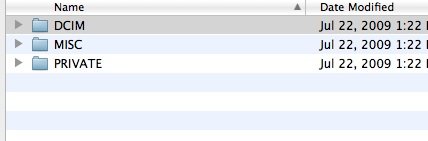
After preparing the Ptools Bin file, instructions say to put the file in the root directory of the SD card. This is what my SD card directory looks like after formatting a new Sandisk Extreme class 10 card in a new GH1. Where should I place the file?

Thanks,
Tom
 

Attachments

  • sdcard.jpg
    sdcard.jpg
    17.8 KB · Views: 0
Back
Top