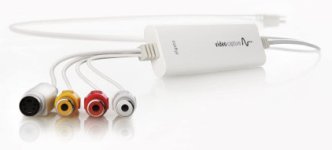
transfering mini-dv cassette from camcorder to a laptop

deleuze3

Well-known member
Hi,
I would like to transfer some mini-dv cassette from a camcorder to a laptop.

1)I heard that firewire was the best option. Sadly i don't have a firewire port on my laptop, and i only have usb port, hdmi, usb-c (no thunderbolt).

I have heard that a pinaccle moviebox would do the job but its discontinued and its 100-200$ on ebay.

Is there a solution to connect the camcorder in firewire to my laptop ?

2) i tried using the s-video port of the camcorder to the laptop and the quality is crap.
As a 2nd option i could maybe use the av-midi port. Will it be an upgrade compare to s-video, and would there be a loss of quality compare to firewire ?

Thanks in advance,
Have a good day,
 
I'd buy a usb analog capture device. They sell for $10-15 on ebay/amazon. I had a potential job to be filmed and streamed in standard def. I dug up such a device and it took me some time to find a driver I could download, otherwise my laptop wouldn't see the camera.
 
Last edited:
Thanks for your answer. I have a elgato that i can use. I can plug the camcorder via a/v mini to the elgato and the elgato in my computer.

But will i lost a lot of quality by using using this method ?
 
I just went through this. Capturing DV used to be dead easy, but now it's convoluted.

Those capture devices like Elgato often transcode it in a codec not of your choice, at a quality acceptable to consumers but maybe not to you, if you're picky like me :)

I have a Macbook and was able to keep the conversion all digital through a hilariously long chain of adapters (Firewire 400 to Firewire 800, Firewire 800 to Thunderbolt, Thunderbolt to USB-C). But Apple software (iMovie, Final Cut Pro, Quicktime) all want to transcode the DV to something else (like ProRes or MPEG-4) or split it on cuts into separate clips, and rejoining them occasionally resulted in an audible, dropped frame of audio. I finally settled on capturing with simply Quicktime, which insisted on transcoding, but the ProRes quality was acceptable (though painful to my perfectionism).

If you have Windows, I'm unsure what to do.

If you have Linux, that might have been the best way to capture the DV how you want. But you would still need to find a computer with Firewire off eBay or something.
 
Thanks for your answer. I have a elgato that i can use. I can plug the camcorder via a/v mini to the elgato and the elgato in my computer.
But will i lost a lot of quality by using using this method ?
I can't imagine there is much to lose considering the low resolution and quality of the original video.
 
I just went through this. Capturing DV used to be dead easy, but now it's convoluted.

Those capture devices like Elgato often transcode it in a codec not of your choice, at a quality acceptable to consumers but maybe not to you, if you're picky like me :)

I have a Macbook and was able to keep the conversion all digital through a hilariously long chain of adapters (Firewire 400 to Firewire 800, Firewire 800 to Thunderbolt, Thunderbolt to USB-C). But Apple software (iMovie, Final Cut Pro, Quicktime) all want to transcode the DV to something else (like ProRes or MPEG-4) or split it on cuts into separate clips, and rejoining them occasionally resulted in an audible, dropped frame of audio. I finally settled on capturing with simply Quicktime, which insisted on transcoding, but the ProRes quality was acceptable (though painful to my perfectionism).

If you have Windows, I'm unsure what to do.

If you have Linux, that might have been the best way to capture the DV how you want. But you would still need to find a computer with Firewire off eBay or something.

+1

I ended up with Quicktime as well. FCPX didn't recognize the camera for me.

Attempt to get the firewire cable with the highest through put, because if you drop a frame, or the recording stops, it is one less thing to trouble shoot.
 
Hi,
I would like to transfer some mini-dv cassette from a camcorder to a laptop.

1)I heard that firewire was the best option. Sadly i don't have a firewire port on my laptop, and i only have usb port, hdmi, usb-c (no thunderbolt).

I have heard that a pinaccle moviebox would do the job but its discontinued and its 100-200$ on ebay.

Is there a solution to connect the camcorder in firewire to my laptop ?

2) i tried using the s-video port of the camcorder to the laptop and the quality is crap.
As a 2nd option i could maybe use the av-midi port. Will it be an upgrade compare to s-video, and would there be a loss of quality compare to firewire ?

Thanks in advance,
Have a good day,


Buying an old PC or Mac that has firewire 400 or 800 may be as inexpesnive as buying any number of contraptions to get your mini DV footage ingested. The benefit of older computers, is running old Adobe Premiere or FCP7 or some other capture software that is cheap cheap cheap, and ingest it natively.

I find the Quicktime capture method is so tedious. It often stops recording, so I can't just press play and walk away. Where as with old premiere or fcp7, I can tell it to ignore drop frames, if I am desperate.


HOWEVER, if you are only doing a few tapes, then the Quicktime method Combat is talking about is by far the simplest and most accessible.
 
1. In windows: buy a cheap firewire card. (less than 20 dollar).
2. I own an old Sony HD recorder with DVD player. It has firewire and only thing you have to do is plug the camcorder in and start recording on a DVD. I guess you can filnd these recorders on Ebay for not su much.

I found this one on ebay: https://www.ebay.com/itm/Sony-RDR-GX257-DVD-Recorder-Full-1080-HD-w-Remote-Cables-Works-Great/164522616026?hash=item264e4fe4da:g:2XAAAOSwSqJftdrx

3. Or you can use the S-Video out and capture with a blackmagic decklink card (also gives you extra 4K monitor output.) Use Davinci Resolve to capture.

4. I had an old HP Notebook, also had firewire. Recording DV was very easy with that combo. (notebook and sonu dv-cam).
 
Last edited:
Most DV cams have an S-video output. If your capture device has that input option the capture quality will be significantly better than composite.
I use a third party utility suite and a BM Intensity Shuttle USB3 to capture footage from my old Canon GL2 in native DV format. It is called AVS4YOU, but I think it is PC only. Could probably use Suzy's 2012 iMac which does have firewire 800 to do the job, but haven't tried it.
Anyone had success converting older non-supported iMacs to Linux installs?
 
i tried with s-video with my camcorder to transfer to my laptop (and i used a elgato video capture) and the image quality was crap. The image was dark and over saturated. I wonder why.
Thanks in advance,
 
Last edited:
what do i do with sound if i tranfer with s-video ?

I record the audio from the camcorder elsewhere and edit it on adobe premiere ? It makes another step.

i might be better with using the rca cable i guess?
 
what do i do with sound if i tranfer with s-video ?

I record the audio from the camcorder elsewhere and edit it on adobe premiere ? It makes another step.

i might be better with using the rca cable i guess?

You have to connect the audio output of the camera to the Elgato and record it with the video. Depending on the recording codec, the audio will either be imbedded in the video file or recorded separately as a WAV file. You would have to do this with the composite video out too. There is no audio imbedded in analog video formats.
 
20201120_200424[1].jpg
20201120_200358[1].jpg
its a real mess.

I have a cable s-video to s-video.

pic 1: i can't use my cable s-video to s-video because on the elgato it's s-video and at the other end its RCA

pic 2: i can plug my cable s-video to s-video directly in the elgato. But i can't transfer the sound. For the sound i thought of using a 1/8 cable in the headphone of the camcorder that would go in the "hdmi in" of the elgato?

I'm lost.
 
I'm glad you added a picture of your Elgato. That is the HDMI model. I thought you meant the one with one S-video and 3 RCA, https://www.elgato.com/en/video-capture

elgato.jpg

If you decide to go the analog route, you will need something like that. It has an S-video input as well as audio, and it translates it all to USB.

This is the one I got for transferring analog tapes, based on its description of having high-quality electronics and a built-in time-base corrector. Sorry, I haven't tried it myself yet. But it got a lot of good reviews. https://www.amazon.com/gp/product/B0049BE3TA/
 
Ah! You will need an S-video to component video adapter. The HDMI Elgato doesn't have S-video. Is the S-video port on your camera a 6-pin or 4-pin version? The link would be camera S-video>S-video to RGB/YUV component>Elgato component in + separate audio cable into Elgato.
 
Last edited:
The analog signals will not be as good as the FireWire dv data. Best way is buy an old PC or Mac, and a FireWire card. On windows you can use the free dvIO program to bring in both type 1 and type 2 DV. You only need around a Pentium 2 processor and a USB hard drive. I have an old tablet and pcmcia card I can use for the odd dv transfers, though most of those are long finished now.
 
Difference between analog (s-video or composite) and digital (firewire) captured material is night and day.

20 year old computer can be bought for peanuts and handle DV through firewire with no sweat.

Hook it up to your network through Gbps card and capture to network drive.

Use the best software for DV capture: Scenelyzer Live, which is free now.

If the material you are capturing has value to invest in restoration, Video Enhance AI will have de-interlace implemented by the end of the year.
 
Back
Top