FS7: Transfer a look from Lightroom stills to Davinci Resolve footage?

Martin.G

Well-known member
Hi

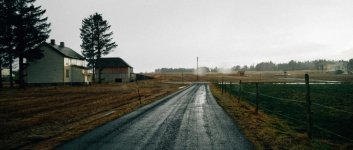
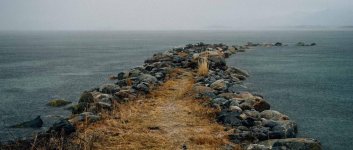
I have a job coming up where i have location scouted for both look and mood in the coming film. We really love the VSCO Kodak 200 film stock look for our raw, contrasty, and foul weathered coastline.

My question however, is how to transfer this look, to a LUT into Davinci Resolve?

Is it so easy as to shoot a Macbeth chart with my stills, apply the look on that, and bring it into Davinci to color match all the LOG footage from the Macbeth picture?
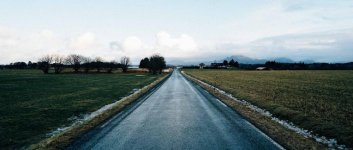
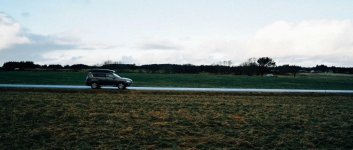
NSSW (1 of 42).jpgNSSW (2 of 42).jpgNSSW (4 of 42).jpgNSSW (18 of 42).jpgNSSW (39 of 42).jpg

(The bottom photo was shot with an unprotected Sony A7 II. Id like to give the weather sealing some credit where its due!)
 
Its a "LUT" from the VSCO Lightroom package. Need to buy it again if i want it as a Photoshop filter too :\

https://vsco.co/store

They are rather sneaky :-)

Googled how to import Lightroom presets into Photoshop and seems it may be possible with ACR.

However, when neither Davinci or Photoshop has an identical foundation to base their LUTs upon, like a Macbeth chart, will it really be accurate colors in the final LUT?

I want to match the Kodak 200 filter on Sony A7 sensor color science, with the S-log3.cine from FS7.
 
People will pay for that look? :-)
You should be able to create something close (maybe better) with a node or two in Resolve and then apply it to all the clips. In my opinion, you don't need to buy a LUT for an over the top look like that.
Try it. Maybe save yourself some Euros.
 
It is an interesting question for those looking to keep consistent colour across stills and motion.

For a LUT to work the input signal need to be consistent.

I cant imagine a stills cam puts out raw files that match Slog?

Im guessing the shortest route would be to match by eye. This is high saturation blue in the shadows to my eye.

S
 
For a LUT to work the input signal need to be consistent.

I cant imagine a stills cam puts out raw files that match Slog?

Im guessing the shortest route would be to match by eye. This is high saturation blue in the shadows to my eye.

Wont the Macbeth chart act as that matcher? Then Davinci makes the red on the Macbeth LOG footage to match with the red on the stills Macbeth chart. Voila, instant LUT. No?

@Doug: Yeah, perhaps. I have not tried to grade this in Davinci yet. These are just the location photos and i already owned the preset packages from VSCO, so tried around until i found a look that both me and the client liked. Its way faster to try different looks with a presets package like this, than to build each look seperately.
 
It appears that a large part of the work of VSCO presets in Lightroom is done in camera calibration - shifting the hues of the Red, Green, and Blue and their saturation points - as well as shadow tint. Perhaps studying the Camera Calibration panel at the bottom of the Develop area could give you some ideas on how to create that look yourself, as Doug pointed out, that you're going for? I guess what I'm saying is, check out the Camera Calibration panel. lol
 
Part of the fun of learning grading is to pick apart looks that you find in contemporary film and TV.

If I were you I'd take my camera shoot a RAW still of a scene and a SLog3/.cine video clip of the same scene. Put the still into LR apply the look, export a still. Put the video into Resolve, bring the LUTted still into Resolve. Use all of the scopes and analysis tools Resolve has to match the grade.

To me the look is contrasty, with desaturated highlights and cool colour temperature. Yellows rotated towards red, greens rotated towards blue and blue rotated towards green. This is a really common cliche in these so called film LUTs.

Making your own looks and LUTs is far more rewarding than lining someone else's pocket.
 
https://mixinglight.com/portfolio/from-lightroom-into-davinci-resolve/

I found this one method. Works like i hoped the Macbeth method would.

But i think i probably changed some colorscience around when i converted the .dpx into TIFF, and then exported the TIFF with grade from Lightroom. Because in Resolve i get really psychadelic acid colors when i change exposure with the resulting LUT.

Need to tinker more with this, but that will have to happen on another day.
 
Making your own looks and LUTs is far more rewarding than lining someone else's pocket.

On this specific job i have a grading budget, so i intend to play around more with the grade manually. Just looking for a base starting point

But i beg to differ. Unless the client is paying you to spend a couple of days tinkering with the look, getting a 60 bucks preset package really saves you alot of time. That time can be invested in more jobs and even more money, or family. I dont think we should work 12 hour days and get paid for 8 just because we are lucky to work with film.

Its not my intention to come hard off on this, i appreciate your two cents and i am grateful for your input on how to get the grade manually. I will take a look at it later, when im available again. Need to go on a different shoot for the rest of the night.
 
On this specific job i have a grading budget, so i intend to play around more with the grade manually. Just looking for a base starting point

But i beg to differ. Unless the client is paying you to spend a couple of days tinkering with the look, getting a 60 bucks preset package really saves you alot of time. That time can be invested in more jobs and even more money, or family. I dont think we should work 12 hour days and get paid for 8 just because we are lucky to work with film.

Its not my intention to come hard off on this, i appreciate your two cents and i am grateful for your input on how to get the grade manually. I will take a look at it later, when im available again. Need to go on a different shoot for the rest of the night.

OK Pal, that'll be the last piece of advice I give you.

I recreated that "film look" in 5 mins here while I ate a sarnie. I have the skills while you're cnuting about.
 
https://mixinglight.com/portfolio/from-lightroom-into-davinci-resolve/

I found this one method. Works like i hoped the Macbeth method would.

But i think i probably changed some colorscience around when i converted the .dpx into TIFF, and then exported the TIFF with grade from Lightroom. Because in Resolve i get really psychadelic acid colors when i change exposure with the resulting LUT.

Need to tinker more with this, but that will have to happen on another day.

when you do in Photoshop you don't need the complicated workaround with the trim LUT
 
OK Pal, that'll be the last piece of advice I give you.

I recreated that "film look" in 5 mins here while I ate a sarnie. I have the skills while you're cnuting about.

Yeah, read the last sentence again. I didnt mean to come hard on you, sorry about that. Im stressed out about a different job tonight, and barely have time to eat while i post this before i need to run out, again.
 
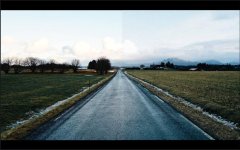
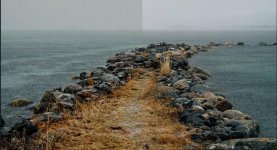
Grade.jpg

Grade 2.jpg

(Left is Resolve, Right is Lightroom. These are just tests so ive not aimed exactly for the look. Ballpark is perfect.)

So today i finally had the time to bite the apple and do it the manual way. Thanks especially to Nirv for tips. I owe you a beer. And yes, it was super fast after getting tips from you.

Check your inbox for how to recieve beer :-)
 
Last edited:
Back
Top