TOTB Think Outside The Box: Upscaling HD...

wwjd

Well-known member
I understand the quick obvious and knee-jerk reaction to this will be a resounding, "no... not just no, but HECK no!" I understand WHY it's wrong. Let's play "What if"

I have a GH4 and plan to make 4K films. I also have a T3i that shoots HD (or whatever crazy version of HD Canon claims it to be)... The GH4 is miles ahead of it in every way, but I was just thinking outloud... couldn't the T3i do close ups or DOF shot that don't require tons of (4k-ish) detail, and upscale to 4K size and fit in well, provided the color correction and grading was done well? And perhaps a pinch of unsharpen mask....

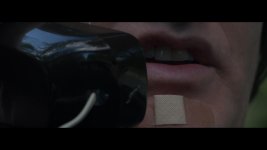
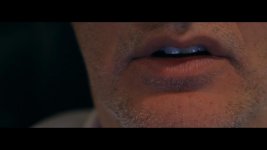
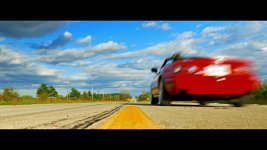
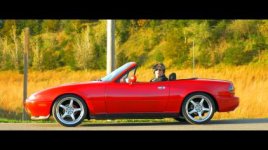
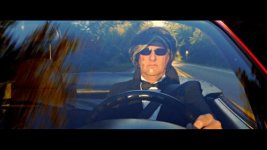
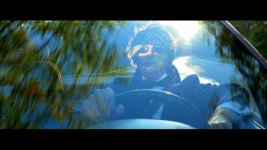
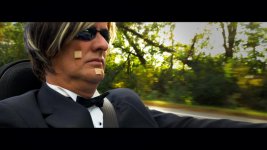
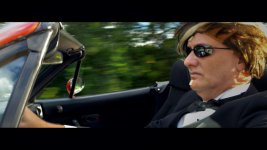
I did some testing: 2 shots from a 4k project, and 2 quick tests at HD upscaled and on the same timeline in Vegas. ALL are uncorrected and graded, just a quick toss up as proof of concept. Location and lighting were completely different, please don't rag on that.

What do you guys think? (I realize uploads here have any quality choked out of them)
- driving: 4k
- eyes hd
- phone/mouth 4k
- mouth/stubble hd
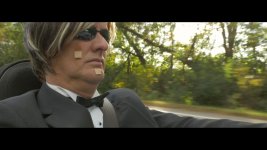
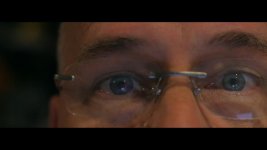
Image32.jpgImage33.jpgImage34.jpgImage36.jpg


Just thought maybe it would be cool to setup a 2nd camera for close ups or DOF only.
I'm a negative budget hobbyist. Obviously I wouldn't do this for a tv show or movie.

All feedback appreciated, especially how DUMB of an idea this is.
Unless it is brilliant. In which case, "Yea, me!"
 
You can get away with practically anything on hobbyist projects. 1080P to 4K is too big of a resolution jump to not be apparent. But if the footage is being viewed on an HD TV or HD projector you might not notice. Depending how efficient the GH4's codec is, the detail difference may or may not be noticeable between 1080P and 4K. You're safe mixing 720P, 1080P and 2K together. I'd look to shoot in 4K and mater in 2K.
 
Don't worry about pixels because as was mentioned above: you can get away with practically anything on hobbyist projects.
(work on your lighting though as it's nothing to write grandma about...)
 
Patryk, I do like the criticism of the lighting, that is actually very helpful to me being a one man show. Besides the HD shots being nothing more than quick test selfies not to be used in this production, what would you suggest for the car and phone scene? It was shot in a moving vehicle near golden hour, and the clips are completely ungraded or corrected. The phone was probably while driving through the shade - there will be flashes of sun to shade, driving along a tree line, by design.

Maybe more reflectors to light up face more or something?
I worried a lot about reflections in the sunglasses and phone...

ANY input on lighting is much appreciated.
 
at 5 times the budget of the whole production?? I don't think so! hahahahahh but thanks for the feedback. I WISH I had money for those things.

so that top picture is so bad, it would be better to have a weird bright light reflecting in the glasses just to light up the face more? I don't get it. The mouth on phone was a split second of shadow from trees before being bathed in bright sunlight... I geuss I have a lot to learn about proper lighting
 
... Obviously I wouldn't do this for a tv show or movie.

All feedback appreciated, especially how DUMB of an idea this is.
Unless it is brilliant. In which case, "Yea, me!"


Well, upscaling to 4k was good enough for "Skyfall", and since you have a 007ish theme....
 
hahahahaha true. My whole point is pixel fill: where as close up shots don't need a bajillion pixels, and lower resolution would be noticed way less if at all. Esepcailly if the upscale is smooth instead of jagged.
I've got a true 4k monitor coming in a couple days and I will pixel peep these pictures together and really SEE if the less pixels are noticable in close ups and bokeh shots.
 
http://www.ebay.com/itm/Kino-Flo-Mi...826?pt=LH_DefaultDomain_0&hash=item566926534a

So your entire production budget is $60?


You might then consider a low cost LED strip light for $15. Of course that will blow 1/4 of your production budget.

I just got yelled at for squandering $20 on a 1600 Lumen 'LED light passing as a bulb'... ok, I bought 3 of them to put into this old 8/16mm 'movie light' fixture I bought some time ago...

So, yeah... $60 whole bux...
 
I learned a very long time ago, if I purchase anything for my business, it's a deduction.

If I purchase a toy for myself, I buy my wife jewelry.
 
hehehehe my buget was zero and has gone deep in the hole many times over now. that kino kit is a grand at B&H
I've got a variety of lights...small to large.... how could I have lit the front seat even more (had to use an ND filter at 200 ISO) to highlight better and NOT reflect in the heavily rounded sunglasses??
 
so how could the lighting be fixed in the car shot? It was all natural, outdoors, moving convertible w/ top down, bright sunlight and shade flashes (per the script), shot flat, ungraded.... I'm not sure why it is so bad, other than dull and ungraded at this moment. Trying to learn here... tell me directly what it could use that I might learn? Even though this thread is about upscaling HD to 4k... :D

(BTW that one shot is a fake crane, right arm selfie shot that will get maybe 1 full second of screen time, probably less)
 
so how could the lighting be fixed in the car shot? It was all natural, outdoors, moving convertible w/ top down, bright sunlight and shade flashes (per the script), shot flat, ungraded.... I'm not sure why it is so bad, other than dull and ungraded at this moment. Trying to learn here... tell me directly what it could use that I might learn? Even though this thread is about upscaling HD to 4k... :D

(BTW that one shot is a fake crane, right arm selfie shot that will get maybe 1 full second of screen time, probably less)

Flag left to/behind the camera as large as possible and as close to his face as possible. 2'x3' at least, 4'x4' if possible. Negative fill.
 
interesting. is that for more contrast on the right side of face? The entire interior of the car is black, and mostly flat already.... sorry, I literally know nothing about lighting but have read and observed a few things things. Had to google flagging. To me everything looks lame before grading.

Any example of how the shot should look?
 
interesting. is that for more contrast on the right side of face? The entire interior of the car is black, and mostly flat already.... sorry, I literally know nothing about lighting but have read and observed a few things things. Had to google flagging. To me everything looks lame before grading.

Any example of how the shot should look?

Watch the car shots in True Detective and how they swap offside keys even when it defies continuity:

http://cdn.serietivu.com/wp-content/uploads/2014/01/True-Detective-1x01.png (for instance)

There are other options, but this is easier and cheaper trust me. :)

Buy this (rumored to be the text book at USC's Cinematography program) and keep shooting:

http://www.tomschroeppel.com/BBad.htm

Or just focus on story. Do you think most youtube channels are successful because of lighting (or scaling footage between cameras)? Nope.... When they reach the point at which that factors in it's because they've already generated good content and get a budget to hire a good camera crew.

It's about content. Mostly cute kids and dumb pranks. Stop worrying about resolution. In five years your GH8 will be shooting 25k or something.
 
Thanks for the input, Policar! I see what you mean. What about an open roof vehicle traveling 40mph?
I MUCH prefer STORY over all. This has one... it is just not good. These are sandbox videos for playing and learning.

hopefully these look better, quick grade test. a lot more to shoot before really grading (completely off topic now)
half of these shots will not be in the final film
 

Attachments

  • car.jpg
    car.jpg
    65.1 KB · Views: 0
  • Image31.jpg
    Image31.jpg
    20.6 KB · Views: 0
  • Image65.jpg
    Image65.jpg
    17.6 KB · Views: 0
  • Image67.jpg
    Image67.jpg
    19.4 KB · Views: 0
  • Image35.jpg
    Image35.jpg
    57.1 KB · Views: 0
  • Image37.jpg
    Image37.jpg
    48.8 KB · Views: 0
  • Image38.jpg
    Image38.jpg
    88.6 KB · Views: 0
  • Image39.jpg
    Image39.jpg
    35.6 KB · Views: 0
got a 4k monitor... just tried it and the answer is YES, one can cut carefully filmed close up and bokeh HD shots in with 4k footage, upscaled. Intelligent grading, matching, and clip selection (close ups and bokeh only) disguises the lower resolution. It is a pixel fill thing.

I'm not saying a trained eye couldn't spot it - but chances are they wouldn't - but any regular viewing audience would never think about it.
 
Back
Top