GH4 Top gimbal choices for the GH5...

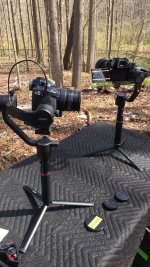
I have been using gimbals since late 2014 and played with several ones. At one point I owned and used 7 gimbals lol currently since my main camera is the gh5 i decided to sell off all my two handed ones and went to crane and Moza Air. They both seems good and we did a bunch of test. We will have our extensive review/comparison out this week.

for the price and payload Moza Air is great while it can be used with different cameras. While the Crane is mostly for mirrorless cameras and it just work. :)
 
Be careful who you take gimbal advice from, few people have used several different gimbals from the same generation... and these days many gimbal owners are first time gimbal owners so they are blown away by gimbals no matter what faults they have. I'm really amazed how many youtube gimbal reviews I've seen where the gimbal clearly has tilt jiggle in all their sample footage but they give it a glowing review.

Personally the Moza Air looks like it could be a winner, but it really depends on the software which remains to be seen. The Zhiyun Crane I tested very briefly had the jiggle/wobble/lag issue similar to the EC1. I assume the Crane can be fixed in software, and the EC1 definitely can. I'm on my 3rd generation of gimbal and they clearly get better and better, but still none of the single handed gimbals work all that great without some software adjustments. Maybe Moza will have great software to do this easily, and I haven't tried Zhiyun's, but otherwise I would not really recommend any gimbal I've used for someone who doesn't know SimpleBGC well. The Beholder DS1 and Pilotfly H2 are completely useable without tweaking in software but you get so much more out of them if you fix their control curves and tune more carefully for your payload. Frankly if you have never used a carefully tuned gimbal you might not notice the difference, but having to use other people's gimbals with their factory settings really makes me frustrated sometimes. I just couldn't get some of the shots I wanted today with an H2 because the standard control curve is too linear and too slow.

All of the single handed gimbals are using the same motors, encoders and electronics. The only difference is in the design. To get the most out of ANY of these gimbals one must learn to use SimpleBGC. It's not that hard to learn it. But one has to know what you're doing in the program and why you're doing it.

Each of these gimbals will work. Some better out of the box than others. Learn SimpleBGC and all of them will do what the other does.
 
All of the single handed gimbals are using the same motors, encoders and electronics. The only difference is in the design. To get the most out of ANY of these gimbals one must learn to use SimpleBGC. It's not that hard to learn it. But one has to know what you're doing in the program and why you're doing it.

Each of these gimbals will work. Some better out of the box than others. Learn SimpleBGC and all of them will do what the other does.

Yes I agree, but in my experience there seem to be a lot of people out there using Alexmos gimbals without any knowledge of SimpleBGC, and they are likely the majority these days.

Zhiyun and Moza seem to use their own software, not SimpleBGC. Personally since I know SimpleBGC I tend to imagine the other apps may be more simplified which could be good for some and bad for others. I don't mind simplebgc so much, but it seems like SimpleBGC32 for android hasn't been updated in a while so it may not work with a lot of more recent firmware gimbals.

My point was that I'm not sure I would make the characterization that "each of these gimbals will work" unless you don't mind high frequency vibrations, know SimpleBGC well, or have tested carefully and fully before buying. Those options seem to be in the minority these days though so I would be very careful and hesitant to recommend any of them.
 
I have the crane (newest model looks just like the crane-m) and I can fly my gh5 + metabones XL + sigma art 35 1.4 with the screen extended out. Initially used the factory "weak" settings on the motor and was fine, but Zhiyun's customer service suggested to use "strong" so that's what I have it set at now. Total camera payload is about 1650grams. Also with the 35 art, I had to take the eye piece off the camera otherwise it'd hit the rear knuckle when I tilt too much.
 
The Crane doesn't use SimpleBGC.

That's why I bought it.

Never noted any high frequency vibrations with the Crane, & don't believe there's any report of such in the very long thread located in the Industry News forum.

Have noted that sometimes the Crane seems to be using a weaker setting when first starting up, which may be some form of power savings, or calibration, but if you push on the body a little bit it firms right up.
 
I definitely highly recommend the crane with the GH5. I am having some issues with the app, though. Perhaps I have the wrong one downloaded? I cannot download anything but ZY Play on the app store. No Zhiyun assistant is available. On ZY Play, I cannot find anywhere on it that I can alter settings beyond lock, follow etc, and to control the crane with the touch screen. There is no calibration/strong/weak options. I am using an iPhone, is anyone else having this issue? It seems that this app also allows you to take photos with the iPhone camera, and really seems not specifically designed for the crane, so I'm really confused. Also, would the app I'm missing be where one would update the firmware to make it carry heavier payloads?

Even with all that, I still love the crane! At 60P, it can create exceptional results, and even at 24p, if you walk carefully, it's awesome. I would suggest being careful with the e-stabilization on the GH5, as it has the ability to create the weird jello-ing that premiere's warp stabilizer does in certain situations. Cheers!
 
There is another app called Zhiyun besides the ZY Play, see if you can get that one.

I definitely highly recommend the crane with the GH5. I am having some issues with the app, though. Perhaps I have the wrong one downloaded? I cannot download anything but ZY Play on the app store. No Zhiyun assistant is available. On ZY Play, I cannot find anywhere on it that I can alter settings beyond lock, follow etc, and to control the crane with the touch screen. There is no calibration/strong/weak options. I am using an iPhone, is anyone else having this issue? It seems that this app also allows you to take photos with the iPhone camera, and really seems not specifically designed for the crane, so I'm really confused. Also, would the app I'm missing be where one would update the firmware to make it carry heavier payloads?

Even with all that, I still love the crane! At 60P, it can create exceptional results, and even at 24p, if you walk carefully, it's awesome. I would suggest being careful with the e-stabilization on the GH5, as it has the ability to create the weird jello-ing that premiere's warp stabilizer does in certain situations. Cheers!
 
Here's our in-depth review of the two single handed gimbals: Gudsen Moza Air vs Zhiyun Crane. it's about 42 mins long. Tested with Gh5, a7s, Nikon d750 and Canon 70D. https://youtu.be/ZbSYekkubHA #moza #zhiyun #mdifilm #gudsen #crane

Hmm just watched it and wrote a comment. Why do they look so horrible? Both seem to exhibit pretty loose/wobbly tilt stabilization for extended periods during the samples and have ugly linear follow control curves that make panning operation look pretty jerky. Can these issues be fixed in these units? You label the operators as experienced gimbal operators but no one even mentioned any detail about operational differences... what's the point of a review if all you're going to say is "yeah they're both pretty good..."
 
B&H has the Feiyu MG V2 for $400 off today, making it $369. We're considering picking it up for use with our two GH4's today (and maybe I'd borrow it for use with my own GH5 outside of work :P )

I have this gimbal for the GH4. I love it, it handles a lot of weight, and the bluetooth iPhone App is easy to use. Batteries last a long time too...Keep in mind you'll have to get a cheese plate or some other way to mount it if you want to put the tilt motor on the right, so you can flip out the LCD. The QR plate it comes with won't slide in far enough to lock down in that configuration. You need the cheeseplate to shift the mount point to the left. I ended up mounting a Manfrotto 577 QR adapter, using the two right hand screw holes to mount it to the QR plate. This also allows me too take the camera on and off and rebalance forwards and backwards quickly after changing lenses. One thing I don't like, you can adjust the dead zone, which I like at zero, but it only affects pan, not tilt. When tilting up, there is sometimes a jolt when the motor engages...Bummed I missed this deal. I got the version without the extra handles and paid around 500.

UPDATE:

They put out a new app that controls this gimbal 'Feiyu ON', and now you can adjust the dead zone on the tilt and roll axis as well. No more jerking. The latest firmware also fixed vibration issues some were having.
 
Last edited:
I just received my Gudsen MOZA Air and have had a chance to use it on a shoot. I am enjoying it so far, with a few caveats. I like it more then the Zhiyun Crane which I am now selling, since it just isn't quite strong enough for a GH5 with a Tokina 11-16.

Pros:
•Motors feel very strong. I can make light adjustments to the camera without it protesting, unlike the Crane.
•Adjustments are toolless and very easy to make, along with measurement marks on each arm.
•The mini tripod legs are strong and fold down to give extra length and support to the gimbal when needed.
•The thumbstick is smooth, and nicer to use then the Crane.
•Feels very nice to hold and quick to set up.
•Big one for me. You can make pan adjustments with the thumbstick in any mode. This was one of the most frustrating aspects of the Zhiyun Crane.

Cons:
•Maybe slightly less stable then the Crane. I have noticed some wobble on the roll axis. Gudsen says this will be addressed in a firmware update. I also haven't gone deep into the settings yet, so I may be able to improve this, and I'm hoping that firmware updates will continue to improve stabability and smoothness.
•Motors are a bit noisy. Coming from the almost silent Crane, in a quite room, you will notice a constant motor buzz/whine. I think this is due to the stronger motors in the air. Not a major problem in all but the quietest of rooms.
•The iPhone app is a bit buggy currently. Does not always remember settings, and using the movement controls will only work smoothly if you are right next to the gimbal. Further then 3 feet means that movement will be jerky. Hopefully can be fixed with a firmware update.
•just like with the Crane, when balanced with a GH camera, the arms are too extended to switch to underslung mode while powered.

Overall, I am enjoying this gimbal, and hopefully future firmware updates will further improve it.
 
I have this gimbal for the GH4. I love it, it handles a lot of weight, and the bluetooth iPhone App is easy to use. Batteries last a long time too...Keep in mind you'll have to get a cheese plate or some other way to mount it if you want to put the tilt motor on the right, so you can flip out the LCD. The QR plate it comes with won't slide in far enough to lock down in that configuration. You need the cheeseplate to shift the mount point to the left. I ended up mounting a Manfrotto 577 QR adapter, using the two right hand screw holes to mount it to the QR plate. This also allows me too take the camera on and off and rebalance forwards and backwards quickly after changing lenses. One thing I don't like, you can adjust the dead zone, which I like at zero, but it only affects pan, not tilt. When tilting up, there is sometimes a jolt when the motor engages...Bummed I missed this deal. I got the version without the extra handles and paid around 500.

We ended up getting the B&H deal on the Feiyu MG V2, so thanks for the input. Getting my head wrapped around it, got balancing the camera down and figured out how to adjust the tilt motor to get rid of the slight vibration/noise at certain angles. One thing I'm having trouble with is pressing the button twice to put it into pan/tilt mode, the tilting doesn't seem to work at all. It still pans as I turn the gimbal, and I can pan/tilt using the joystick, but it won't tilt up or down following my motion. Don't know if I'm missing something obvious or what. Every other function seems to be working fine though.

EDIT: I downloaded the app and reset the settings to default and now the tilting works properly!
 
Last edited:
I have a FilmPower 5100 in for review and it's pretty good. On the heavy side but seems to work well with heavier cameras. I'll have a review up next week. Next will be the MOZA Air. Man do we have a lot of these singles now. I think it's all about the software. If I need to use PID then i'm out. YMMV
 
I have owned came-tv series of gimbals (7000), ronin, crane v2 and Moza Air. By value I think Air wins. By quick setup/quick use crane v2 wins. By versatility ronin for two handles and Air for one. If you are using gh5 with many time of lens and a quick release consider Air. Crane works but it's almost to its limit.

Right now Air can do mimic (gimbal follows you via the thumb controller, start stop recording). While Crane v2 can do focus with the handle. Air future firmware can do focus too.
 
We decided to go with CAME-TV, and pre-purchase their new Prophet.

Looking forward to trying it out... whenever it gets here.
 
Here's our in-depth review of the two single handed gimbals: Gudsen Moza Air vs Zhiyun Crane. it's about 42 mins long. Tested with Gh5, a7s, Nikon d750 and Canon 70D. https://youtu.be/ZbSYekkubHA #moza #zhiyun #mdifilm #gudsen #crane

How come that you didn't ever notice in your "In-depth" review, that the Moza remote control is a primitive on-off based switch, i.e. it's not real proportional joystick and is pretty useless for tracking shoots?

you owe me $200 I wasted on that crap
 
Back
Top